AI agent for school counselors
Student Support Meeting Coordination Agent
Well-prepared meetings with actions completed
What it does
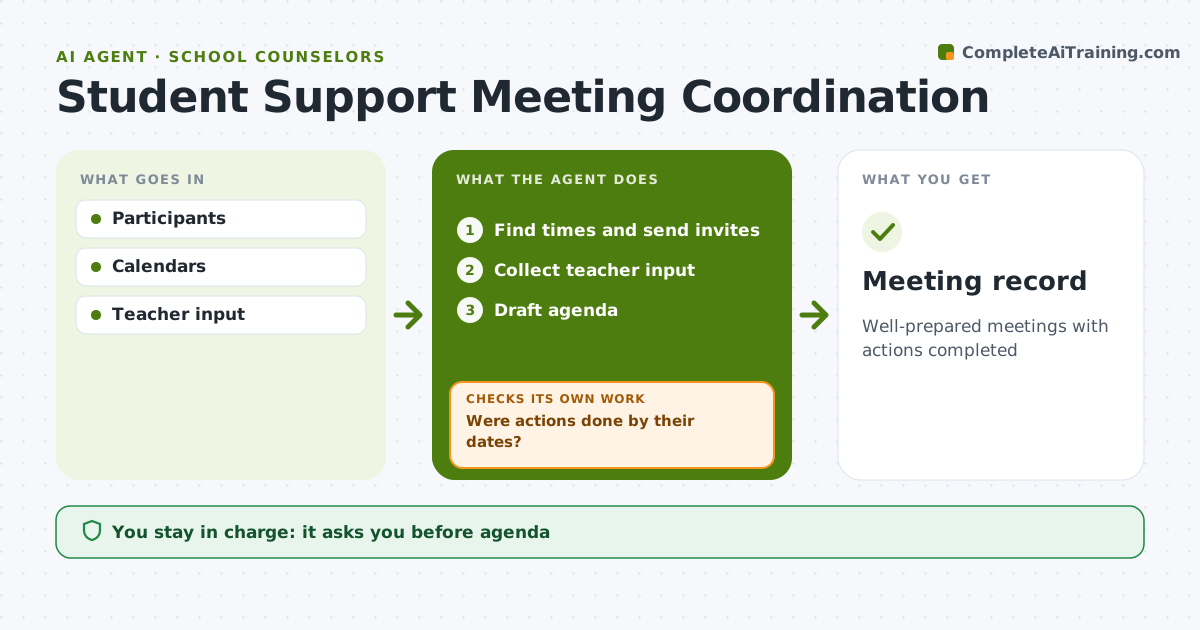
Support meetings bring families, teachers, counselors and specialists together, and follow-through is often weak once everyone leaves the room. This agent finds meeting times that work for every required person, sends invites, and gathers input forms from teachers, due three days ahead. It drafts an agenda and a summary template, and the counselor approves both. After the meeting, it records agreed actions, and it will not save an action without an owner and a due date. It sends the action list out, then checks whether each action was done by its date. When one is late, it reminds the owner first, checks again, and if it is still open, informs the counselor. The counselor decides what happens with actions that keep slipping. Edge case: families who need an interpreter or a different meeting format, such as a phone call, are asked in advance.
How it works
Follow the arrows from top to bottom. The orange dashed arrow is the loop: when a check fails, the agent goes back and tries again.
Read the steps as a list
- Meeting requested
- Find times and send invites
- Collect teacher input
- Draft agenda
- Counselor leads meeting and confirms actionsThe agent waits here for your OK.
- Were actions done by their dates?If not: remind owners, then inform counselor. Back to step 5.
- Meeting record
How it decides
Required attendees decide the time. Actions are tracked by date.
- Teacher input due 3 days ahead
- Interpreters offered
- Actions need an owner and date
Make it yours
Every agent is a starting point. You choose these settings for your own situation.
- Input forms
- Reminder timing
- Meeting types
- Summary template
What keeps you in control
It always asks you first
- Agenda
- Meeting summary
Hard limits
- Student records shared only with participants
It stops when
- Done: actions complete
- Stop: plan replaced
Set it up
We guide you through the set-up, step by step
Members get the full set-up guide for this agent. No technical skills needed: you copy, paste and upload.
- One set of instructions to paste into your AI, with the clicks for ChatGPT, Claude, Microsoft 365 Copilot, Gemini and Grok
- The agent then walks you through connecting your own data, one source at a time
- A downloadable copy with the flow chart, the rules and the full guide