AI agent for clinical research coordinators
Study Close-Out Readiness Agent
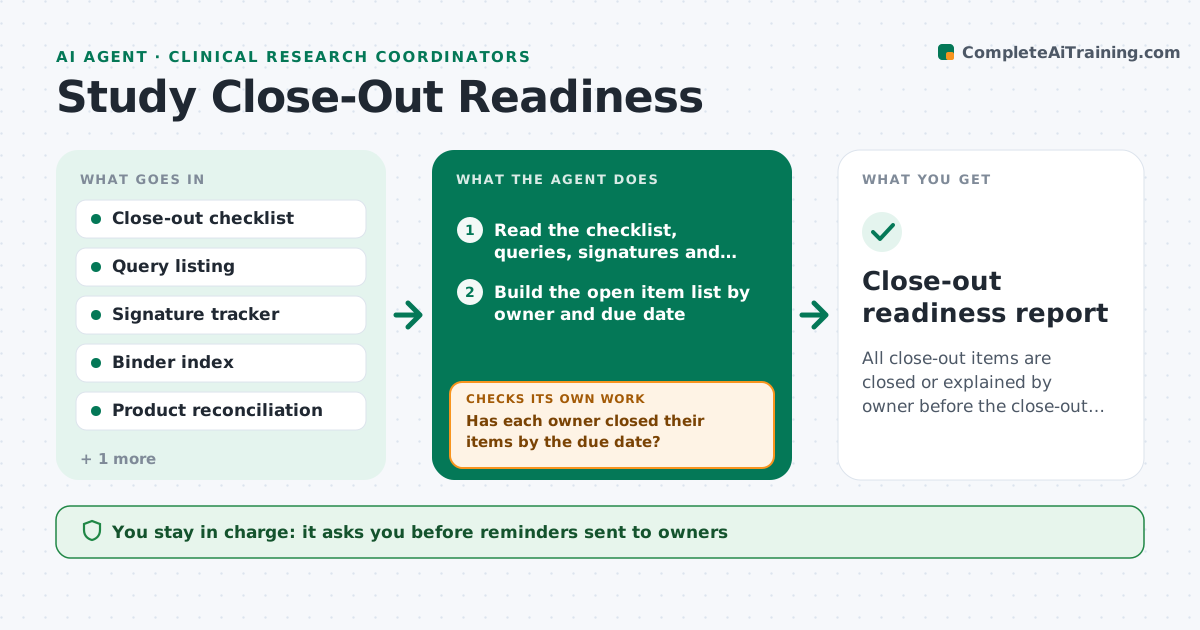
All close-out items are closed or explained by owner before the close-out date
What it does
Close-out is when a study discovers open queries, missing signatures, unreturned supplies and lost essential documents. This agent starts earlier. It reads the close-out checklist and compares it to the data system, the regulatory binder and the product records. It builds a list of open items by owner, with due dates. For each owner it drafts a reminder with exactly what is needed. After replies and updates, it rechecks every item and rebuilds the list. It counts down to the close-out visit and flags items at risk of missing it. The principal investigator approves close-out. Edge case: all queries are closed but one is reopened by the sponsor, so the agent moves it back onto the list.
How it works
Follow the arrows from top to bottom. The orange dashed arrow is the loop: when a check fails, the agent goes back and tries again.
Read the steps as a list
- Close-out countdown begins
- Read the checklist, queries, signatures and binder index
- Build the open item list by owner and due date
- Check product reconciliation status
- Rank items by risk to the close-out date
- Draft reminders to each owner
- Has each owner closed their items by the due date?If not: escalate the overdue items to the PI with a revised plan. Back to step 6.
- Reread systems and rebuild the list
- Are there new or reopened items?If not: add them to the owner list and redraft reminders. Back to step 3.
- PI approves close-outThe agent waits here for your OK.
- Close-out readiness report
How it decides
An item is closed only with evidence in the system or binder. Items due within two weeks of close-out rank first.
- Rank items due within 14 days first
- Escalate after 2 reminders without response
- Treat a reopened query as a new open item
- Count an item closed only with a record link
Make it yours
Every agent is a starting point. You choose these settings for your own situation.
- Start of countdown (default 8 weeks)
- Reminder timing
- Escalation rule (default 2 reminders)
- Checklist version
What keeps you in control
It always asks you first
- Reminders sent to owners
- Close-out decision
Hard limits
- Never closes a query
- Never sends reminders without coordinator approval
It stops when
- Done: all items closed and PI approves
- Stop: sponsor changes the close-out date
Set it up
We guide you through the set-up, step by step
Members get the full set-up guide for this agent. No technical skills needed: you copy, paste and upload.
- One set of instructions to paste into your AI, with the clicks for ChatGPT, Claude, Microsoft 365 Copilot, Gemini and Grok
- The agent then walks you through connecting your own data, one source at a time
- A downloadable copy with the flow chart, the rules and the full guide