AI agent for optometrists
Surgical Co-Management Visit Agent
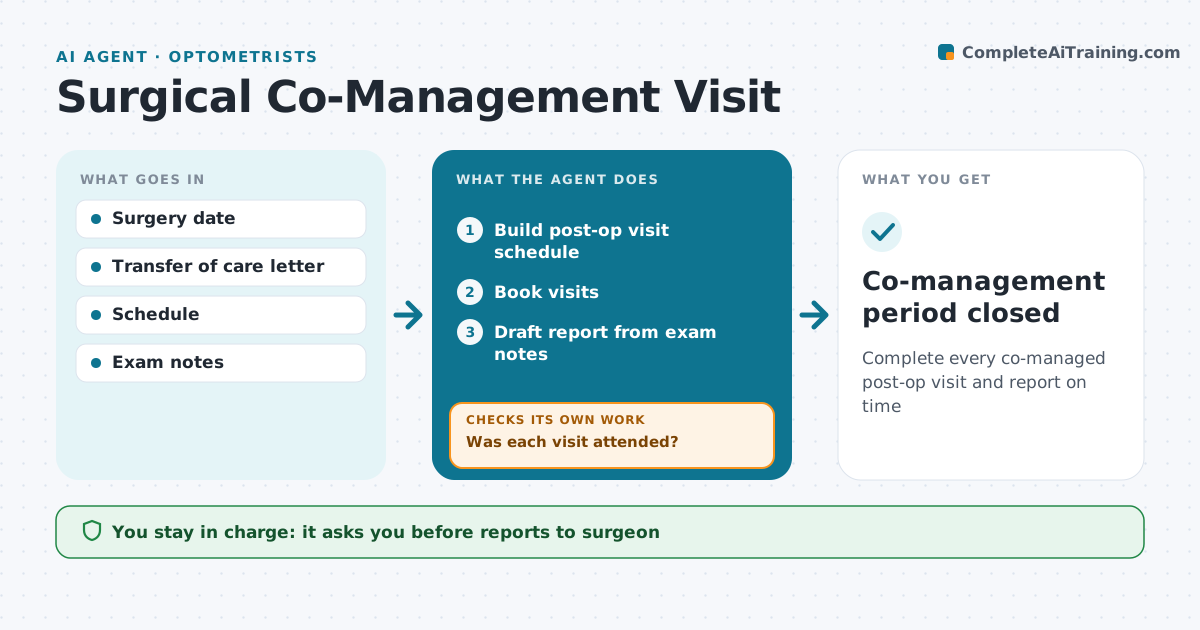
Complete every co-managed post-op visit and report on time
What it does
In co-management, the optometrist sees patients after cataract or refractive surgery on a set schedule and reports back to the surgeon. Missed visits or late reports strain the relationship. This agent builds the visit schedule from the surgery date and checks that each visit was booked and attended. If a patient misses a visit, it alerts staff to reschedule. After each visit, it drafts the report to the surgeon from the exam notes. If notes show findings outside expected recovery, such as high pressure or swelling, it flags them for urgent contact with the surgeon. Before billing, it checks that the transfer of care letter is on file. The optometrist approves every report and the co-management billing. Edge case: when the surgeon's office changes the surgery date, the whole schedule is rebuilt.
How it works
Follow the arrows from top to bottom. The orange dashed arrow is the loop: when a check fails, the agent goes back and tries again.
Read the steps as a list
- Surgery date confirmed
- Build post-op visit schedule
- Book visits
- Was each visit attended?If not: alert staff to reschedule. Back to step 3.
- Draft report from exam notes
- Optometrist signs and sends reportThe agent waits here for your OK.
- Co-management period closed
How it decides
The schedule follows the agreed post-op timeline. Missing letters block billing; unexpected findings trigger surgeon contact.
- Visits at day 1, week 1 and month 1 by default
- Billing needs the transfer letter
- Unexpected findings go to the surgeon same day
Make it yours
Every agent is a starting point. You choose these settings for your own situation.
- Visit timeline
- Report template
- Surgeon contacts
- Billing rules
What keeps you in control
It always asks you first
- Reports to surgeon
- Billing for co-management
Hard limits
- The agent never sends reports unsigned
- Urgent findings always go to a person
It stops when
- Done: final visit reported
- Stop: patient transfers care elsewhere
Set it up
We guide you through the set-up, step by step
Members get the full set-up guide for this agent. No technical skills needed: you copy, paste and upload.
- One set of instructions to paste into your AI, with the clicks for ChatGPT, Claude, Microsoft 365 Copilot, Gemini and Grok
- The agent then walks you through connecting your own data, one source at a time
- A downloadable copy with the flow chart, the rules and the full guide