AI agent for supplier relationship managers
Tail Spend Consolidation Agent
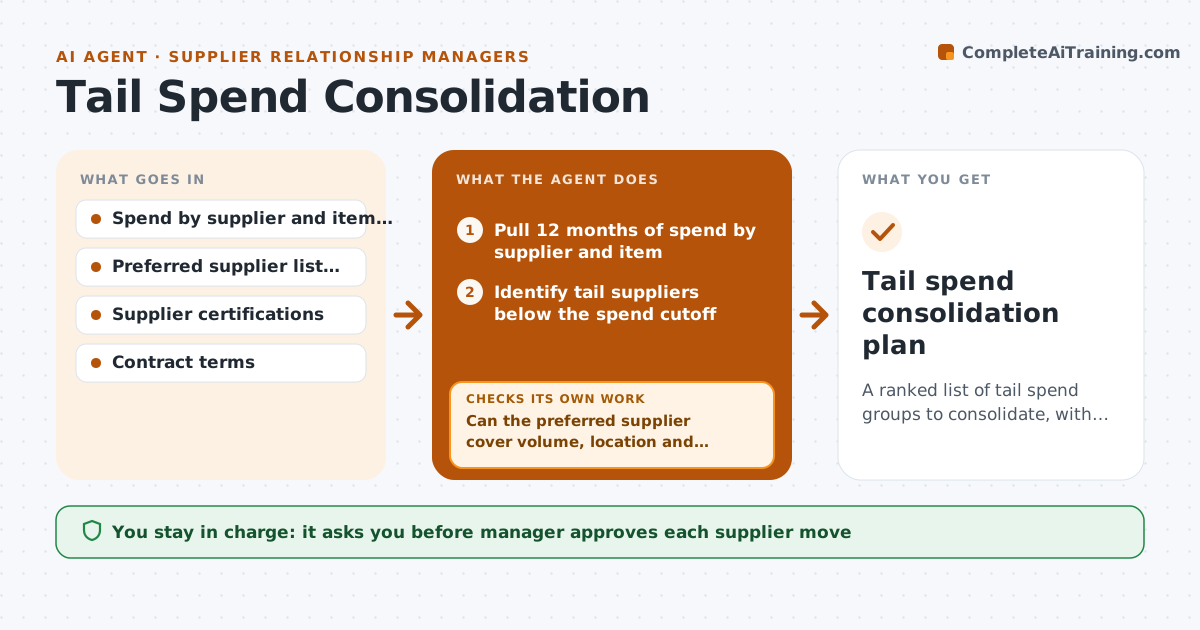
A ranked list of tail spend groups to consolidate, with estimated savings and a named owner for each conversation.
What it does
Your spend report lists 400 suppliers, and 300 of them together account for 8% of spend. Nobody has time to see which overlap. This agent works through the long tail every quarter. It pulls spend data, groups small suppliers by what they sell, and finds overlap with your preferred suppliers. It estimates savings from moving each group using price differences and volume. Before proposing a move, it checks that the preferred supplier can cover the volume, delivery area and quality needs, and when it cannot, it re-groups or proposes a second preferred supplier. You approve which suppliers to move and who talks to them. Edge case: a small supplier that is the only certified source for a part is excluded from consolidation.
How it works
Follow the arrows from top to bottom. The orange dashed arrow is the loop: when a check fails, the agent goes back and tries again.
Read the steps as a list
- Quarter closes
- Pull 12 months of spend by supplier and item
- Identify tail suppliers below the spend cutoff
- Group tail suppliers by product or service
- Match each group to preferred suppliers and compare prices
- Can the preferred supplier cover volume, location and certification needs?If not: Regroup the items or propose a second preferred supplier. Back to step 3.
- Estimate savings net of switching cost
- Draft a consolidation list with owners and talking points
- Do savings exceed the minimum threshold per group?If not: Drop the group or merge it with a similar one. Back to step 4.
- Manager approves which suppliers move and who contacts themThe agent waits here for your OK.
- Tail spend consolidation plan
How it decides
It ranks groups by savings after switching cost, and only proposes groups where a preferred supplier covers at least 90% of the volume.
- Tail means suppliers below 0.1% of total spend each
- Propose only if the preferred supplier covers 90% of volume
- Exclude sole-source or certified suppliers
- Drop groups with savings under $5,000 a year
Make it yours
Every agent is a starting point. You choose these settings for your own situation.
- Tail spend cutoff (default 0.1% each)
- Coverage requirement (default 90%)
- Minimum savings per group
- Which categories to exclude
What keeps you in control
It always asks you first
- Manager approves each supplier move
- Manager approves who contacts suppliers
Hard limits
- Never contact or drop a supplier itself
- Never recommend moves that break contract minimums
It stops when
- Done: consolidation plan approved
- Stop: spend data is missing for a large category
Set it up
We guide you through the set-up, step by step
Members get the full set-up guide for this agent. No technical skills needed: you copy, paste and upload.
- One set of instructions to paste into your AI, with the clicks for ChatGPT, Claude, Microsoft 365 Copilot, Gemini and Grok
- The agent then walks you through connecting your own data, one source at a time
- A downloadable copy with the flow chart, the rules and the full guide