AI agent for claims adjusters
Total Loss Valuation Agent
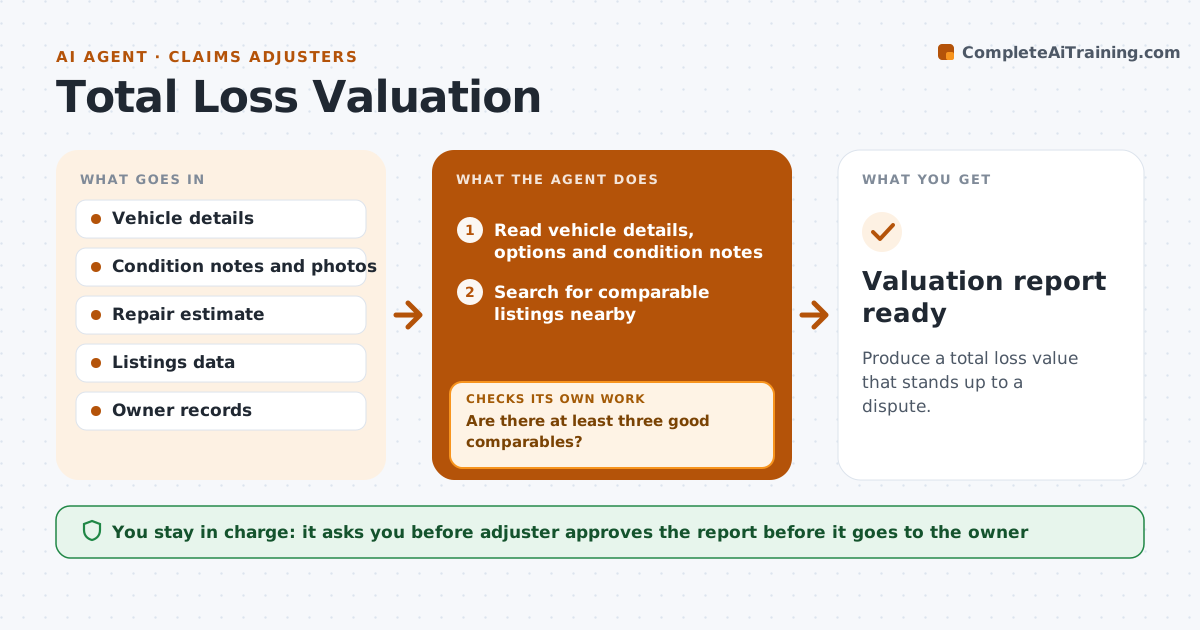
Produce a total loss value that stands up to a dispute.
What it does
A total loss value is disputed when the comparables are weak or the condition is not credited. This agent gathers listings for similar vehicles in the local market, matching year, model, trim, mileage and options. It adjusts each for condition and options, calculates a value, and compares it with the repair estimate and the owner's own evidence. If the comparables are weak, such as fewer than three or too far away, it widens the search and recalculates. It drafts a valuation report that shows every comparable and adjustment. The adjuster approves it. Edge case: a low mileage vehicle with a recent engine replacement is adjusted upward and the receipt is cited.
How it works
Follow the arrows from top to bottom. The orange dashed arrow is the loop: when a check fails, the agent goes back and tries again.
Read the steps as a list
- Vehicle declared a total loss
- Read vehicle details, options and condition notes
- Search for comparable listings nearby
- Are there at least three good comparables?If not: Widen the distance and the year range and search again. Back to step 2.
- Adjust each comparable for mileage, options and condition
- Calculate the value and the range
- Compare with the repair estimate and the owner's evidence
- Is the value within the range supported by the evidence?If not: Recheck adjustments and add missing documents. Back to step 4.
- Draft the valuation report
- Adjuster approves the reportThe agent waits here for your OK.
- Valuation report ready
How it decides
It uses comparables closest in model, mileage and distance and widens the search only when fewer than three good ones are found.
- Use at least three comparables within 100 miles and 2 model years
- Adjust for mileage with the agreed rate per mile
- Credit documented recent major repairs
- Show the range, not only a single number
Make it yours
Every agent is a starting point. You choose these settings for your own situation.
- Distance and year range for comparables
- Adjustment rates
- Number of comparables (default 3)
- Report template
What keeps you in control
It always asks you first
- Adjuster approves the report before it goes to the owner
Hard limits
- Never use a comparable without a source
- Never send the report before approval
It stops when
- Done: an approved report with sources
- Stop: no comparables can be found and the adjuster uses another method
Set it up
We guide you through the set-up, step by step
Members get the full set-up guide for this agent. No technical skills needed: you copy, paste and upload.
- One set of instructions to paste into your AI, with the clicks for ChatGPT, Claude, Microsoft 365 Copilot, Gemini and Grok
- The agent then walks you through connecting your own data, one source at a time
- A downloadable copy with the flow chart, the rules and the full guide