AI agent for food scientists
Traceability Drill Agent
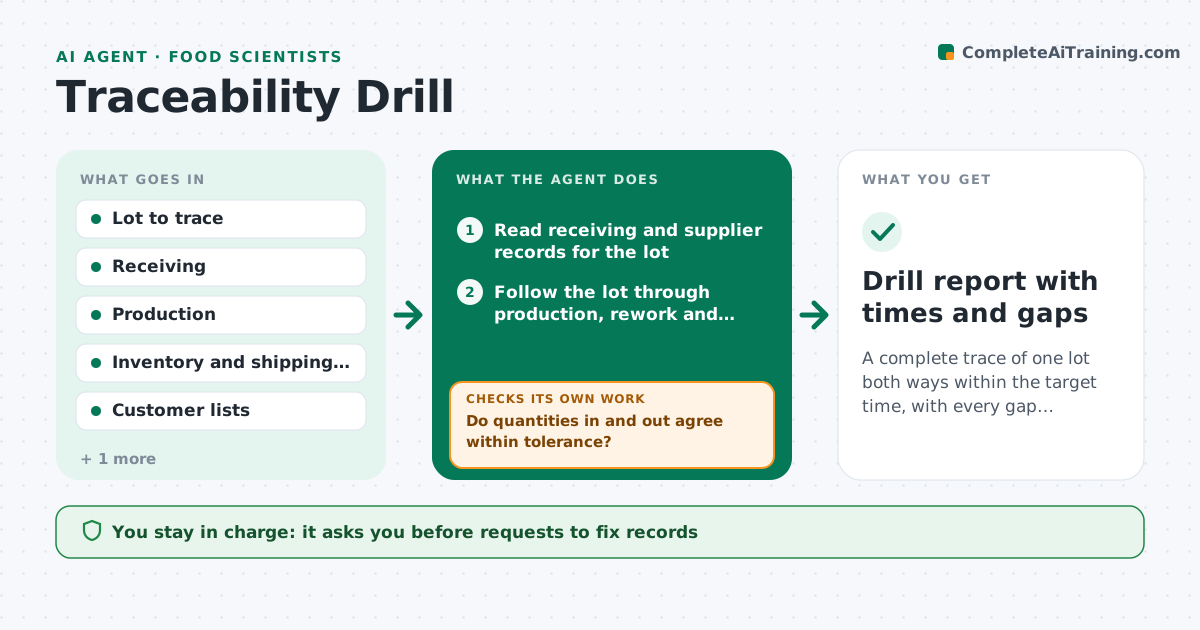
A complete trace of one lot both ways within the target time, with every gap documented and fixed.
What it does
A mock recall is announced and, three hours later, the team is still looking for the receiving record of one ingredient lot. This agent runs the mock trace for a chosen lot. It traces forward to customers and backward to suppliers using receiving, production, storage and shipping records. It checks that quantities in match quantities out, within a tolerance, and flags gaps in records or lots that cannot be accounted for. After fixes, it reruns the trace and records the time to complete. You approve the drill report. Edge case: rework and carryover lots are included in the balance so the totals can match.
How it works
Follow the arrows from top to bottom. The orange dashed arrow is the loop: when a check fails, the agent goes back and tries again.
Read the steps as a list
- Drill lot chosen and timer started
- Read receiving and supplier records for the lot
- Follow the lot through production, rework and storage
- Follow outputs to shipping records and customers
- Total quantities in and quantities out
- Do quantities in and out agree within tolerance?If not: search for missing records, carryover and rework, and list unaccounted amounts. Back to step 3.
- List record gaps and owners
- Quality manager approves requests to fix recordsThe agent waits here for your OK.
- Rerun the trace after fixes
- Is the trace complete and within the target time?If not: repeat the search for the remaining gaps and note time lost. Back to step 3.
- Drill report with times and gaps
How it decides
A trace is complete when every quantity of the lot is accounted for between the input and output records within tolerance.
- Quantity difference over 2 percent: investigate
- Lot with no receiving record: critical gap
- Rework or carryover present: include it in the balance
- Trace time over the target: list the slowest steps
Make it yours
Every agent is a starting point. You choose these settings for your own situation.
- Quantity tolerance (default 2 percent)
- Target time in hours
- Records included
- Drill frequency
- Report format
What keeps you in control
It always asks you first
- Requests to fix records
- The drill report
Hard limits
- Never alter any record
- Never mark a trace complete with unaccounted quantity
It stops when
- Done: trace complete and report approved
- Stop: records unavailable
Set it up
We guide you through the set-up, step by step
Members get the full set-up guide for this agent. No technical skills needed: you copy, paste and upload.
- One set of instructions to paste into your AI, with the clicks for ChatGPT, Claude, Microsoft 365 Copilot, Gemini and Grok
- The agent then walks you through connecting your own data, one source at a time
- A downloadable copy with the flow chart, the rules and the full guide