AI agent for operations coordinators
Training Room and Materials Logistics Agent
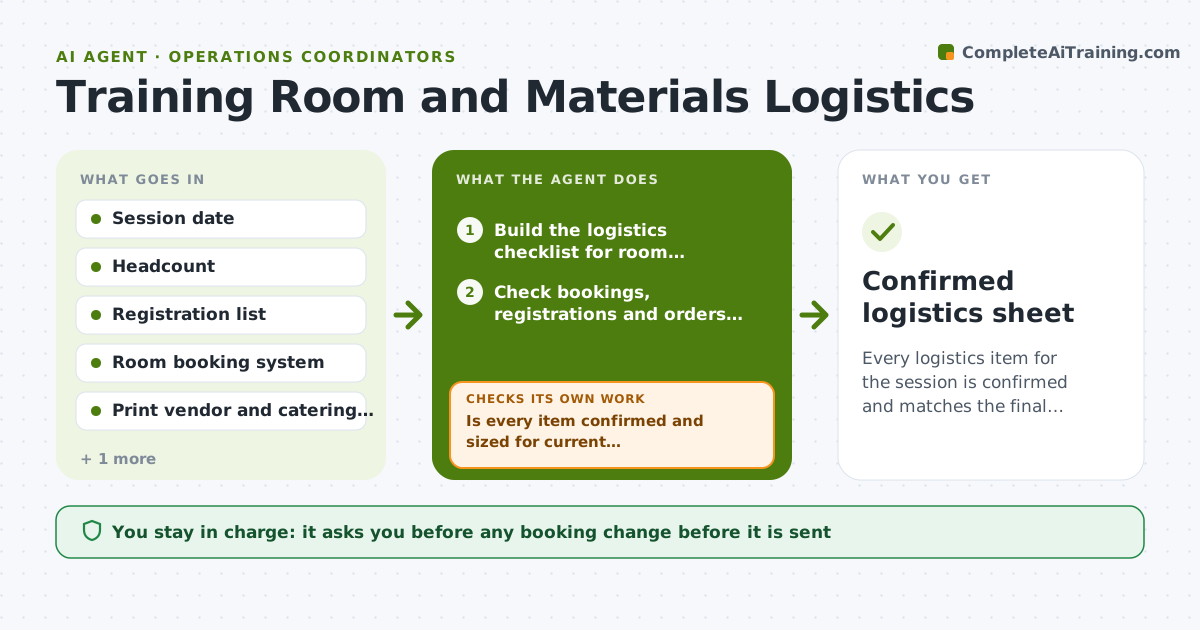
Every logistics item for the session is confirmed and matches the final headcount before the day.
What it does
A session is booked for 24 people on Thursday, but the projector is not confirmed, the print order is not placed and catering still shows 18 guests. This agent starts from the session date and headcount and builds a logistics checklist for room, equipment, printed packs and catering. It checks room bookings, registration counts and print orders against the checklist and flags each gap. It then re-checks every open item at set points, such as 7 days, 3 days and 1 day before the session, and compares registration numbers with what was ordered. Items that stay unconfirmed are escalated with a clear message to the right owner. Edge case: registrations jump from 24 to 31 after the print order, so the agent drafts a reprint request. The coordinator approves every booking change or order before it is sent.
How it works
Follow the arrows from top to bottom. The orange dashed arrow is the loop: when a check fails, the agent goes back and tries again.
Read the steps as a list
- Session scheduled with date and headcount
- Build the logistics checklist for room, equipment, print and catering
- Check bookings, registrations and orders against the checklist
- Is every item confirmed and sized for current registrations?If not: draft a request or fix for each open item and flag the owner. Back to step 3.
- Coordinator approves booking changes and ordersThe agent waits here for your OK.
- Wait until the next checkpoint and re-pull registrations
- Do orders still match the latest headcount?If not: draft quantity changes and escalate unconfirmed items. Back to step 3.
- Prepare a day-before status sheet
- Coordinator approves the final statusThe agent waits here for your OK.
- Confirmed logistics sheet
How it decides
It flags an item as at risk when it is unconfirmed 3 days out or when its quantity is lower than current registrations, and escalates it to the owner.
- Quantities must be at least the registration count plus 5% spare for print.
- Anything unconfirmed 3 days before is escalated to the owner.
- A room change triggers a re-check of equipment and catering.
- Catering counts follow the registration list, not the original plan.
Make it yours
Every agent is a starting point. You choose these settings for your own situation.
- Checkpoint days (default 7, 3, 1)
- Spare print percentage
- Vendors and contacts
- Who gets each escalation
- Items on the checklist
What keeps you in control
It always asks you first
- Any booking change before it is sent
- Any print or catering order
- Escalation messages to outside vendors
Hard limits
- Never place an order or send a booking change without approval.
- Do not guess a quantity when the registration list is unavailable.
It stops when
- Done: all items confirmed and sized to the final headcount
- Stop: the room cannot be secured, so the agent asks the coordinator to move the session
Set it up
We guide you through the set-up, step by step
Members get the full set-up guide for this agent. No technical skills needed: you copy, paste and upload.
- One set of instructions to paste into your AI, with the clicks for ChatGPT, Claude, Microsoft 365 Copilot, Gemini and Grok
- The agent then walks you through connecting your own data, one source at a time
- A downloadable copy with the flow chart, the rules and the full guide