AI agent for court reporters
Transcript Proofreading Agent
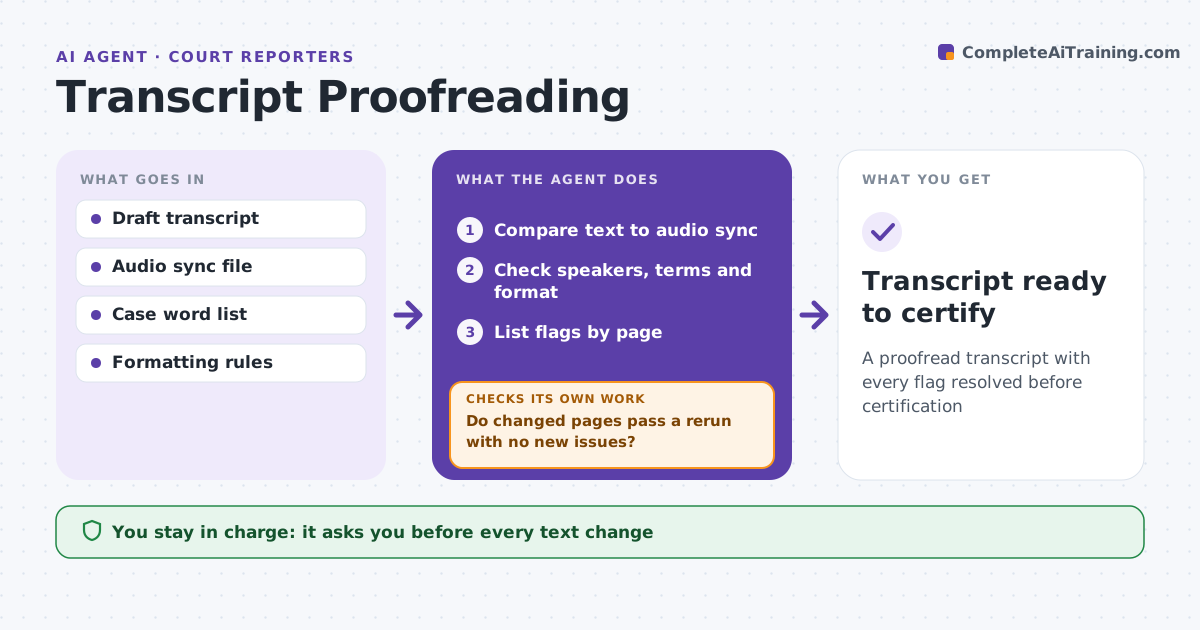
A proofread transcript with every flag resolved before certification
What it does
Proofreading a deposition transcript line by line is slow, and small errors in names or speaker labels can matter in court. After the reporter edits a rough draft, this agent compares the text against the audio sync where available and flags words with a low match. It checks that speaker labels follow the flow of questions and answers, flagging two Q lines in a row, and checks spellings of names and terms against the case word list. It also flags punctuation and formatting issues such as missing Q and A markers. The reporter reviews each flag and fixes or rejects it; the agent never changes text on its own. It then reruns on the changed pages to confirm nothing new broke, listing any new issues. The reporter certifies the final transcript. Edge case: a witness and an attorney share a surname, so speaker labels get extra checks.
How it works
Follow the arrows from top to bottom. The orange dashed arrow is the loop: when a check fails, the agent goes back and tries again.
Read the steps as a list
- Draft ready for proofreading
- Compare text to audio sync
- Check speakers, terms and format
- List flags by page
- Reporter resolves each flagThe agent waits here for your OK.
- Do changed pages pass a rerun with no new issues?If not: list new issues for the reporter. Back to step 3.
- Transcript ready to certify
How it decides
It flags text with low audio match, inconsistent speakers and terms not in the word list.
- Audio match low: flag word
- Term not in word list: flag spelling
- Two Q lines in a row: check speaker
Make it yours
Every agent is a starting point. You choose these settings for your own situation.
- Flag sensitivity
- Formatting rules by jurisdiction
- Word list sources
- Flag display
What keeps you in control
It always asks you first
- Every text change
- Certification
Hard limits
- Never changes text without reporter approval
- Never certifies
It stops when
- Done: all flags resolved
- Stop: audio missing for a section
Set it up
We guide you through the set-up, step by step
Members get the full set-up guide for this agent. No technical skills needed: you copy, paste and upload.
- One set of instructions to paste into your AI, with the clicks for ChatGPT, Claude, Microsoft 365 Copilot, Gemini and Grok
- The agent then walks you through connecting your own data, one source at a time
- A downloadable copy with the flow chart, the rules and the full guide