AI agent for court reporters
Transcript Redaction Agent
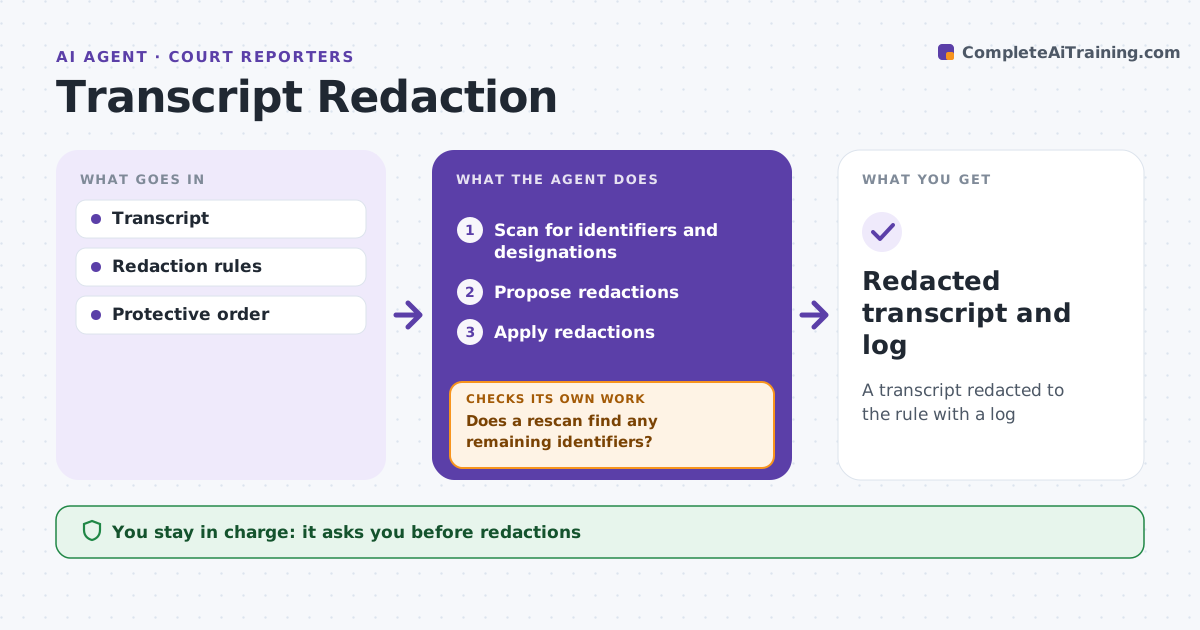
A transcript redacted to the rule with a log
What it does
Transcripts filed with a court or shared under a protective order must not expose personal identifiers, and one missed number can be a serious breach. When redaction is required, this agent scans the transcript for Social Security numbers, birth dates, minors' names, financial account numbers and confidential designations. It proposes redactions according to the rule, such as last four digits for account numbers, year only for birth dates and initials for minors. It then rescans the redacted version for any remaining identifier patterns, including numbers read aloud in odd ways. If it finds more, it proposes added redactions and scans again until nothing remains. It produces a redaction log listing each change and the rule applied. The reporter and attorney approve every redaction before filing. Edge case: a number is read aloud with spaces between digits, which a simple search would miss, so the agent detects it.
How it works
Follow the arrows from top to bottom. The orange dashed arrow is the loop: when a check fails, the agent goes back and tries again.
Read the steps as a list
- Redaction requested
- Scan for identifiers and designations
- Propose redactions
- Reporter and attorney approveThe agent waits here for your OK.
- Apply redactions
- Does a rescan find any remaining identifiers?If not: propose added redactions. Back to step 3.
- Redacted transcript and log
How it decides
It matches identifier patterns and confidential designations.
- Account numbers: last four digits
- Birth date: year only
- Minor's name: initials
Make it yours
Every agent is a starting point. You choose these settings for your own situation.
- Redaction rules
- Patterns
- Log format
- Approval steps
What keeps you in control
It always asks you first
- Redactions
Hard limits
- Never removes testimony beyond the rule
- Never files
It stops when
- Done: delivered
- Stop: rule unclear
Set it up
We guide you through the set-up, step by step
Members get the full set-up guide for this agent. No technical skills needed: you copy, paste and upload.
- One set of instructions to paste into your AI, with the clicks for ChatGPT, Claude, Microsoft 365 Copilot, Gemini and Grok
- The agent then walks you through connecting your own data, one source at a time
- A downloadable copy with the flow chart, the rules and the full guide