AI agent for academic advisors
Transfer Student Credit Appeal Agent
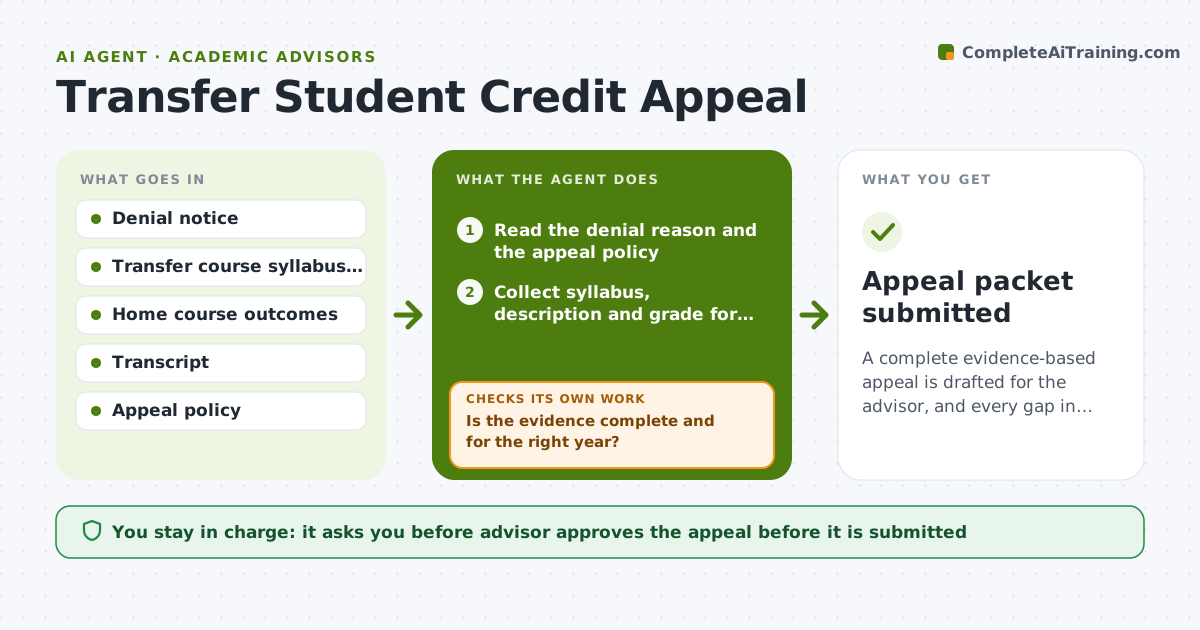
A complete evidence-based appeal is drafted for the advisor, and every gap in the file is closed or noted.
What it does
A transfer student has had credit denied, and the appeal needs the right evidence. The agent reads the denial reason, then collects the syllabus, course description, hours and grade for the course from the student or the other school. It compares learning outcomes with the course at this school and lists matches and gaps. It then drafts an appeal that answers the specific denial reason, and rechecks the file for gaps such as an outdated syllabus or a missing grade. The advisor approves submission. Edge case: a syllabus from a different year, where the agent asks the student for the right one.
How it works
Follow the arrows from top to bottom. The orange dashed arrow is the loop: when a check fails, the agent goes back and tries again.
Read the steps as a list
- Appeal request opened
- Read the denial reason and the appeal policy
- Collect syllabus, description and grade for the transfer course
- Compare learning outcomes with the course here
- Is the evidence complete and for the right year?If not: Request the missing document from the student or school. Back to step 3.
- List outcome matches and gaps
- Draft an appeal that answers the denial reason
- Check the appeal against the policy deadline and format
- Does the file still have gaps or unanswered reasons?If not: Return to the evidence step and ask for more. Back to step 3.
- Advisor approves submissionThe agent waits here for your OK.
- Appeal packet submitted
How it decides
It builds the argument from the denial reason and compares outcomes item by item, treating missing evidence as a gap to close before drafting.
- Answer each denial reason directly
- Count an outcome as met only with syllabus evidence
- Flag a deadline within 5 days
- Do not argue outcomes the course clearly lacks
Make it yours
Every agent is a starting point. You choose these settings for your own situation.
- Appeal deadline warning (default 5 days)
- Outcome match needed to recommend an appeal
- Which documents are required
- Tone and length of the appeal
What keeps you in control
It always asks you first
- Advisor approves the appeal before it is submitted
- Advisor approves each request sent to another school
Hard limits
- Never promise the credit will be accepted
- Do not submit without approval
It stops when
- Done: appeal packet complete and submitted
- Stop: deadline passed or the policy does not allow an appeal
Set it up
We guide you through the set-up, step by step
Members get the full set-up guide for this agent. No technical skills needed: you copy, paste and upload.
- One set of instructions to paste into your AI, with the clicks for ChatGPT, Claude, Microsoft 365 Copilot, Gemini and Grok
- The agent then walks you through connecting your own data, one source at a time
- A downloadable copy with the flow chart, the rules and the full guide