AI agent for travel agents
Trip Proposal Building Agent
Send a client two or three trip options that fit their budget and preferences
What it does
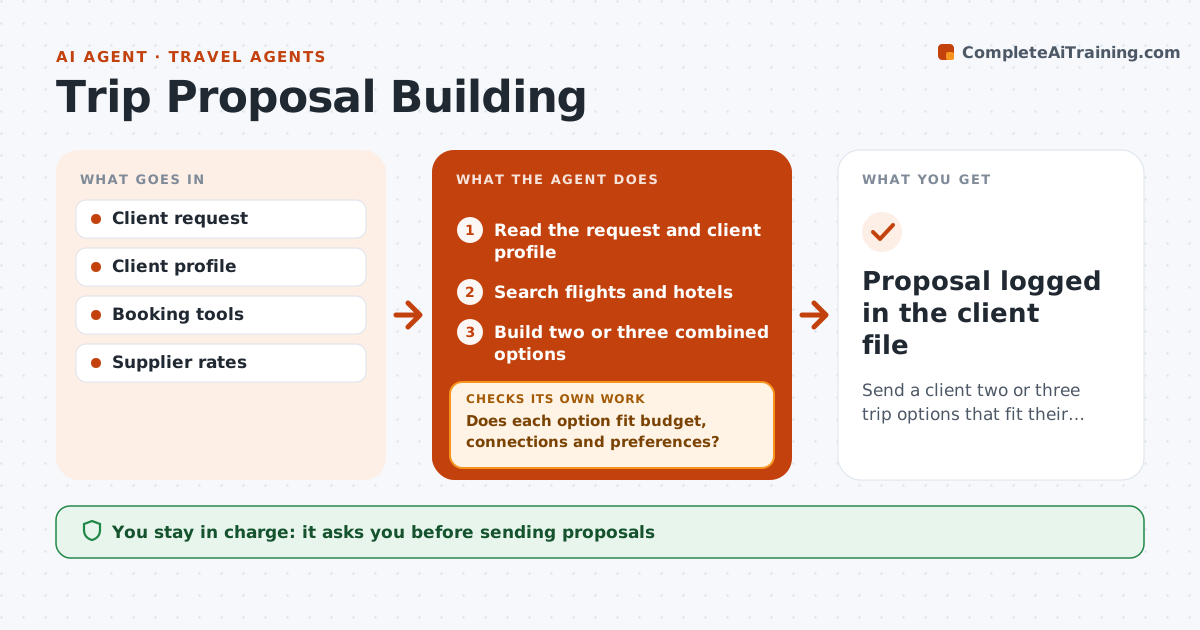
Clients ask for a trip and expect a clear proposal with options, but searching flights and hotels takes hours. This agent reads the request and client profile, such as dates, budget, preferred airlines, room type and past trips. It searches flights and hotels through the agency's booking tools and builds two or three combined options with total cost including taxes and fees. It checks each option fits: total within budget, international connections of at least 75 minutes and hotels near planned activities. Clients with mobility needs only see hotels with confirmed accessible rooms. Options that fail are rebuilt with adjusted dates or alternatives. It drafts the proposal in the agency format, ranked by fit, then price. The travel agent reviews, adjusts and sends. Edge case: accessible rooms must be confirmed, not just listed.
How it works
Follow the arrows from top to bottom. The orange dashed arrow is the loop: when a check fails, the agent goes back and tries again.
Read the steps as a list
- Trip request received
- Read the request and client profile
- Search flights and hotels
- Build two or three combined options
- Does each option fit budget, connections and preferences?If not: search again with adjusted dates or alternatives. Back to step 3.
- Draft the proposal
- Travel agent reviews and sendsThe agent waits here for your OK.
- Proposal logged in the client file
How it decides
Options must fit budget, meet minimum connection times and match profile preferences. Ranking is by fit, then price.
- Minimum connection time 75 minutes for international
- Accessible rooms must be confirmed
- Budget includes taxes and fees
Make it yours
Every agent is a starting point. You choose these settings for your own situation.
- Number of options
- Minimum connection times
- Preferred suppliers
- Proposal format
What keeps you in control
It always asks you first
- Sending proposals
- Holding any booking
Hard limits
- Never books without approval
- Never shares client data with suppliers beyond booking needs
It stops when
- Done: proposal sent
- Stop: travel dates unavailable
Set it up
We guide you through the set-up, step by step
Members get the full set-up guide for this agent. No technical skills needed: you copy, paste and upload.
- One set of instructions to paste into your AI, with the clicks for ChatGPT, Claude, Microsoft 365 Copilot, Gemini and Grok
- The agent then walks you through connecting your own data, one source at a time
- A downloadable copy with the flow chart, the rules and the full guide