AI agent for investor relations managers
Unusual Trading and Short Interest Watch Agent
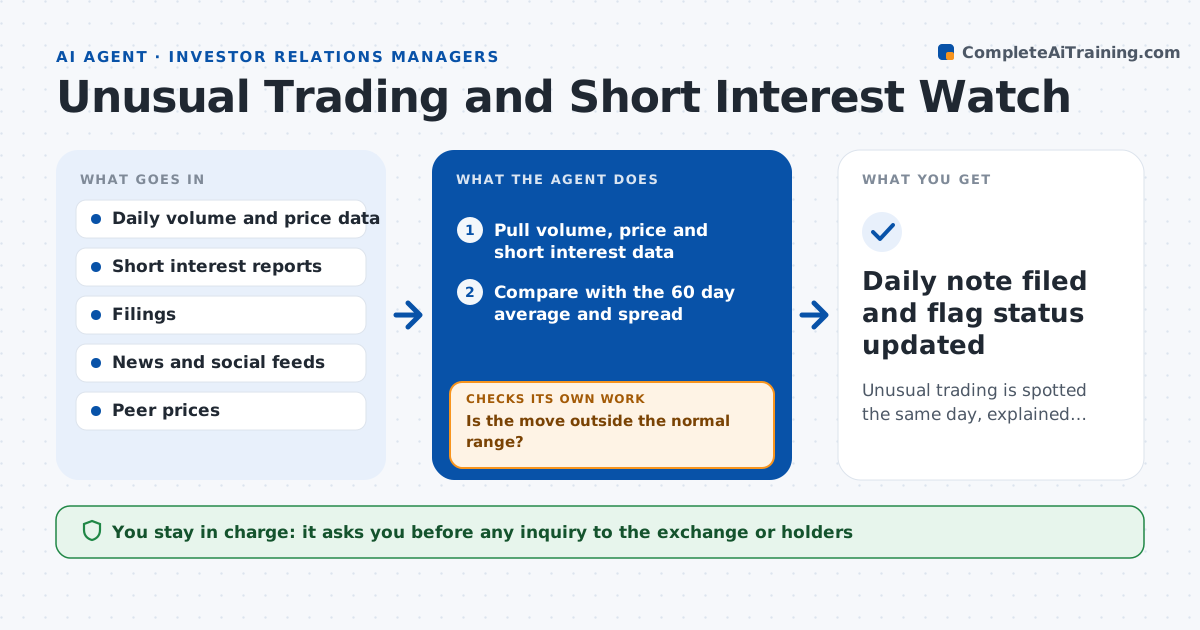
Unusual trading is spotted the same day, explained where possible and escalated when not
What it does
A sudden jump in volume or a rise in short interest can mean a leak, a rumor or a large holder building a position. IR often hears about it from a call from the CEO, a day late. This agent checks each day's trading volume, price move, short interest and changes in holder filings against the stock's normal range. When something is unusual, it searches news, filings, social posts and peer moves for an explanation. If it finds none, it flags the move as unexplained. It then compares with peers and the market that day to see whether the move is specific to the company. It rechecks the next day to see whether the pattern continues. The IR head decides whether to act, and any inquiry to the exchange or holders needs approval. Edge case: an index rebalance explains a volume spike, so the agent notes it and closes the flag.
How it works
Follow the arrows from top to bottom. The orange dashed arrow is the loop: when a check fails, the agent goes back and tries again.
Read the steps as a list
- Market closes
- Pull volume, price and short interest data
- Compare with the 60 day average and spread
- Is the move outside the normal range?If not: record a normal day and stop for today. Back to step 2.
- Search news, filings and index changes for a cause
- Compare with peers and the sector move
- Is there a documented explanation?If not: widen the search to social posts and holder filings and test again, then mark unexplained. Back to step 4.
- Write a note with the facts, the explanation or lack of one
- IR head approves any action, inquiry to the exchange or contact with holdersThe agent waits here for your OK.
- Recheck the pattern the next morning
- Daily note filed and flag status updated
How it decides
It flags a day when volume or short interest moves beyond a set number of standard deviations from the 60 day average and finds no matching event or sector move.
- Flag volume above 3 standard deviations from the 60 day average
- Flag short interest rising more than 20% in two weeks
- Close a flag when an index event or sector move explains it
- Escalate unexplained moves lasting two days
Make it yours
Every agent is a starting point. You choose these settings for your own situation.
- Standard deviation threshold (default 3)
- Short interest rise threshold (default 20%)
- Peer group
- Alert recipients
What keeps you in control
It always asks you first
- Any inquiry to the exchange or holders
- Any public comment
Hard limits
- Never trades or comments publicly
- Labels speculation as unconfirmed
- Keeps all notes inside the company
It stops when
- Done: move explained or flag closed
- Stop: data feed unavailable
Set it up
We guide you through the set-up, step by step
Members get the full set-up guide for this agent. No technical skills needed: you copy, paste and upload.
- One set of instructions to paste into your AI, with the clicks for ChatGPT, Claude, Microsoft 365 Copilot, Gemini and Grok
- The agent then walks you through connecting your own data, one source at a time
- A downloadable copy with the flow chart, the rules and the full guide