AI agent for it support specialists
Update Rollout Customer Impact Agent
Support is ready for the release with guidance, and new issues are caught in the first days
What it does
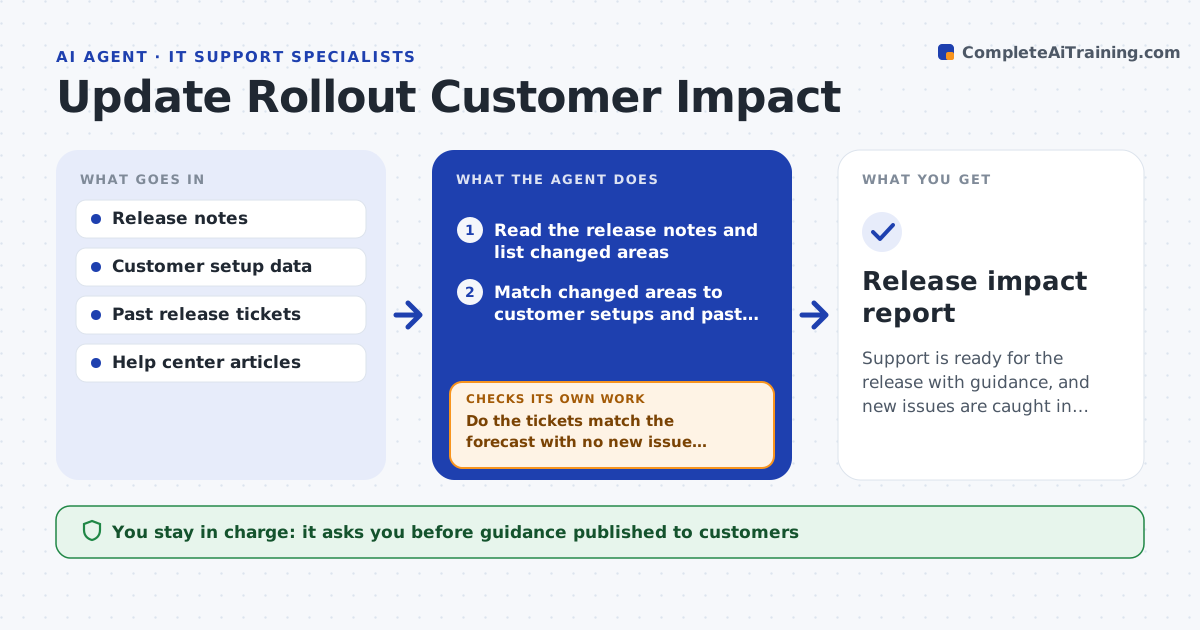
A new software release can bring a flood of tickets because nobody told support which customers would be affected. This agent reads release notes before launch and compares changes with what is known about customer setups, such as versions, plugins, operating systems and settings. It predicts which groups may see problems and how many people are involved. It drafts guidance for the help center and support replies and sends it to the lead for approval. After release, it watches incoming tickets and related searches and checks whether predicted issues appear and whether new ones show up. If a new issue appears, it updates the guidance and flags it. It reports volumes against the forecast. The lead approves guidance and updates. Edge case: a minor change breaks one popular plugin.
How it works
Follow the arrows from top to bottom. The orange dashed arrow is the loop: when a check fails, the agent goes back and tries again.
Read the steps as a list
- Release notes are ready before launch
- Read the release notes and list changed areas
- Match changed areas to customer setups and past release tickets
- Predict affected groups and likely ticket volume
- Draft support guidance and help center notes
- Lead approves the guidanceThe agent waits here for your OK.
- Watch new tickets and searches after release
- Do the tickets match the forecast with no new issue themes?If not: group the new theme, count it and draft a guidance update. Back to step 7.
- Is the ticket volume back to normal?If not: keep watching and escalate anything above the limit to the lead. Back to step 7.
- Lead approves guidance updates and the final reportThe agent waits here for your OK.
- Release impact report
How it decides
Impact is predicted when a changed area matches a setup attribute held by a group of customers. New issues are flagged when a ticket theme grows beyond the forecast.
- Predict impact when changed areas match over 2 percent of customers
- Flag a new ticket theme with 10 or more tickets in a day
- Escalate if volume exceeds forecast by 50 percent
- Update guidance within the same day a new theme is confirmed
Make it yours
Every agent is a starting point. You choose these settings for your own situation.
- Release dates and watch window (default 14 days)
- Theme size that triggers a flag
- Customer groups
- Escalation recipient
What keeps you in control
It always asks you first
- Guidance published to customers
- Escalations to engineering
Hard limits
- Never publishes guidance itself
- Does not use personal customer data in reports
It stops when
- Done: volumes normal for 3 days and guidance final
- Stop: setup data is unavailable for the changed area
Set it up
We guide you through the set-up, step by step
Members get the full set-up guide for this agent. No technical skills needed: you copy, paste and upload.
- One set of instructions to paste into your AI, with the clicks for ChatGPT, Claude, Microsoft 365 Copilot, Gemini and Grok
- The agent then walks you through connecting your own data, one source at a time
- A downloadable copy with the flow chart, the rules and the full guide