AI agent for quantity surveyors
Value Engineering Option Agent
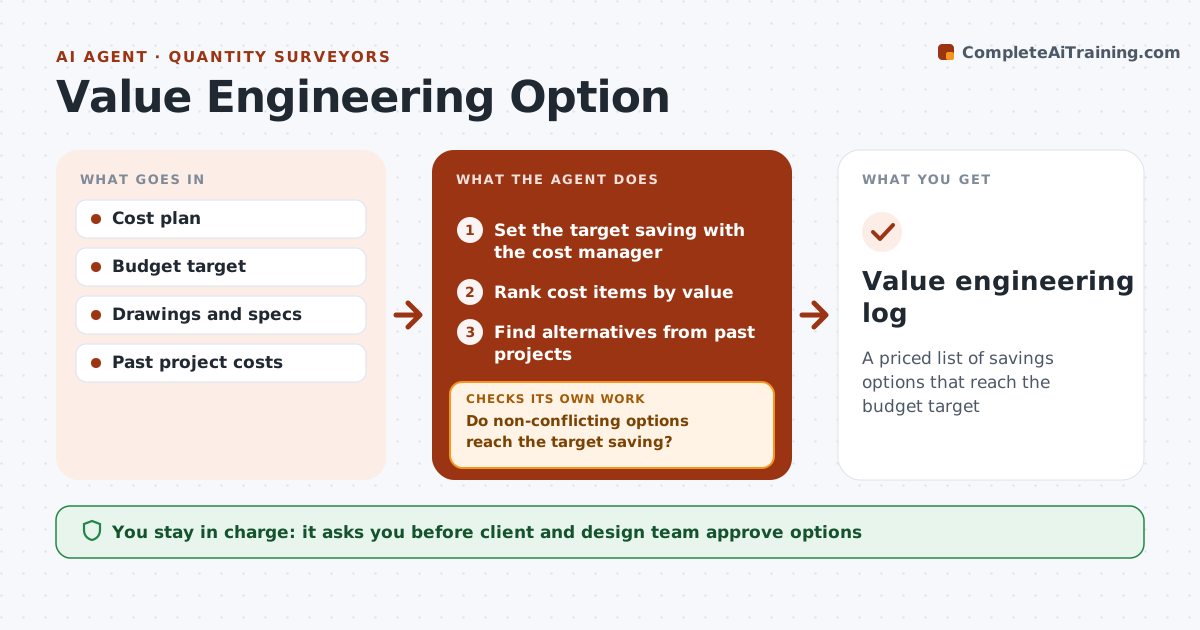
A priced list of savings options that reach the budget target
What it does
When an estimate comes in over budget, the team needs savings options that do not hurt performance or design intent. This agent ranks cost items by value, largest first, and finds alternatives used on past projects or common in the market. It prices each option and lists effects on schedule, maintenance and design intent. It checks that the options do not conflict with each other and that together they reach the target saving. If not, it searches the next cost items for more options. Options that would change planning approval conditions are flagged for the architect. It prepares a decision log for the meeting. The design team and client decide which options to accept. Edge case: a cheaper option that needs a new planning approval is never presented as a simple swap.
How it works
Follow the arrows from top to bottom. The orange dashed arrow is the loop: when a check fails, the agent goes back and tries again.
Read the steps as a list
- Estimate exceeds budget
- Set the target saving with the cost manager
- Rank cost items by value
- Find alternatives from past projects
- Price each option and list impacts
- Do non-conflicting options reach the target saving?If not: search for more options in the next cost items. Back to step 3.
- Does any option change planning approval conditions?If not: keep the option list as is. Back to step 5.
- Design team and client decide optionsThe agent waits here for your OK.
- Value engineering log
How it decides
Options are ranked by saving and low design impact. Combined options must reach the target.
- Largest items first
- Options must not conflict
- Approval-sensitive options flagged
Make it yours
Every agent is a starting point. You choose these settings for your own situation.
- Target saving
- Impact categories
- Option sources
- Approval process
What keeps you in control
It always asks you first
- Client and design team approve options
Hard limits
- Never changes the design
- Shows all impacts
It stops when
- Done: target reached
- Stop: no further options without design change
Set it up
We guide you through the set-up, step by step
Members get the full set-up guide for this agent. No technical skills needed: you copy, paste and upload.
- One set of instructions to paste into your AI, with the clicks for ChatGPT, Claude, Microsoft 365 Copilot, Gemini and Grok
- The agent then walks you through connecting your own data, one source at a time
- A downloadable copy with the flow chart, the rules and the full guide