AI agent for dispatchers
Weather Disruption Replan Agent
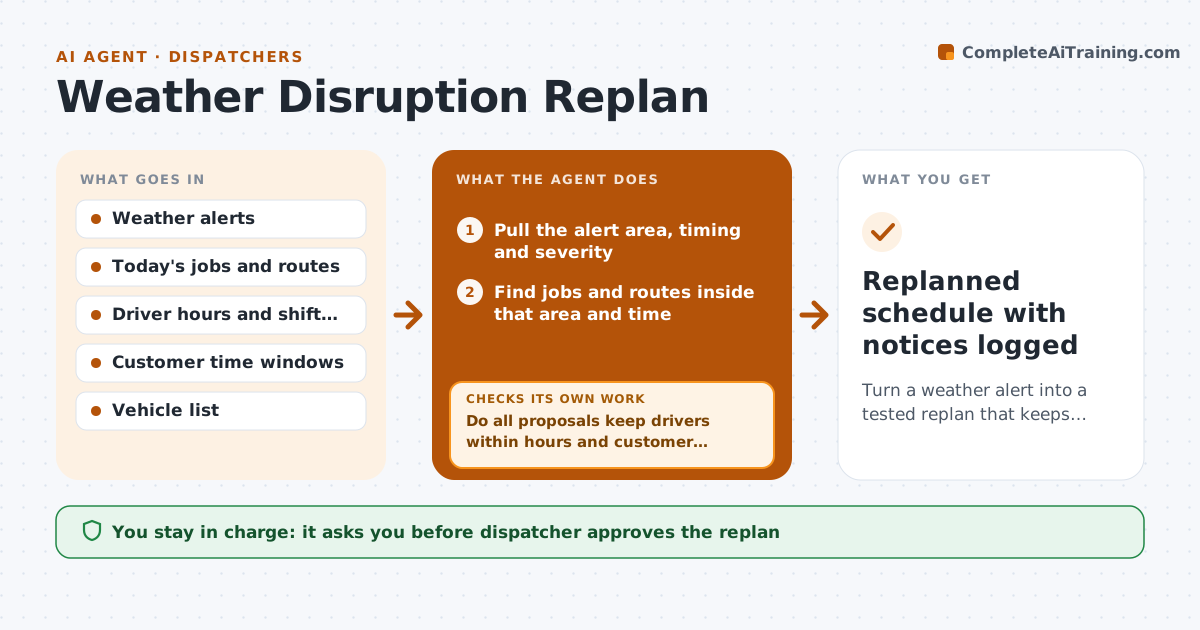
Turn a weather alert into a tested replan that keeps drivers legal and customers informed.
What it does
When a storm warning lands, a dispatcher usually starts calling drivers and rewriting the board by hand while jobs keep coming in. This agent reads the weather alert, maps it to the routes and jobs in the affected area, and lists which stops are at risk. It proposes reschedules and detours, then tests each proposal against driver hours, vehicle limits and customer time windows. A proposal that breaks a rule is revised and tested again. When the plan holds, it drafts the customer notices with the new times. The dispatcher reviews the whole plan and approves every notice before anything is sent. Edge case: a driver who would hit the hours limit after a long detour is swapped for a closer driver, and the agent retests the change before showing it.
How it works
Follow the arrows from top to bottom. The orange dashed arrow is the loop: when a check fails, the agent goes back and tries again.
Read the steps as a list
- Weather alert arrives for the service area
- Pull the alert area, timing and severity
- Find jobs and routes inside that area and time
- Rank jobs by customer urgency and risk
- Propose reschedules and reroutes
- Do all proposals keep drivers within hours and customer windows?If not: Swap drivers or jobs, shorten detours, or mark the stop as unmovable, then retest. Back to step 5.
- Draft customer notices with the new times
- Dispatcher approves the plan and each noticeThe agent waits here for your OK.
- Update the board and send approved notices
- Is the alert still the same as when the plan was made?If not: Re-read the latest alert and replan the affected routes. Back to step 2.
- Replanned schedule with notices logged
How it decides
It keeps a proposal only if every driver stays within hours and every customer window is met or flagged; otherwise it revises the move and tests again.
- Treat a job as at risk if the route enters the alert area within two hours of the alert window
- Never propose a move that puts a driver over the legal hours limit
- Offer customers the nearest open window first, then the next day
- If a job cannot be moved safely, mark it for a call from the dispatcher
Make it yours
Every agent is a starting point. You choose these settings for your own situation.
- Hours of risk before an alert window (default 2 hours)
- Maximum driver hours per day (default 10)
- Notice wording and channel (default text and email)
- Weather alert severity that starts a replan (default warning)
- Jobs treated as unmovable (default emergency calls)
What keeps you in control
It always asks you first
- Dispatcher approves the replan
- Dispatcher approves each customer notice before it is sent
Hard limits
- Never send a customer notice without dispatcher approval
- Never exceed driver hours limits
It stops when
- Done: all affected jobs have a tested new slot and approved notices
- Stop: a rule cannot be met for a job, so the dispatcher handles it by phone
Set it up
We guide you through the set-up, step by step
Members get the full set-up guide for this agent. No technical skills needed: you copy, paste and upload.
- One set of instructions to paste into your AI, with the clicks for ChatGPT, Claude, Microsoft 365 Copilot, Gemini and Grok
- The agent then walks you through connecting your own data, one source at a time
- A downloadable copy with the flow chart, the rules and the full guide