AI agent for bioinformaticians
Workflow Run Failure Triage Agent
Get a failed pipeline run to a valid output with the least repeated compute
What it does
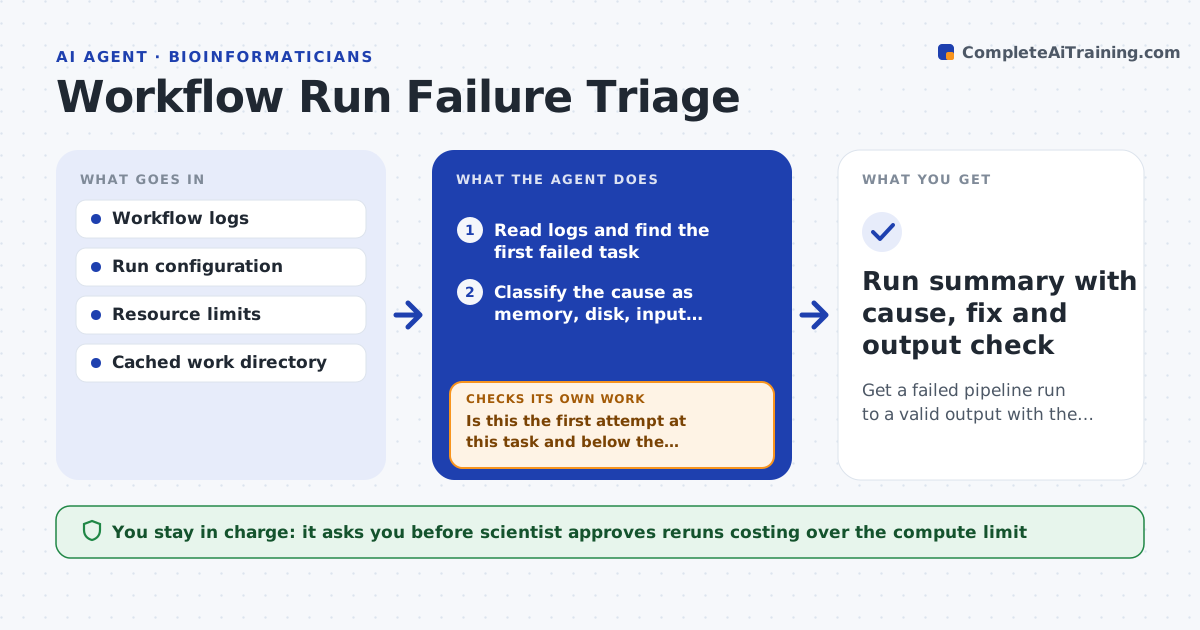
A pipeline dies on step 40 of 60 and the log is thousands of lines long. This agent reads the workflow logs, finds the first real failure, and classifies it: memory, disk, bad or missing input, tool version, timeout or a flaky node. For each class it applies the usual fix, such as raising memory for that task, fixing a path, or pinning a tool version. It resumes from the cache so finished steps are not repeated, then checks the output file for size, format and expected rows. If the same task fails twice, or a rerun would use a lot of compute, it stops and asks the scientist. Edge case: a task seems to need more memory but the real cause is a corrupted input, so more memory never helps.
How it works
Follow the arrows from top to bottom. The orange dashed arrow is the loop: when a check fails, the agent goes back and tries again.
Read the steps as a list
- Workflow run failed
- Read logs and find the first failed task
- Classify the cause as memory, disk, input, version, timeout or node
- Pick the smallest fix for that class
- Is this the first attempt at this task and below the compute limit?If not: stop and ask the scientist, with the log excerpt and what was tried. Back to step 3.
- Scientist approves any rerun above the compute limitThe agent waits here for your OK.
- Apply the fix and resume from cache
- Does the output pass format, size and row-count checks?If not: reclassify, since the first diagnosis was probably wrong, and pick another fix. Back to step 3.
- Run summary with cause, fix and output check
How it decides
It matches the first failure message and resource use to known failure classes and picks the smallest fix that targets that cause.
- Raise memory by 50% for out-of-memory errors, at most twice
- Check input checksums before any memory change
- Pin the last working tool version after a version mismatch
- Stop after two failures of the same task
Make it yours
Every agent is a starting point. You choose these settings for your own situation.
- Compute limit that needs approval (default 200 core hours)
- Memory increase step (default 50%)
- Number of attempts per task (default 2)
- Output checks to run
- Where failure summaries are sent
What keeps you in control
It always asks you first
- Scientist approves reruns costing over the compute limit
- Scientist approves any change to pipeline code
Hard limits
- Never delete the cache or raw inputs
- Never change pipeline code without approval
It stops when
- Done: the output passes checks and the summary is saved
- Stop: the same task fails twice or the cause is unknown
Set it up
We guide you through the set-up, step by step
Members get the full set-up guide for this agent. No technical skills needed: you copy, paste and upload.
- One set of instructions to paste into your AI, with the clicks for ChatGPT, Claude, Microsoft 365 Copilot, Gemini and Grok
- The agent then walks you through connecting your own data, one source at a time
- A downloadable copy with the flow chart, the rules and the full guide