About Catenary
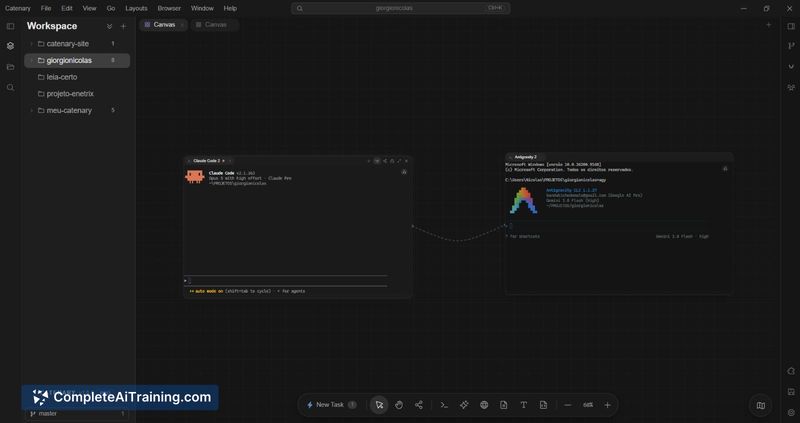
Catenary is a spatial IDE and terminal orchestrator built for workflows that involve AI coding agents. It replaces traditional tab-based layouts with an infinite 2D canvas where developers can arrange terminals, code editors, and browser previews side-by-side. The application runs locally on macOS, Windows, and Linux, with no telemetry and full offline capability.
Review
Catenary approaches the coding environment as a visual workspace rather than a collection of tabs and split panes. The tool arranges native PTY terminals, a Monaco editor, and local webviews on a zoomable canvas, letting you position them spatially. It's a response to the friction of managing multiple AI agent sessions and terminal processes in conventional window layouts.
Key Features
- Visual Cables: Wire agent terminals together on the canvas to pass context between them and chain models-for example, connecting a reasoning model to a test runner.
- Task Islands: Spin up isolated visual workspaces with a single click, keeping separate tasks or projects self-contained without losing the layout of your current session.
- All-in-One Canvas: Combines native PTY terminals (via WebGL xterm.js), the Monaco code editor, and local browser webviews on one spatial surface.
- 100% Local-First: All processing happens on-device. Code and API keys never leave the machine, and the app sends zero telemetry.
Pricing and Value
Catenary is currently free to download for macOS (Apple Silicon and Intel), Windows, and Linux. The maker's infrastructure stack references Stripe for "Catenary Pro" checkout, which indicates a paid tier exists or is planned, but specifics about Pro features, pricing, or a timeline for that tier are not yet defined in the available information.
Pros
- Unusual spatial canvas layout reduces the need to hunt through overlapping terminal windows.
- Visual Cables give a direct, graphical way to pipe context between different AI models and processes.
- Runs entirely offline with no telemetry, keeping sensitive code and keys on the local machine.
- Cross-platform support covers macOS, Windows, and Linux from the initial release.
Cons
- The spatial canvas paradigm has a learning curve; developers accustomed to traditional tabbed IDEs may find the spatial model disorienting at first.
- As a newly launched tool, the plugin ecosystem and community extensions are minimal compared to established editors.
- The tool is not well suited for developers who prefer lightweight, keyboard-only terminal workflows and don't want a graphical, mouse-driven environment.
Catenary fits developers who regularly run multiple AI coding agents in parallel and feel constrained by standard terminal tabs or sidebar chats. It's also worth a look for those who want a local-first, offline-capable environment that keeps API keys and source code off external servers. Teams with deeply entrenched IDE workflows or minimal reliance on AI agents may find the spatial approach more overhead than benefit.
Open 'Catenary' Website
Your membership also unlocks: