About ccshare
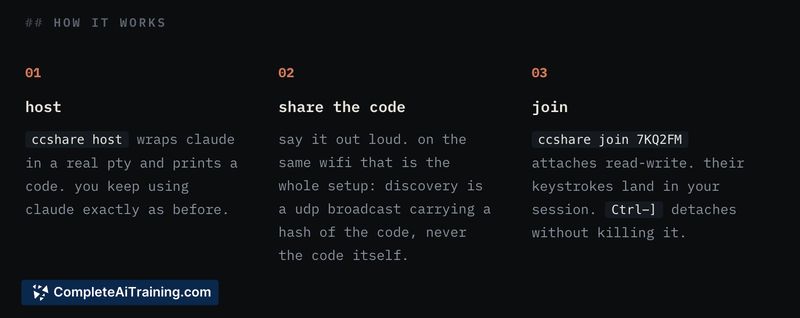
ccshare is a terminal sharing tool that lets multiple people join the same live Claude Code session. Users generate a 6-character code, AirDrop-style, and up to five collaborators connect via their own terminal or a browser link-no software installation required. It operates over local wifi with zero configuration or through a free tunnel for remote access.
Review
The tool targets a specific friction in collaborative coding with AI agents: only one person can typically interact with the terminal at a time. ccshare turns a single Claude Code or Codex session into a shared workspace where everyone sees the same screen and can type simultaneously. Launched recently, it's in an early stage, with the maker actively gathering feedback on interaction models, security, and simultaneous input behavior.
Key Features
- 6-character session code for quick pairing, discoverable on the same network.
- Browser-based join option for guests who don't use a terminal.
- Simultaneous typing with visible cursors, no turn-taking enforced.
- Support for Claude Code, Codex, and other interactive terminal-based tools.
- Free tunnel option for connecting outside the local network.
Pricing and Value
ccshare is currently free. No subscription fees, usage limits, or paid tiers have been announced. The tool reduces the overhead of screen sharing and prompt copying when collaborating around a coding agent.
Pros
- Instant local discovery shortens setup time on the same wifi.
- No software installation required for browser-based participants.
- Works with multiple coding agents, not locked to one vendor.
- Up to five people can join, suiting small team sessions.
- Late joiners see recent prompts, which helps protect earlier sensitive output.
Cons
- Only a limited scrollback is visible to participants joining mid-session, so full context may be missing.
- Simultaneous input behaves like a shared keyboard, which can cause overlapping commands if participants don't coordinate.
- Not well suited for teams that need access controls or audit logs; the session is protected only by a shareable one-time code and trust.
ccshare fits ad-hoc pair programming, debugging sessions, or teaching moments where quick, low-friction terminal sharing is the priority. Teams that require structured turn-taking, full history, or strict access management may find the current model too open. As the tool evolves, the planned communication features and parallel session support could broaden its use for more formal team workflows.
Open 'ccshare' Website
Your membership also unlocks: