About ClawApp
ClawApp is a macOS desktop application that simplifies working with OpenClaw agents by replacing manual setup and scattered tooling with a guided, all-in-one workflow. It lets users install, manage, and run local agents without deep systems knowledge, aiming to get a local OpenClaw agent up and running in minutes.
Review
ClawApp addresses a clear gap for users who find OpenClaw's raw setup intimidating or fragile: it bundles installation, configuration, and runtime controls into a single interface. The app is open-source, focused on lowering the barrier to entry for everyday users, and emphasizes clear progress indicators and quick setup flows.
Key Features
- Guided installation and setup for OpenClaw on macOS, removing the need to assemble toolchains manually.
- Local agent management: install, run, configure, and monitor agents from a single desktop interface.
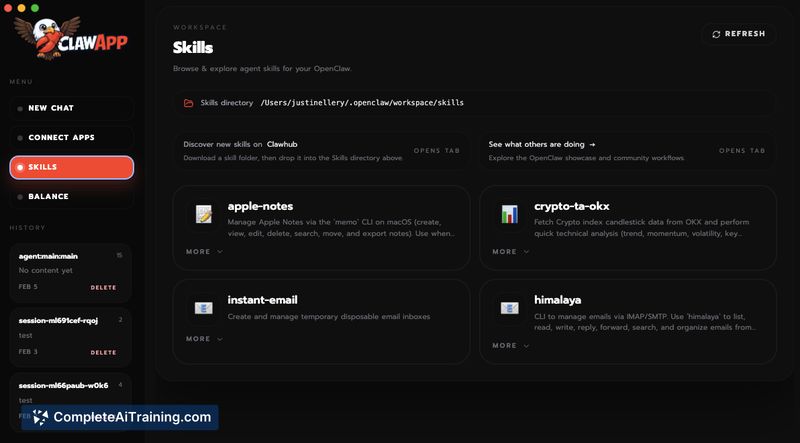
- Skills management and workspace integration, including a quick link to the local skills directory for adding extensions.
- Progress and status UI with estimated time metrics to show setup progress and job status.
- Open-source codebase and local operation so agents run on the user's machine rather than a hosted service.
Pricing and Value
ClawApp launched as a free product. The initial release includes a free tier with limited credits for experimenting. For now, additional credits can be topped up via a direct USD1 transfer to the app's wallet address; the team indicates more top-up options will be added in future releases. For macOS users who want a low-friction way to run OpenClaw locally, the time savings and simplified setup offer clear value compared with manual configuration.
Pros
- Significantly reduces setup time for getting OpenClaw agents running locally.
- Consolidates installation, configuration, and runtime monitoring into one interface.
- Supports modular skills and makes it easy to add or refresh skills from the local workspace.
- Open-source and runs locally, giving users direct control over their agents and files.
- User interface includes helpful progress estimates and clear guidance during setup.
Cons
- Security and sandboxing features are still limited and inherit current OpenClaw constraints; more granular permission controls are planned but not yet available.
- Credit top-up is currently a manual wallet transfer, which may feel cumbersome for some users until native payment options are added.
- Some polish items-such as branding and minor UI refinements-are still in progress.
ClawApp is a strong fit for macOS users who want to experiment with local OpenClaw agents without assembling toolchains or diving into system internals. It is especially useful for hobbyists, developers testing local agents, and no-code users seeking a straightforward desktop experience; organizations with strict security requirements may want to wait for sandboxing and permission-management improvements.
Open 'ClawApp' Website
Your membership also unlocks: