About Cline CLI 2.0
Cline CLI 2.0 is a command-line autonomous coding agent that brings AI-guided development workflows directly to the terminal. It is fully open source and redesigned to support parallel agents, headless CI/CD usage, and editor integration via the Agent Client Protocol.
Review
Cline CLI 2.0 puts an agent-driven development loop into a plain terminal environment, making it possible to run multiple agents at once and to pipe agent output into automated pipelines. In practice it feels fast and dependable for everyday developer tasks, though users who prefer GUIs will face a short adjustment period to learn CLI patterns and configuration details.
Key Features
- Parallel agents: run multiple agent instances concurrently to handle separate tasks or speed up workflows.
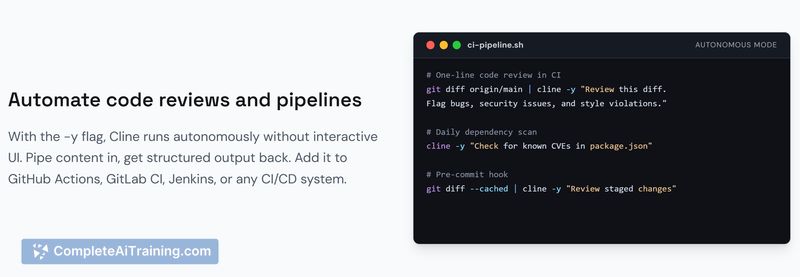
- Headless mode for CI/CD: pipe content and agent actions into continuous integration and deployment pipelines.
- Agent Client Protocol (ACP) support: connect external editors and tools to agent capabilities via a standard protocol.
- Open source and free: source code available for inspection, modification, and self-hosting; no upfront licensing cost for core functionality.
- File-aware edits and task planning: supports context-aware code edits and structured task plans to guide multi-step changes.
Pricing and Value
Cline CLI 2.0 is offered as a free, open source tool for individual developers and teams. That pricing approach delivers strong baseline value: teams can adopt and extend the tool without license fees, and automation-friendly features like headless mode add tangible value for CI/CD pipelines. Organizations should plan for any infrastructure or compute costs associated with running parallel agents, and evaluate whether community support meets their needs or if they require paid support or internal maintenance.
Pros
- Enables fully terminal-native agent workflows, which suits developers who prefer CLI automation.
- Parallel agents accelerate multi-task workflows and prototype iterations.
- Headless CI/CD mode makes it straightforward to incorporate agents into automated pipelines.
- Open source licensing allows customization, auditing, and self-hosting.
- ACP support provides a path to integrate with a variety of editors and tooling.
Cons
- Command-line orientation and configuration can be a barrier for users who expect graphical tooling.
- Running multiple agents increases resource use; teams should monitor CPU and memory during heavy workloads.
- Editor integration via protocol may require additional setup steps and occasional troubleshooting.
Overall, Cline CLI 2.0 is best suited for developers and teams comfortable with terminal workflows who want to automate coding tasks and integrate AI agents into CI/CD. It's a practical choice for prototyping, automated testing, and developer automation where open source, extensibility, and headless operation matter most.
Open 'Cline CLI 2.0' Website
Your membership also unlocks: