About CodeYam CLI & Memory
CodeYam CLI & Memory is a lightweight command-line tool that helps manage project-specific memory for Claude Code. It runs a background agent that reviews coding session transcripts, identifies repeated confusions, and proposes scoped rules stored with your repository.
Review
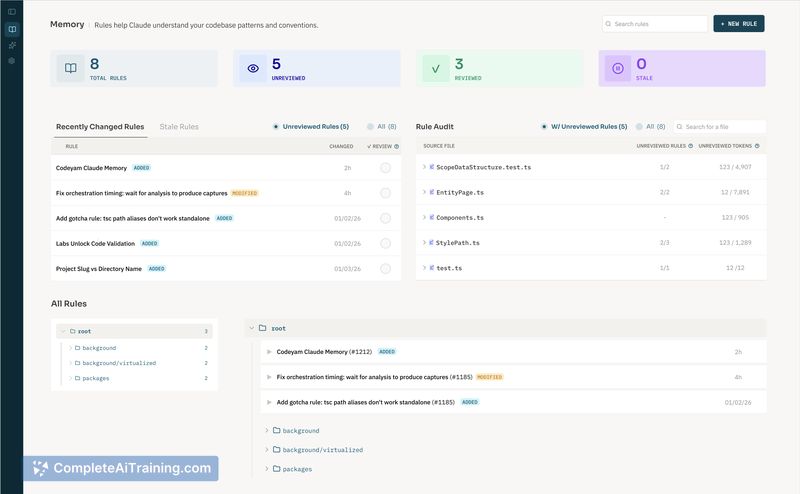
The tool aims to reduce the maintenance burden of stale claude.md files by automating the discovery and creation of targeted rules for Claude Code. Installation is straightforward via npm and a dashboard supports reviewing and approving rule suggestions generated by the agent.
Key Features
- Background agent that scans session transcripts and flags recurring confusion patterns or repeated mistakes.
- Automatic generation of scoped Claude Code rules with path matching so rules apply only to relevant files or directories.
- Dashboard for auditing, approving, and editing suggested rules, with all changes tracked as files in git.
- Lightweight CLI that runs locally, is free to use, requires no login, and is language-agnostic.
Pricing and Value
CodeYam CLI & Memory is offered for free and runs locally with no account required. Its main value is in reducing repeated agent errors and lowering the time spent keeping claude.md files up to date by surfacing actionable rules directly in the repo. The return on that time investment is greatest for mid-to-large codebases that use Claude Code frequently; very small projects may find the setup and review steps add more overhead than benefit.
Pros
- Reduces recurring mistakes by detecting patterns from real coding sessions and converting them into rules.
- Creates scoped rules using path matching, which helps keep context focused and avoids unnecessary context noise.
- Keeps a clear audit trail by storing rules as files in git and providing a dashboard for review.
- Runs locally, is simple to install, and does not require cloud credentials or sign-in.
Cons
- Still early in development; the agent can produce false positives or suggestions that need manual vetting.
- Relies on Claude Code's rules system, so benefits are limited if you use other LLM tooling without similar rule support.
- Introduces an extra review step and process overhead that may not suit very small teams or single-file projects.
Overall, this tool is a good fit for engineering teams that use Claude Code across multiple files or services and want to reduce time spent maintaining project context. It makes the most sense for repositories where stale claude.md files cause repeated agent mistakes; teams not invested in Claude Code or with very small projects may not get as much value.
Open 'CodeYam CLI & Memory' Website
Your membership also unlocks: