
About Domscribe
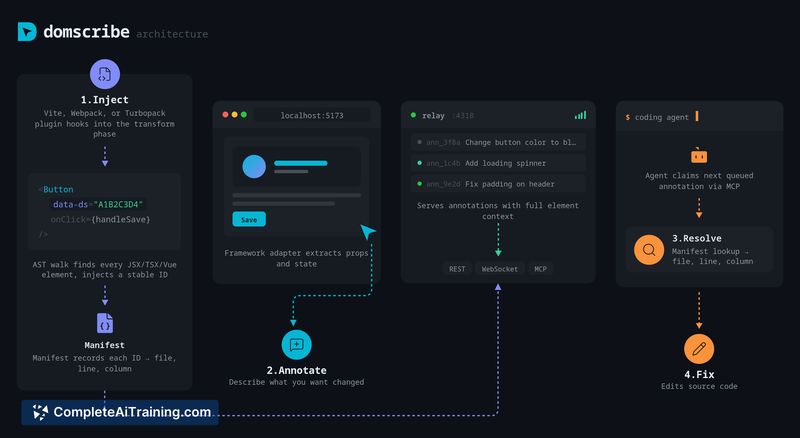
Domscribe connects AI coding agents to a live frontend by mapping DOM elements to their exact source locations. It provides bidirectional links: agents can request live DOM snapshots, props, and state, and developers can click UI elements to resolve the file:line:col for edits.
Review
Domscribe addresses a common pain point for AI-assisted frontend edits by eliminating much of the guesswork agents perform when searching for the right file. The tool combines a build-time injection of stable element IDs with runtime adapters that capture component props and state, making agent-driven edits more precise and efficient.
Key Features
- Code → UI: MCP tool returns live DOM snapshot, component props, and state for a given file and location.
- UI → Code: Click an element in a browser overlay and resolve the exact source location for an edit (file:line:col).
- Build-time stable IDs: AST transform injects stable data IDs and writes a manifest mapping IDs to source locations (xxhash64-based).
- Framework and bundler support: First-party adapters for React, Vue, Next.js, Nuxt and compatibility with Vite, Webpack, and Turbopack.
- Open source (MIT); plugins for multiple agents and automatic PII redaction with no production runtime cost.
Pricing and Value
Domscribe is available under an MIT license and is listed as free, which makes it attractive for teams that prefer open-source tooling. The primary value is operational: it reduces token and time waste by directing agents straight to the right source locations, speeds up iterative frontend edits, and strips instrumentation from production builds so there's no runtime overhead. Expect implementation effort for build-step integration and any custom adapter work if you use non-supported frameworks.
Pros
- Accurate mapping from UI elements to source files, reducing agent guesswork and wasted tokens.
- Works with major frontend frameworks and common bundlers out of the box.
- Open-source MIT license with first-party agent plugins for quick setup.
- PII auto-redaction and no instrumentation left in production builds.
- Extensible adapter architecture for adding support to other frameworks.
Cons
- Canvas-drawn objects cannot be tracked at the per-shape level; only the canvas element is instrumented.
- Native web components and some shadow DOM scenarios may need extra parser/adapter work to gain full coverage.
- Requires build-time integration and configuration, which adds upfront setup for existing projects.
Overall, Domscribe is best suited for frontend teams that use React, Vue, Next.js, or Nuxt and want AI agents to make precise UI-driven edits without manual file hunting. It's particularly useful for teams that frequently iterate on UI and rely on agent tooling; projects that rely heavily on canvas graphics or native web components may need additional work to get the same level of granularity.
Open 'Domscribe' Website
Your membership also unlocks:

















