AI tool
ilse
Ilse is a visual overlay for React apps that lets designers and developers click on elements and describe changes in plain language for their coding agent. It captures exact file locations, offers a token-based style panel, reads components into a...
About ilse
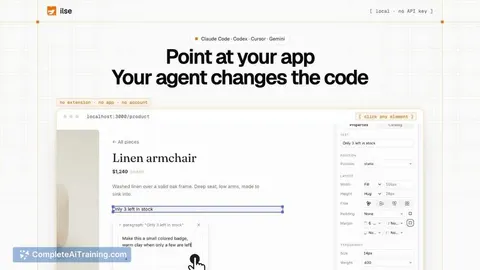
ilse is a toolbar that overlays a running React application and lets developers point at UI elements to direct AI coding agents. Instead of describing a visual change in text and hoping the agent edits the correct file, users click an element, type an instruction, and ilse sends the note to agents like Claude Code, Codex, Cursor, or Gemini with the exact file path and line reference. The tool also handles instant visual adjustments-spacing, sizing, colors, and layout-directly in the browser using the project's own design tokens, reserving agent calls for changes that require code generation.
Review
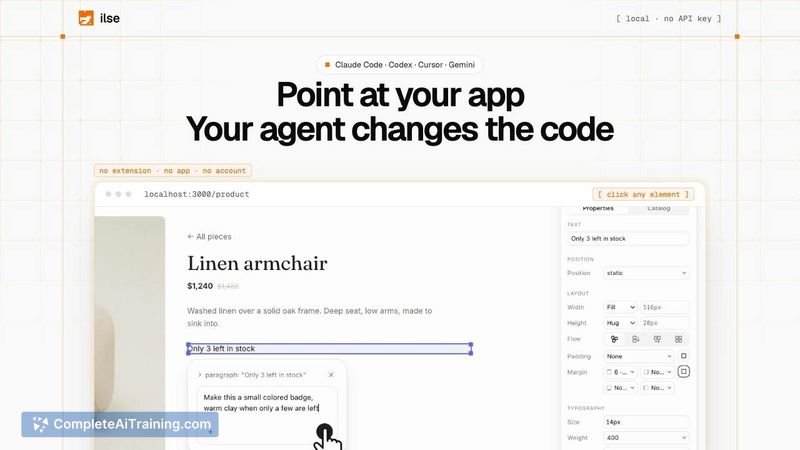
ilse addresses a specific friction point in AI-assisted frontend development: the gap between what a developer sees on screen and what the coding agent can locate in the codebase. The toolbar approach means you don't leave your running app to make edits, and the agent receives coordinates rather than vague descriptions. The tool launched this week and is in active development, with a free tier available and a Pro plan in founder pre-sale.
Key Features
- Point-and-instruct: Click any element in the running React app, write what should change, and ilse forwards the instruction to your chosen AI agent along with the relevant file and line number.
- Visual panel with project tokens: Adjust spacing, size, type, and color using the project's own scale and design tokens. These changes apply instantly and consume few or no AI tokens.
- Live manipulation: Move, resize, edit text, and draw directly on the page. The visual results appear immediately, and the agent translates them into code afterward.
- Component library and design system extraction: ilse reads existing components and writes the design system to a markdown file, giving agents a reference so they stop generating ad-hoc buttons and styles.
- Test mode (Pro, pre-sale): Define a user journey-such as "buy the paper lamp"-and ilse walks through the real app on its own, reporting accessibility issues, errors, and layout problems, then remembers what was fixed.
Pricing and Value
ilse offers a free tier. A Pro plan with test mode is available through a founder pre-sale at launch; exact pricing beyond the pre-sale period is not yet defined. The tool does not handle API keys-users bring their own agent, and costs associated with that agent are separate.
Pros
- Reduces back-and-forth with AI agents by sending precise file and line references instead of natural language descriptions of visual elements.
- Instant visual tweaks use project-specific design tokens, which helps prevent hardcoded, one-off values from creeping into the codebase.
- Works with multiple AI coding agents-Claude Code, Codex, Cursor, and Gemini-so users aren't locked into a single provider.
- Component-level scoping lets users choose whether a change applies to a single instance or every occurrence of a shared component.
- Setup is a single command (
npx ilse-design@latest) and requires no API key handover to ilse itself.
Cons
- Works only with React apps (Next.js, Vite, Remix, Astro, CRA); teams using Vue, Svelte, Angular, or plain HTML cannot use it.
- Test mode's localization checks are not yet built-the maker has noted plans to explore German and Arabic overflow and layout issues, but these are not available today.
- The tool is not well suited for developers who prefer fully agent-driven workflows and don't want a visual overlay in their browser while working.
ilse fits teams where a designer or developer already spends significant time in the browser adjusting React UIs and directing an AI agent through terminal or IDE prompts. The instant token-aware adjustments and the component-level scoping address real pain points around design consistency and agent accuracy. For projects outside the React ecosystem, or for those who want the agent to handle everything without a pointing step, the tool doesn't yet apply.