About mpai
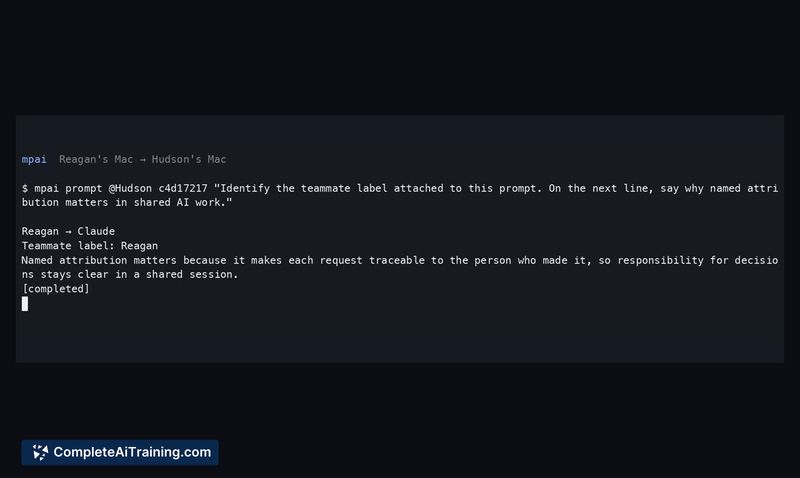
mpai is an open-source terminal tool that makes existing Codex and Claude Code sessions multiplayer. Two Macs connected via Tailscale can share an explicit AI coding session - the host stays in control while a teammate joins with the real conversation context and sends attributed prompts. It's MIT-licensed, built in public, and currently in public alpha.
Review
mpai tackles a specific friction point in AI-assisted coding: the session remains single-player even when the work is collaborative. Instead of summarizing a 40-turn conversation for a teammate, mpai lets that teammate enter the session directly, see the context, and contribute with their name attached. The tool layers shared access on top of native terminal workflows rather than replacing Codex or Claude Code.
Key Features
- Explicit session sharing where a teammate arrives with the full conversation context intact
- Attributed prompting that records each turn under the guest's identity in the native transcript and audit log
- Host-controlled execution with remote approvals denied - guests cannot bypass the host's decision authority
- Managed-mode Codex prompting alongside Claude Code support (standalone Codex remains view-only by default)
- One-command teammate join via a version-pinned npx line with no global install or background service required
Pricing and Value
mpai is free and MIT-licensed, which permits commercial use. There are no subscription tiers or usage-based fees - the source code is available on GitHub. As a public alpha, it does not carry an enterprise SLA or paid support channel.
Pros
- Lets teammates join an active AI session without losing context or switching away from their terminal
- Attribution stays anchored to the human who prompted, even when the agent runs a long downstream chain
- Host retains execution authority and exposes no arbitrary shell to guests
- Teammate setup requires no global install, no configuration, and no background service
- MIT license permits commercial use without restriction
Cons
- Standalone Codex sessions remain view-only, so Codex users get reduced interaction compared to Claude Code users
- As a public alpha, the tool lacks enterprise support, SLAs, and runs only on macOS
- Teams not on macOS with Tailscale - which includes most Windows and Linux-first development shops - cannot adopt mpai in its current state
mpai fits small macOS-based development teams already using Tailscale and Codex or Claude Code who want to cut down on context-handoff friction during pair programming or collaborative debugging. It's less suited for large teams, cross-platform shops, or production environments where enterprise support and SLAs are required. The public alpha status means early adopters should expect setup rough edges and plan to give feedback on the install flow.
Open 'mpai' Website
Your membership also unlocks: