About Pulse
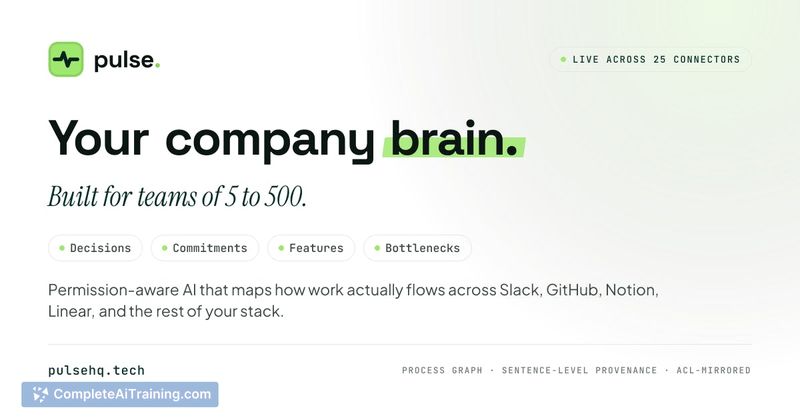
Pulse is a company knowledge platform that connects Slack, email, documents, meetings, and over 25 other tools into a single permission-aware memory. It answers questions with a citation on every line and captures decisions so they don't need to be re-explained. The tool also surfaces relevant experts, runs approved agents, and generates reports from real data, all while working inside Claude, Cursor, and ChatGPT via MCP.
Review
Pulse tries to solve a common problem with AI assistants at work: they don't know your company's history. Instead of starting each session from zero, Pulse builds a persistent, searchable memory that respects existing access controls. The result is an assistant that can retrieve information, cite sources, and track decisions across teams without becoming a surveillance tool.
Key Features
- Permission-aware retrieval - Pulse rebuilds your permission scope on every query, so it only surfaces information you already have access to in the source system. Two people asking the same question can get different answers scoped to what each can see.
- Cited answers with deep research - Every line in an answer links to its source. If Pulse can't back a claim, it states that instead of guessing. The "Ask" feature also supports a deep research mode.
- Decision graph and contradiction detection - Decisions are treated as first-class objects, linked to who made them and why. A nightly job scans for contradictions, and when a new decision conflicts with an old one, Pulse shows both, marks the current one, and explains the reasoning (recency, authority, specificity). It can also surface past reversals when someone drafts a similar decision later.
- Expert finder and agent workflows - Pulse identifies the right person for a topic and can run agents that require human approval before executing. Agents can produce reports drawn from real data.
- MCP integration - Pulse lives inside Claude, Cursor, and ChatGPT via the Model Context Protocol, so those tools start sessions already aware of company knowledge.
Pricing and Value
The product page lists "Payment Required," but no specific pricing tiers or plans are publicly detailed. It's not yet clear whether pricing will be per-seat, usage-based, or a flat subscription. Interested teams should expect to request pricing information directly.
Pros
- Citations on every line make verification straightforward-you can always inspect the source.
- Permission awareness is built into retrieval, not bolted on as a filter after the fact.
- Decisions persist with full context, so institutional knowledge doesn't walk out the door when someone leaves.
- Works inside existing AI tools (Claude, Cursor, ChatGPT) without requiring a separate interface.
- Voice control and a proactive home screen let you interact without typing.
Cons
- Pulse is not well suited for teams that don't already use the tools it connects to-if your stack isn't among the 25 supported integrations, you'll hit a wall.
- The heavy reliance on citations and permission scoping means setup and onboarding likely require significant time to connect sources and map access levels.
- Pricing is opaque; without public numbers, it's hard to evaluate cost against alternatives before committing to a demo.
Pulse fits teams that already work across Slack, email, and multiple SaaS tools and want a single memory layer that respects permissions. It's less useful for smaller groups with simpler tool stacks or those unwilling to invest in configuration. The decision-tracking and contradiction detection features could help organizations that make frequent, high-stakes choices and need an audit trail of what changed and why.
Open 'Pulse' Website
Your membership also unlocks: