About SpeakoFlow
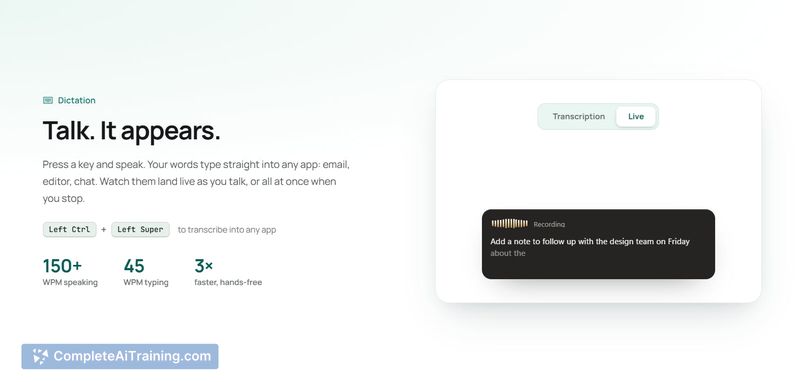
SpeakoFlow is a free, open-source voice dictation and AI assistant that runs on Windows, macOS, and Linux. It transcribes speech into text that lands in any application, and it can also see what is on your screen to answer questions or write replies. The tool is designed to run speech-to-text entirely on your own machine, with no upload required.
Review
SpeakoFlow began as a dictation tool and has grown into a voice layer over the desktop. It lets you speak into emails, editors, chat apps, or terminals, and includes an assistant that can read your screen and respond aloud. The tool is early in development, built by a single developer, and released under the MIT license.
Key Features
- Voice dictation that sends text directly into any application - email, editor, chat, or terminal.
- "Hey Flow" command that writes a full reply based on what is currently on your screen.
- An assistant that answers questions about what you are looking at, with responses spoken aloud.
- Dictation cleanup and real-time translation while you speak.
- Speech-to-text runs entirely on your local machine; the assistant can use a built-in offline model, your own Ollama or LM Studio setup, or a cloud provider with your own API key.
Pricing and Value
SpeakoFlow is free. There are no paid tiers or subscriptions. The source code is available under the MIT license, meaning anyone can fork, modify, or build something else with it. The project is currently funded and maintained by its solo developer without a paid business model.
Pros
- Dictation works offline and does not send your voice to any server for transcription.
- The assistant can see your screen and answer questions about your current work without you having to describe it.
- Supports multiple assistant backends: local models, Ollama, LM Studio, or cloud APIs with your own key.
- Available on Windows, macOS, and Linux with the same feature set.
- Open source under MIT license - you can inspect the code or adapt it to your needs.
Cons
- Local assistant models are battery-intensive on laptops; the developer recommends using an API key for portable use.
- On macOS, the app is not yet notarized by Apple, requiring a one-time manual step to open it for the first time.
- Not well suited for users who need a polished, fully supported product with dedicated customer support - this is a solo project in early development.
SpeakoFlow is most useful for people who want to control their computer by voice, particularly developers, writers, or students who switch between many applications. It is also a strong choice for anyone who wants offline dictation without sending data to cloud services. The tool is actively maintained but still rough around the edges, so it fits best for users comfortable with open-source software and occasional bugs.
Open 'SpeakoFlow' Website
Your membership also unlocks: