About VibeCSS
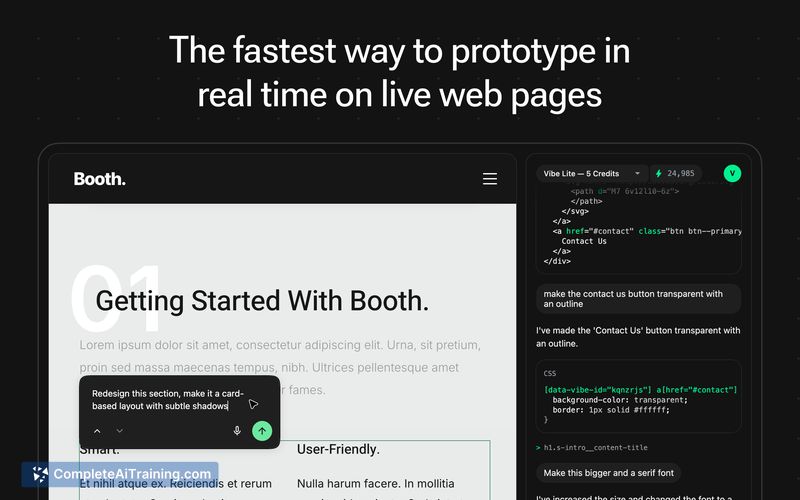
VibeCSS is a Chrome extension AI design agent that lets you prototype and experiment with web design directly on live pages. Select any element, describe the change in plain language, and the tool applies CSS instantly without opening dev tools.
Review
VibeCSS streamlines visual experimentation by letting designers and developers test styles on the actual DOM instead of working from static mockups. Its context-aware adjustments and an Atomic State Engine that manages specificity make it straightforward to try ideas fast, though the current workflow focuses on temporary prototyping rather than permanent site changes.
Key Features
- Select an element and describe the desired look in plain language to apply CSS immediately.
- Context-aware styling that considers site palette, typography, and layout so changes blend with the page.
- No dev tools required - edits happen directly through the extension UI for a faster creative flow.
- Atomic State Engine that handles specificity and conflict resolution so modifications are less likely to break layouts.
- The AI can modify HTML to fulfil requests, which enables more flexible prototypes but can affect event handlers.
Pricing and Value
The product lists free options for getting started. For users who frequently prototype visual ideas, the time saved by avoiding manual inspect-and-edit cycles can deliver clear value. Keep in mind this is intended for experimentation and iteration on live pages rather than as a replacement for production-grade stylesheet management.
Pros
- Very fast way to experiment with style changes on live pages.
- Plain-language interface lowers the barrier for non-coders to prototype designs.
- Context-aware edits help new styles feel consistent with existing site design.
- Built-in handling for CSS specificity reduces accidental layout breakage during prototyping.
- Works directly in the browser without opening dev tools, which streamlines the workflow.
Cons
- Changes are temporary by design; saving modified page state is not currently supported.
- Some requests require HTML changes that can detach event handlers or introduce side effects.
- Available as a Chrome extension, so usage is limited to that browser environment.
VibeCSS is best suited for designers, frontend developers, and product teams who want to iterate on visual ideas quickly and test alternatives on real pages. For permanent styling or production deployments, treat it as a prototyping aid and transfer successful experiments into your codebase through standard development workflows.
Open 'VibeCSS' Website
Your membership also unlocks: