About Visdiff
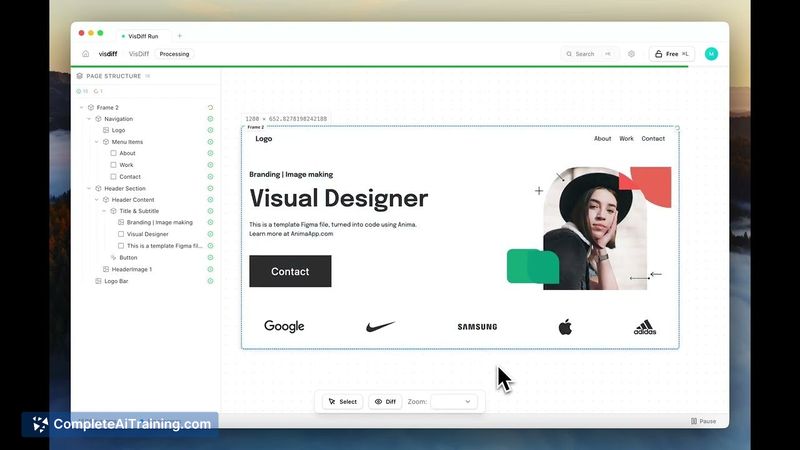
Visdiff is a visual diffing tool that connects Figma designs to a live codebase and iterates code until the implementation matches the design. It automates generate-verify-fix cycles so teams spend less time correcting spacing, fonts, colors, and layout mismatches.
Review
Visdiff addresses a common pain point for developers and designers: AI-generated frontends often look close to a mockup but require hours of manual tweaking. By taking a Figma link, rendering the generated UI, comparing it pixel-by-pixel to the reference, and applying iterative fixes, Visdiff aims to make the shipped UI match the design precisely.
Key Features
- Generate-verify-fix loop: agents generate code, capture screenshots, compare to the Figma reference, and iterate until alignment is reached.
- Pixel-level visual diffing combined with computed-style checks for spacing, fonts, colors, and layout values.
- Integration with an existing frontend: implementations are generated with context from the current codebase so updates fit project conventions.
- Responsive-first output and planned multi-breakpoint support so single-frame designs are produced without breaking other screen sizes.
- Guardrails to discourage quick hacks (magic numbers or !important), prioritizing code that aligns with existing patterns and utility classes.
Pricing and Value
The launch listing shows free options available; detailed tiered pricing was not published on the listing. The core value proposition is time saved: teams that routinely spend several hours per page fixing visual issues can reduce that manual effort by letting Visdiff drive focused, context-aware corrections. For teams that rely on Figma as the source of truth and maintain an active frontend, the tool promises a favorable return by cutting down design-to-code friction.
Pros
- Reduces manual rework by iterating until the rendered UI matches the design reference.
- Works against an existing codebase, which helps keep output consistent with project conventions and components.
- Clear focus on measurable visual properties (spacing, sizes, colors) that are commonly the source of post-generation fixes.
- Supports responsive output by default and is adding explicit multi-breakpoint matching.
Cons
- Interactive states, animations, and other design aspects that lack explicit Figma specs remain harder to validate and fix automatically.
- Some advanced workflows or production code that has diverged from Figma may require manual guidance to avoid unintended changes.
- Pricing details for higher-volume or enterprise usage were not clearly listed at launch, so total cost for large teams is unclear.
Visdiff is best suited for agencies, freelancers, and in-house teams that work from Figma and want to reduce the hours spent reconciling generated frontends with designs. It fits projects where visual fidelity matters and where teams are willing to integrate an agent-driven workflow into their code review and component processes. For interfaces that rely heavily on custom interactions or where design and production have significant drift, expect some manual oversight even with Visdiff.
Open 'Visdiff' Website
Your membership also unlocks: