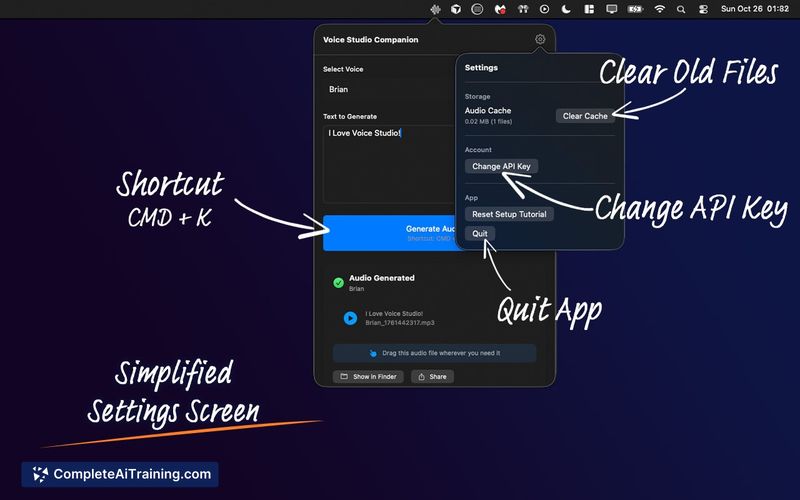
About Voice Studio Companion
Voice Studio Companion is a macOS menu bar app that converts text into AI-generated voiceovers. It offers a selection of 20+ high-quality voices and produces audio in seconds, with drag-and-drop export directly into popular editing and presentation apps.
Review
Voice Studio Companion focuses on speed and convenience for creators who need quick voiceover files without leaving their workflow. The app lives in the menu bar, provides a compact feature set, and integrates with editors like Final Cut Pro, Premiere Pro, DaVinci Resolve, Logic Pro and common presentation tools.
Key Features
- Menu bar app for macOS - quick access without a full app window.
- 20+ selectable voices with short generation time (audio in seconds).
- Direct drag-and-drop export to Final Cut Pro, Premiere Pro, DaVinci Resolve, Logic Pro, GarageBand, Keynote, PowerPoint, and any app that accepts audio files.
- Simple setup that accepts a user-supplied API key for voice synthesis services.
- Low-cost trial option to test functionality before heavier use.
Pricing and Value
The product requires payment to use. A low-cost test option is available (listed at £1.99 at launch) which lets you link your API key and try the app quickly. Note that the app relies on a third-party text-to-speech service tied to your API key, so additional usage charges from that service may apply. For users who need frequent short voiceovers and already manage API credentials, the app represents good value for quick workflows; users who expect extensive, high-volume synthesis should budget for external API costs.
Pros
- Very fast generation of voice files for short scripts.
- Convenient menu bar placement keeps the app lightweight and always available.
- Direct drag-and-drop into major NLEs and DAWs saves export/import steps.
- Wide selection of ready-to-use voices that suit varied content types.
- Low entry cost to test the app before committing to heavier use.
Cons
- macOS only - not available for Windows or Linux users.
- Requires linking your own API key, which means extra setup and potential outside charges.
- Limited on-board editing controls for fine-grained voice tuning; advanced adjustments must be handled elsewhere.
Overall, Voice Studio Companion is best for content creators, video editors, podcasters, and presenters who use macOS and want a fast way to produce voiceovers that drop straight into their editor. It suits anyone who prefers a lightweight, workflow-friendly utility and who is comfortable managing an external API for synthesis costs and settings.
Open 'Voice Studio Companion' Website
Your membership also unlocks: