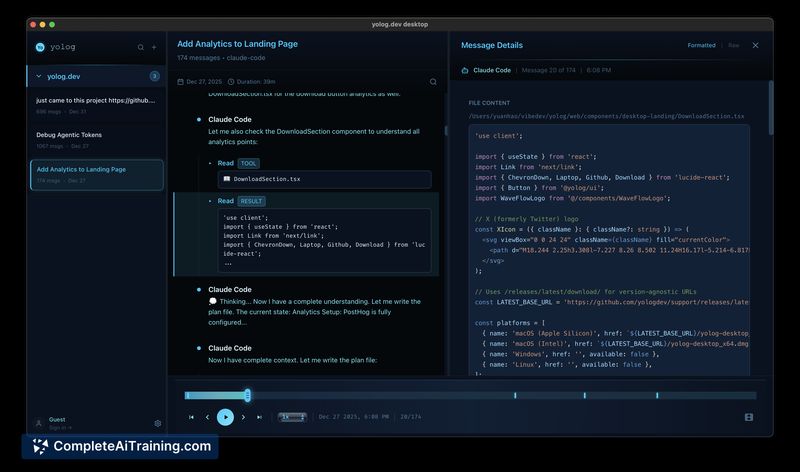
About yolog.dev Desktop
yolog.dev Desktop is a compact desktop application that records, archives, and replays AI-assisted coding sessions so you can revisit prompts, responses and decision points. It offers searchable session history, playback with a timeline, session-level metrics and per-project cost tracking while keeping data stored locally.
Review
yolog.dev Desktop tackles a common friction for developers who rely on AI tools: sessions that disappear and valuable context that is lost. The app focuses on preserving those interactions in a lightweight package and surfacing metrics that make past work easier to find and learn from.
Key Features
- Archive & replay of entire coding sessions with a timeline-based playback.
- Searchable session history so you can find specific prompts, decisions or code snippets.
- Vibe metrics including token usage, burn rate, flow detection and streak tracking.
- Per-project and per-session cost tracking to see where tokens or compute were spent.
- Local-first storage and a small install footprint (around 10MB).
Pricing and Value
The product page lists free options for getting started, with additional advanced capabilities available under a paid offering. For developers who frequently interact with AI assistants, the value lies in avoiding repeated troubleshooting, retaining rationale behind code choices, and getting simple analytics on session behavior and cost. The local-first model also adds privacy value that some users will prefer over cloud-only alternatives.
Pros
- Preserves full AI sessions so past conversations and reasoning are recoverable.
- Playback and timeline view make it easy to reconstruct how a solution evolved.
- Useful metrics and cost tracking provide insight into session efficiency and spending.
- Small, local-first application reduces concerns about cloud storage and data exposure.
- Streak and habit tracking can help build and measure consistent AI-assisted workflows.
Cons
- Still early-stage: integration support is limited to a small set of AI coding platforms for now.
- Lacks built-in team sharing, export or collaboration features that some workflows require.
- Some advanced analytics and workflow automations are not available yet.
Ideal users are individual developers and privacy-minded engineers who want a permanent, searchable memory of their AI-assisted work and simple metrics on usage and cost. Teams that need built-in sharing or wide platform support should evaluate whether current integrations meet their needs, but this tool is a strong fit for anyone who wants to stop losing the context of earlier AI sessions.
Open 'yolog.dev Desktop' Website
Your membership also unlocks: