AI app for education · no coding needed
Gap Tutor
A precise diagnosis of the exact missing sub-skill from a photo of handwritten work, combined with a patient voice-led lesson and adaptive practice that checks back days later.
Made for: Parents of 4th to 8th graders who already pay for tutoring but see no progress
What it does for you
The problem
A student gets stuck on a math problem because of one earlier concept they never fully grasped, and traditional tutoring is too expensive and too slow to find that hidden gap.
What it gives you
Root-cause diagnosis, short voice-led lesson, adaptive practice set, and a scheduled retention check
What you give it
Photos of wrong answersspoken confusiongrade level
How it works, step by step
- Read a photo of handwritten work and extract the problem and attempt
- Diagnose the exact missing sub-skill from a curated skill map
- Generate a short voice-led lesson with visual aids for that sub-skill
- Create adaptive practice problems that increase in difficulty
- Ask the student to teach the concept back and assess their explanation
- Schedule and run a follow-up quick check three days later
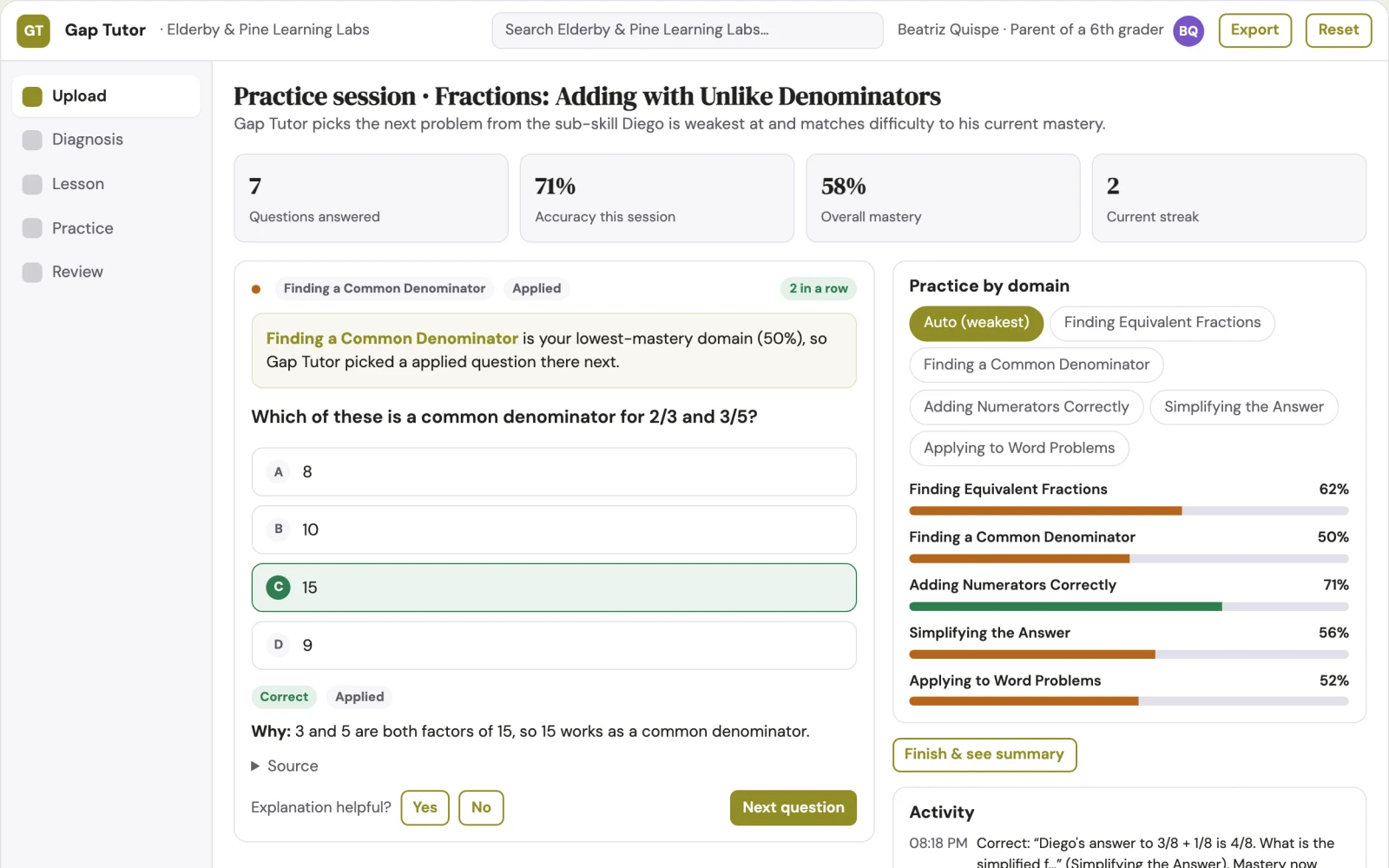
What you see on screen
- Upload
- Diagnosis
- Lesson
- Practice
- Review
Jobs this app suits
Our AI checked this app against 500 jobs; these get the most out of it. Each job links to its learning path.
Build it yourself with your AI system
Build this app yourself, no coding needed
Start with a quick version you can try in a few minutes. Like it? Then build the full app by copying and pasting our step-by-step instructions: everything is prepared for you.
Sign in to see how to build it yourself
Build a quick version to try, or get the full app pack for Gap Tutor with the step-by-step building instructions. You don't need any technical skills: you copy, paste and answer a few questions. Both are included in the membership.
4 Have it built for you days to a few weeks
Rather not do it yourself, or want it fully tailored to your data, your way of working and your brand? Nexibeo builds Gap Tutor with you.
What's in the app pack
Included in the Complete AI Training membership.
- The building instructions your AI follows, step by step
- The questions your AI will ask you about your business before it starts
- A clickable demo you can open in your browser, to see how it should work
- A detailed blueprint of the screens, the information it keeps and the checks it runs
Become a member to get the app packAlready a member? Sign in
The files, for the technically curious
- START-HERE.mdHow to build it with your own AI (read first)3 KB
- README.mdOverview and links1 KB
- questions.mdQuestions to answer before you build2 KB
- prompt-cloudflare.mdThe full build prompt, hosted on Cloudflare22 KB
- prompt-vps.mdThe same build on your own server (Docker)22 KB
- spec.jsonData model, API, AI pipeline, acceptance criteria12 KB
- demo/index.htmlThe working demo on sample data195 KB
Questions
Do I need to know how to code?
No. You copy and paste the prompts on this page into ChatGPT or Claude, and the AI does the building. When it asks you something, you answer in your own words.
What does it cost?
The quick version, the app pack and the step-by-step instructions are for members: you pay the membership price, not a price per app (see the plans). Building the full app uses your own ChatGPT or Claude subscription. Putting it online is often cheap or no cost at the start, and your AI tells you before anything costs money.
How long does it take?
The quick version: about two minutes. The real app: an afternoon for a first version you can use, longer if you want every feature.
Can I change it to fit my business?
Yes. Tell your AI what to change in plain words, like “add a column for the price” or “use our logo and colours”. Or have Nexibeo build and customise it for you.
More detailsHow the AI works, safeguards and what to build first
For parents of 4th to 8th graders who already pay for tutoring but see no progress, turn photos of handwritten work and spoken confusion into a root-cause diagnosis, a short spoken lesson and adaptive practice that sticks. Address the recurring problem: a student keeps falling behind because the missing sub-skill is never identified and taught properly. The value hypothesis is that a precise, patient, always-available tutor closes the gap faster and more affordably than scheduled human sessions; the pilot must establish whether that benefit is real.
Upload a photo or voice note, receive a diagnosis, watch a short lesson, complete adaptive practice, teach the concept back, and receive a scheduled follow-up check. Start with photos of wrong answers and spoken confusion and finish with a mastered sub-skill and a retention check.
How the AI works
Use vision models to read handwritten work and language models to diagnose the missing sub-skill against a curated skill map. Generate lesson scripts and practice problems with language models, and use voice synthesis for narration. A human curriculum expert reviews the skill map and a sample of generated lessons and problems before release, and a teacher checks flagged diagnoses before they are shown to the student.
Safeguards
Age-appropriate content only, no collection of personal data beyond a student profile, teacher review of all diagnoses and lessons before delivery, a limit on practice session length, and a clear statement that the AI must not provide medical or psychological advice. It must not generate content outside the curated math skill map.
What to build first
One buyer: parents of 4th to 8th graders. One use case: fractions for grades 4 to 8. First two modules: photo upload and diagnosis, and lesson generation. Manual review: a teacher reviews every diagnosis and lesson before it is sent to the student.
What it can connect to
Photo upload from device, voice recording from device, a learning management system for schools, and a simple payment provider.
The screens in detail
Use a simple upload screen for photos or voice notes, a diagnosis screen showing the identified sub-skill with evidence, a lesson screen with a short voice-led explainer and visuals, a practice screen with adaptive problems, and a review screen showing progress and scheduled check-ins. In this product, the first view is upload, followed by diagnosis, lesson, practice and review.