AI app for it and development · no coding needed
Unified Voice Command Interface
One voice interface for staff that works across old and new business software without rebuilding either.
Made for: Operations leads at mid-sized logistics companies
What it does for you
The problem
Staff spend excessive time switching between disparate software systems to answer simple questions or perform routine tasks.
What it gives you
Structured data summaries, executed task confirmations, interaction logs.
What you give it
Voice recordingsuser authentication tokensAPI credentials.
How it works, step by step
- Parse natural language voice commands
- Route queries to specific software APIs
- Execute routine administrative tasks
- Summarise complex data sets
- Maintain user context across sessions
- Provide feedback on command accuracy
What you see on screen
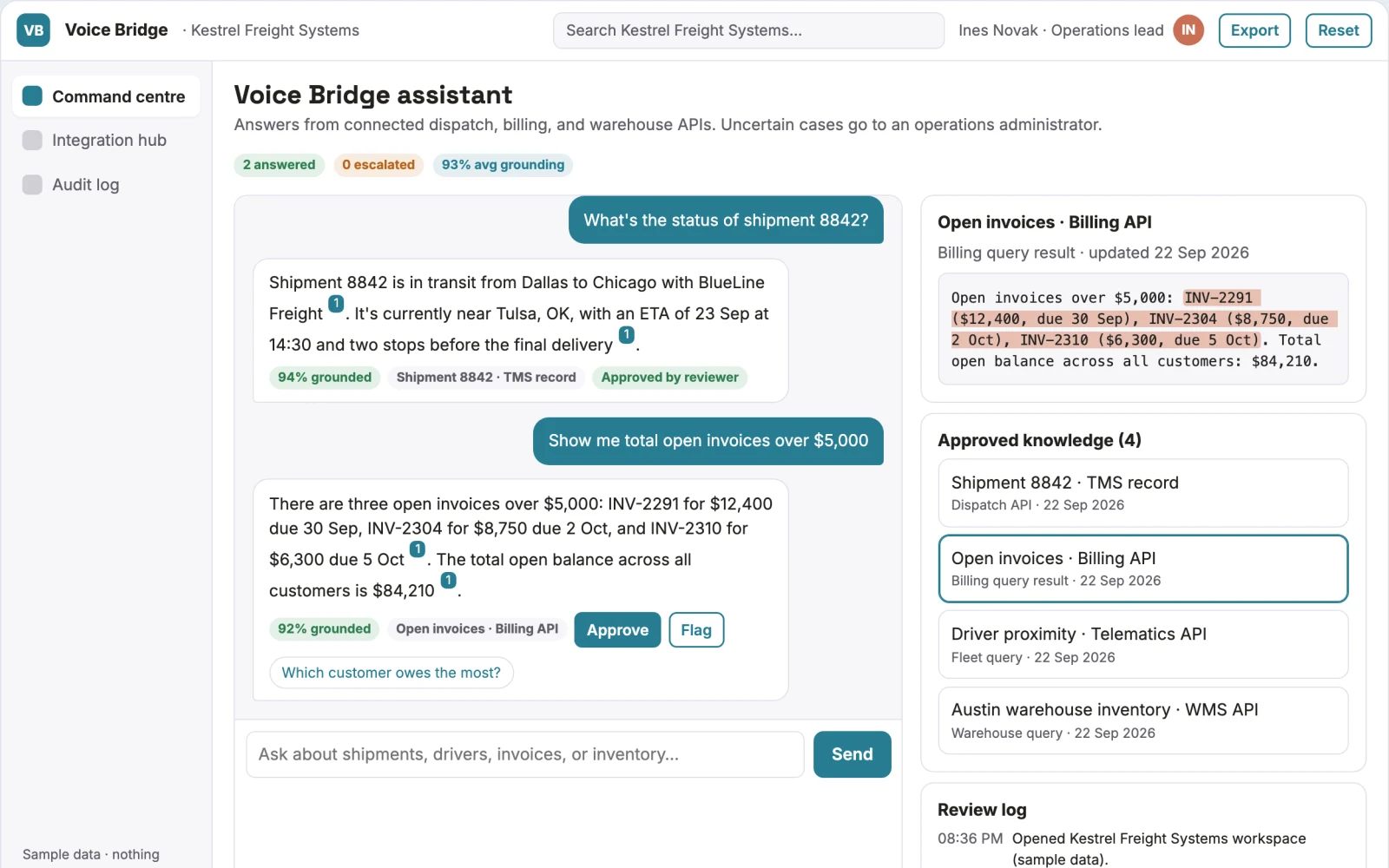
- Command centre
- Integration hub
- Audit log
Jobs this app suits
Our AI checked this app against 500 jobs; these get the most out of it. Each job links to its learning path.
Build it yourself with your AI system
Build this app yourself, no coding needed
Start with a quick version you can try in a few minutes. Like it? Then build the full app by copying and pasting our step-by-step instructions: everything is prepared for you.
Sign in to see how to build it yourself
Build a quick version to try, or get the full app pack for Unified Voice Command Interface with the step-by-step building instructions. You don't need any technical skills: you copy, paste and answer a few questions. Both are included in the membership.
4 Have it built for you days to a few weeks
Rather not do it yourself, or want it fully tailored to your data, your way of working and your brand? Nexibeo builds Unified Voice Command Interface with you.
What's in the app pack
Included in the Complete AI Training membership.
- The building instructions your AI follows, step by step
- The questions your AI will ask you about your business before it starts
- A clickable demo you can open in your browser, to see how it should work
- A detailed blueprint of the screens, the information it keeps and the checks it runs
Become a member to get the app packAlready a member? Sign in
The files, for the technically curious
- START-HERE.mdHow to build it with your own AI (read first)3 KB
- README.mdOverview and links1 KB
- questions.mdQuestions to answer before you build2 KB
- prompt-cloudflare.mdThe full build prompt, hosted on Cloudflare18 KB
- prompt-vps.mdThe same build on your own server (Docker)18 KB
- spec.jsonData model, API, AI pipeline, acceptance criteria10 KB
- demo/index.htmlThe working demo on sample data196 KB
Questions
Do I need to know how to code?
No. You copy and paste the prompts on this page into ChatGPT or Claude, and the AI does the building. When it asks you something, you answer in your own words.
What does it cost?
The quick version, the app pack and the step-by-step instructions are for members: you pay the membership price, not a price per app (see the plans). Building the full app uses your own ChatGPT or Claude subscription. Putting it online is often cheap or no cost at the start, and your AI tells you before anything costs money.
How long does it take?
The quick version: about two minutes. The real app: an afternoon for a first version you can use, longer if you want every feature.
Can I change it to fit my business?
Yes. Tell your AI what to change in plain words, like “add a column for the price” or “use our logo and colours”. Or have Nexibeo build and customise it for you.
More detailsHow the AI works, safeguards and what to build first
For operations leads at mid-sized logistics companies, turn spoken questions and commands into direct data queries and task executions across multiple software systems. Address the problem of fragmented workflows and slow information retrieval. The value hypothesis is a unified voice layer that reduces context switching; the pilot must establish whether this significantly improves operational efficiency.
Define intent, authenticate user, route to system, retrieve data, synthesise response, present output, log interaction. Start with spoken questions and finish with data summaries or executed tasks.
How the AI works
Use large language models to interpret intent and generate the correct API calls. Validate the output against business logic rules. A system administrator reviews the routing logic and security permissions before deployment.
Safeguards
Strict role-based access control, no access to sensitive financial data without explicit approval, blocking of commands that could delete data.
What to build first
One logistics client, one use case for inventory checking, two core integrations (ERP and Warehouse Mgmt), manual review of API calls.
What it can connect to
ERP systems, CRM platforms, Email servers.
The screens in detail
The main screen is a command centre displaying a list of active voice sessions, recent queries, and system status indicators. It allows users to see the history of interactions and the current state of connected systems.