AI app for operations · no coding needed
Pass-Line Phone Agent
The agent is trained on the exact menu and cadence of a busy takeaway, with a clear human handoff path for off-script callers.
Made for: Owners and managers at busy neighbourhood takeaways
What it does for you
The problem
Phone orders during the dinner rush pull staff off the pass and produce misheard tickets.
What it gives you
Confirmed digital tickets, SMS confirmations, call recordings, dashboard analytics
What you give it
Live menu datastock levelskitchen display system accessphone number
How it works, step by step
- Answer calls after one ring with a scripted greeting
- Guide callers through menu items and modifiers
- Mark items unavailable from live stock levels
- Read back the full order and ask for confirmation
- Send structured tickets to the kitchen display
- Send SMS confirmation with collection or delivery details
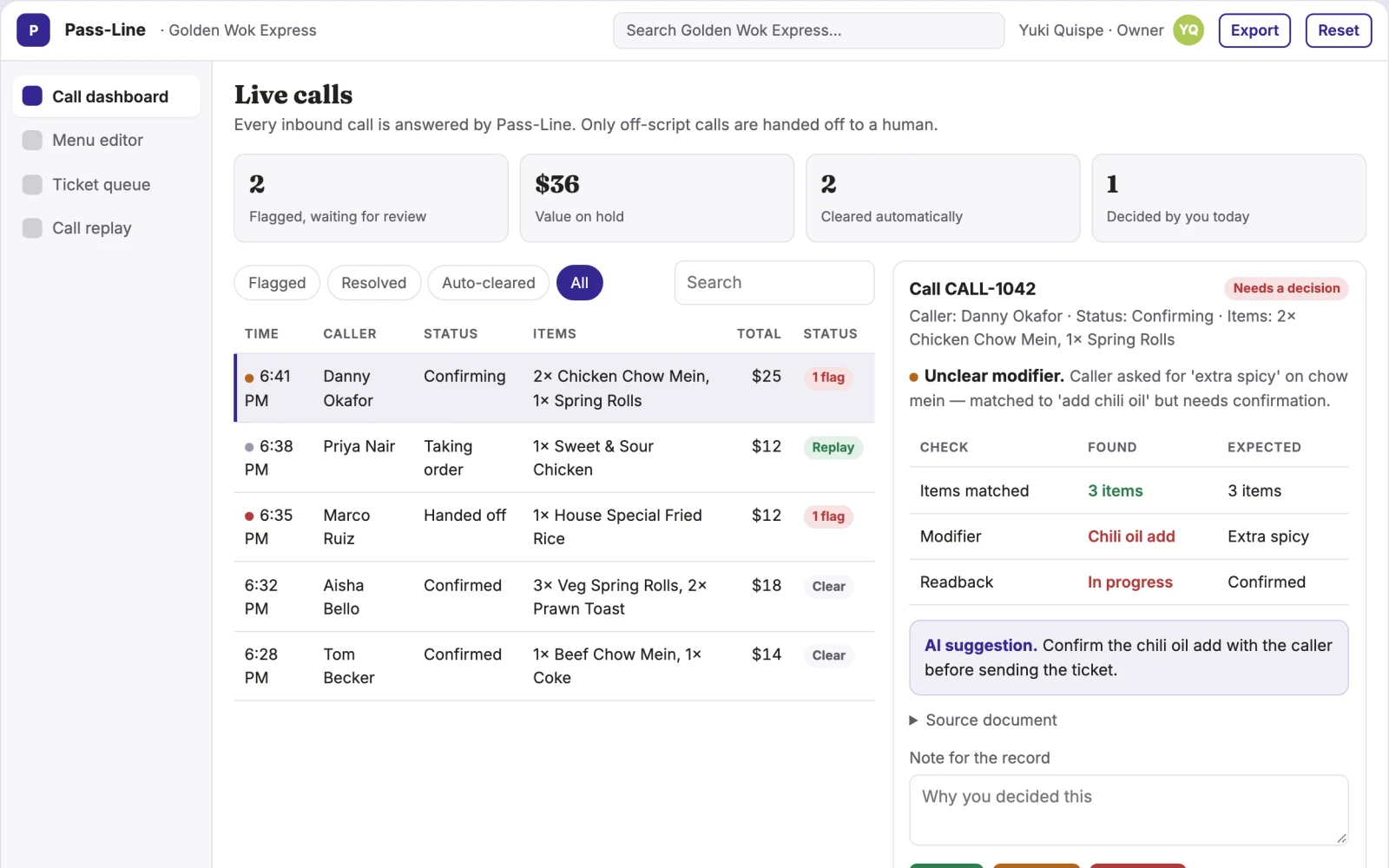
What you see on screen
- Call dashboard
- menu editor
- ticket queue
- call replay
Jobs this app suits
Our AI checked this app against 500 jobs; these get the most out of it. Each job links to its learning path.
Build it yourself with your AI system
Build this app yourself, no coding needed
Start with a quick version you can try in a few minutes. Like it? Then build the full app by copying and pasting our step-by-step instructions: everything is prepared for you.
Sign in to see how to build it yourself
Build a quick version to try, or get the full app pack for Pass-Line Phone Agent with the step-by-step building instructions. You don't need any technical skills: you copy, paste and answer a few questions. Both are included in the membership.
4 Have it built for you days to a few weeks
Rather not do it yourself, or want it fully tailored to your data, your way of working and your brand? Nexibeo builds Pass-Line Phone Agent with you.
What's in the app pack
Included in the Complete AI Training membership.
- The building instructions your AI follows, step by step
- The questions your AI will ask you about your business before it starts
- A clickable demo you can open in your browser, to see how it should work
- A detailed blueprint of the screens, the information it keeps and the checks it runs
Become a member to get the app packAlready a member? Sign in
The files, for the technically curious
- START-HERE.mdHow to build it with your own AI (read first)3 KB
- README.mdOverview and links1 KB
- questions.mdQuestions to answer before you build2 KB
- prompt-cloudflare.mdThe full build prompt, hosted on Cloudflare19 KB
- prompt-vps.mdThe same build on your own server (Docker)19 KB
- spec.jsonData model, API, AI pipeline, acceptance criteria10 KB
- demo/index.htmlThe working demo on sample data194 KB
Questions
Do I need to know how to code?
No. You copy and paste the prompts on this page into ChatGPT or Claude, and the AI does the building. When it asks you something, you answer in your own words.
What does it cost?
The quick version, the app pack and the step-by-step instructions are for members: you pay the membership price, not a price per app (see the plans). Building the full app uses your own ChatGPT or Claude subscription. Putting it online is often cheap or no cost at the start, and your AI tells you before anything costs money.
How long does it take?
The quick version: about two minutes. The real app: an afternoon for a first version you can use, longer if you want every feature.
Can I change it to fit my business?
Yes. Tell your AI what to change in plain words, like “add a column for the price” or “use our logo and colours”. Or have Nexibeo build and customise it for you.
More detailsHow the AI works, safeguards and what to build first
For owners and managers at busy neighbourhood takeaways, turn live menu data and spoken customer requests into confirmed digital tickets and SMS confirmations. Address the recurring problem: phone orders during the dinner rush pull staff off the pass and produce misheard tickets. The value hypothesis is a faster, cleaner order flow with fewer errors; the pilot must establish whether the agent reliably handles real callers.
Caller dials, agent answers, agent takes order against live menu, agent reads back and confirms, agent captures time slot and address, ticket appears on kitchen screen, SMS goes to customer. Start with live menu data and spoken customer requests and finish with confirmed digital tickets and SMS confirmations.
How the AI works
Use a voice model to transcribe and understand conversational orders, including accents and background noise. Match spoken items to menu entries using fuzzy logic. A human manager reviews call replays and edits menu descriptions; no ticket is sent until the caller confirms.
Safeguards
Agent must not take payment or personal data beyond name and address, must hand off to a human if the caller asks or seems confused, and must never mark an item available if stock is zero. All calls recorded and accessible only to managers.
What to build first
One buyer (a pizza or curry house), one use case (takeaway phone orders), first two modules (call handling and ticket output), manual review of every call transcript before go-live
What it can connect to
Kitchen display system, POS for stock levels, SMS gateway, phone system (Twilio or similar)
The screens in detail
Use a live call list with statuses (ringing, taking order, confirming, handed off), a menu editor for spoken descriptions and stock flags, a ticket queue mirroring the kitchen display, and a replay panel for any recorded call. In this product, the first view is call dashboard, followed by menu editor, ticket queue and call replay.