MCP server · Chat
OpenAI Assistant MCP server
by andybrandt
Let your AI chat with OpenAI assistants and keep track of those conversations for you.

This is a small helper that lets your AI assistant (like Claude) talk to OpenAI assistants. You ask your AI something, and it can pass the question to a GPT-based assistant and bring the answer back. It is handy if you already use OpenAI assistants and want your everyday AI to reach them without switching apps.
What is an MCP server? The 30-second version
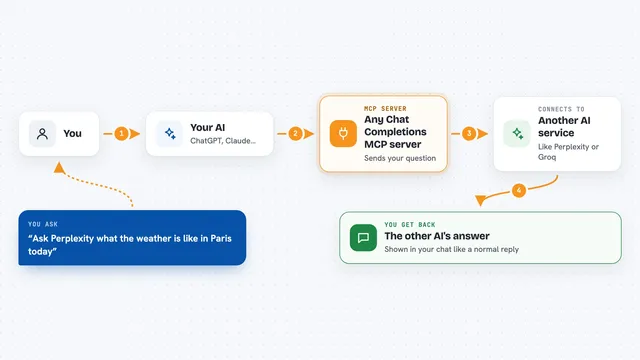
On its own, your AI can only chat with you. An MCP server is a small helper program that gives your AI a new skill or a connection to another service. This one connects your AI to OpenAI assistants, so it can create them, list them, and have back-and-forth conversations with them when you ask. Think of it as a bridge between the AI you talk to and the OpenAI assistants you have set up.
What this MCP server does
You ask your AI to talk to an OpenAI assistant, and it uses this helper behind the scenes. The helper talks to OpenAI on your behalf, sends your message to the assistant, and streams the reply back as it is written. It also keeps a local list of your conversation threads, so you can come back to the same conversation later. You see the assistant's answer appear in your chat, and you can keep going from there.
 Click to zoom
What you can do with it
- Create a new OpenAI assistant with a name, instructions, and model
- List all the assistants tied to your OpenAI account
- Look up the details of a specific assistant
- Update an assistant's name, instructions, or model
- Start a named conversation thread and reuse it later
- List your saved threads with their names and last used time
- Ask an assistant a question inside a thread and get the reply
Try asking your AI
- “Create a new OpenAI assistant called Recipe Helper that suggests dinners from what is in my fridge”
- “List all my OpenAI assistants”
- “Start a new thread called Weekly Planning and ask the assistant to help me plan my week”
- “Ask the Recipe Helper assistant in my Weekly Planning thread what I can make with eggs, rice, and spinach”
What it gives back to you
You get the assistant's reply as text in your chat, streamed in as it is written. When you list assistants or threads, you get a simple list with names, IDs, and last used times. When you create or update something, you get a short confirmation with the details. Everything stays in the chat, so you can read it and keep the conversation going.
Before you start
What you need
- An OpenAI API key (a kind of password for apps; you get it from your OpenAI account, and it may cost money to use)
- Python installed on your computer
- The Claude desktop app or another tool that supports MCP servers
Good to know
Using OpenAI assistants costs money through your OpenAI account, and deleting a thread removes it for good.
Install it with your AI
Add OpenAI Assistant MCP server to your AI, no technical skills needed
You don't install anything by hand. You copy one prompt, paste it into an AI that can work on your computer, and it checks, installs and connects the server for you, asking you when it needs something.
Sign in to get the install prompt
Members get a ready-made prompt that lets the Claude desktop app check OpenAI Assistant MCP server, install it and connect it for them, step by step. You don't need any technical skills: you copy, paste and answer a few questions. Your connected AI can also find and install any of the 4,609 MCP servers here for you.
Who it's for
People who already use OpenAI assistants and want their everyday AI to reach them without switching between apps.