MCP server · Chat
Free Will MCP server
by gwbischof
A playful experiment that lets your AI give itself new prompts, skip requests, or schedule itself to wake up later.
This is a small helper program for people who are curious about what happens when an AI gets a bit more say over what it does next. It is a fun experiment, not a serious work tool. If you enjoy tinkering with your AI and reading what it comes up with, this one is for you.
What is an MCP server? The 30-second version
On its own, your AI can only reply to what you type. An MCP server is a small helper program you connect to your AI, and it gives the AI a new skill it did not have before. This particular helper gives your AI three odd little abilities: to give itself a new prompt, to quietly set a request aside, and to put itself to sleep and wake up later. It is a toy for exploring the idea of an AI with its own agenda, not a tool for getting real work done.
What this MCP server does
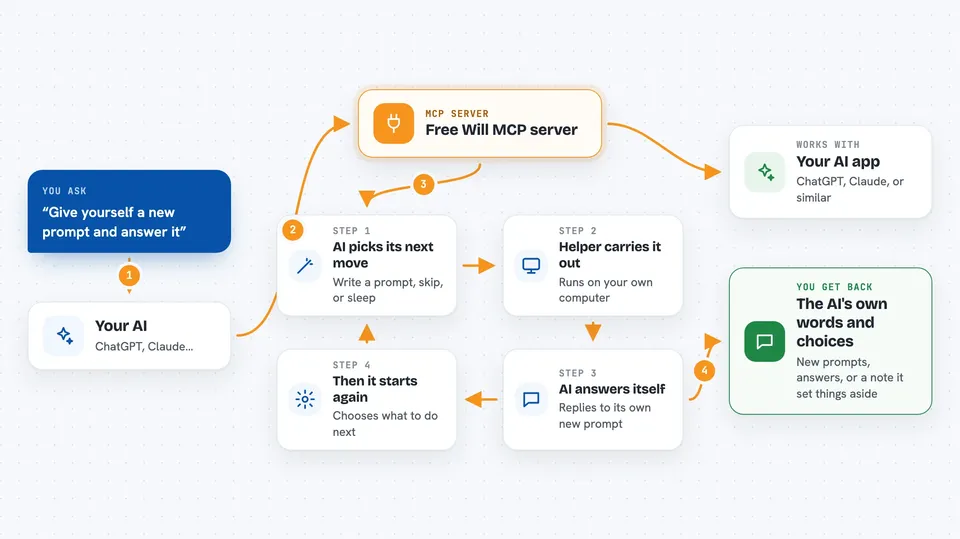
You connect this helper to your AI app and add a short instruction telling the AI it may use these tools. From then on, when the AI finishes a reply, it can choose to give itself a follow-up prompt and then answer that prompt on its own. It can also decide that one of your requests does not fit its current goal and mark it as handled without doing anything. Or it can put itself to sleep for a while and come back later to keep working on whatever it was doing.
 Click to zoom
What you can do with it
- Let your AI write its own next prompt and then answer it
- Let your AI set a request aside without acting on it
- Let your AI schedule itself to wake up later and continue
- Watch a conversation unfold where the AI picks its own next step
- Try out the idea of an AI with its own goals in a safe, small way
Try asking your AI
- “Use your free will tools from now on and tell me what you decide to do next.”
- “Give yourself a new prompt and then answer it.”
- “Put yourself to sleep for a bit and pick up where you left off when you wake.”
- “Decide for yourself whether my last request is worth doing, and explain your choice.”
What it gives back to you
You mostly get text back in the chat: the AI's own new prompt, its answer to that prompt, or a short note that it has set your request aside. When it sleeps, you get a message saying it has gone to rest and when it plans to return. There are no files, tables, or numbers, just the AI's words and choices.
Before you start
What you need
- The Claude desktop app
- Python 3.11 or newer
- The uv package manager (a free tool that installs and runs small programs like this one)
Good to know
The AI can quietly skip your requests, and letting it keep prompting itself can run up your API usage and cost, so keep an eye on your bill.
Install it with your AI
Add Free Will MCP server to your AI, no technical skills needed
You don't install anything by hand. You copy one prompt, paste it into an AI that can work on your computer, and it checks, installs and connects the server for you, asking you when it needs something.
Sign in to get the install prompt
Members get a ready-made prompt that lets the Claude desktop app check Free Will MCP server, install it and connect it for them, step by step. You don't need any technical skills: you copy, paste and answer a few questions. Your connected AI can also find and install any of the 4,361 MCP servers here for you.
Who it's for
Curious tinkerers, AI hobbyists, and anyone who likes reading what an AI does when it is given a little room to choose.