MCP server · Chat
ChatGPT MCP server
by billster45
Let Claude ask ChatGPT questions and search the web for fresh answers.

This is a small helper that lets Claude talk to ChatGPT. You ask Claude something, and Claude can pass the question over to ChatGPT and bring the answer back. It is handy if you already use Claude and want a second opinion or up to date information from the web.
What is an MCP server? The 30-second version
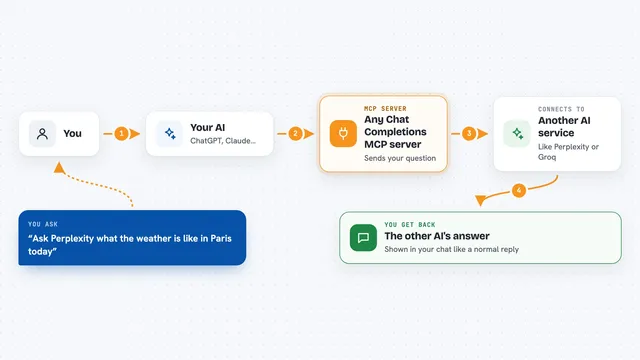
On its own, your AI can only chat with you using what it already knows. An MCP server is a small helper program that gives your AI a new skill or a connection to another service. This one connects Claude to ChatGPT, so Claude can send a question over to ChatGPT and read the reply. You do not need to switch apps or copy and paste between two chat windows.
What this MCP server does
You ask Claude a question, and Claude decides to use this helper. The helper sends your question to ChatGPT using your own OpenAI account. ChatGPT answers, and the helper hands that answer back to Claude. Claude then shows it to you in the same chat. If you turn on web search, ChatGPT can also look things up on the internet first so the answer is more current.
 Click to zoom
What you can do with it
- Ask ChatGPT a question without leaving Claude
- Get a second opinion from a different AI
- Search the web for recent news or updates
- Have Claude and ChatGPT go back and forth on a topic
- Pick which ChatGPT model to use for a question
- Keep track of a longer back and forth conversation
What it gives back to you
You get ChatGPT's answer written out in your Claude chat, as normal text. If web search was used, the answer may include recent facts from the internet. For longer back and forth chats, the helper keeps track of what was already said so the conversation flows. You do not get files or downloads, just written answers.
Before you start
What you need
- The Claude Desktop app
- An OpenAI API key (a kind of password for apps; you get one from your OpenAI account, and it is billed by OpenAI)
- Python 3.10 or newer
- The uv tool for Python packages
Good to know
Using this spends money on your OpenAI account, since each question is billed by OpenAI, so keep an eye on your usage.
Install it with your AI
Add ChatGPT MCP server to your AI, no technical skills needed
You don't install anything by hand. You copy one prompt, paste it into an AI that can work on your computer, and it checks, installs and connects the server for you, asking you when it needs something.
Sign in to get the install prompt
Members get a ready-made prompt that lets the Claude desktop app check ChatGPT MCP server, install it and connect it for them, step by step. You don't need any technical skills: you copy, paste and answer a few questions. Your connected AI can also find and install any of the 4,361 MCP servers here for you.
Who it's for
People who already use Claude Desktop and want to ask ChatGPT questions or pull in fresh web results without switching apps.