MCP server · Chat
Any Chat Completions MCP server
by pyroprompts
Let your AI ask another AI service a question and bring the answer back into your chat.
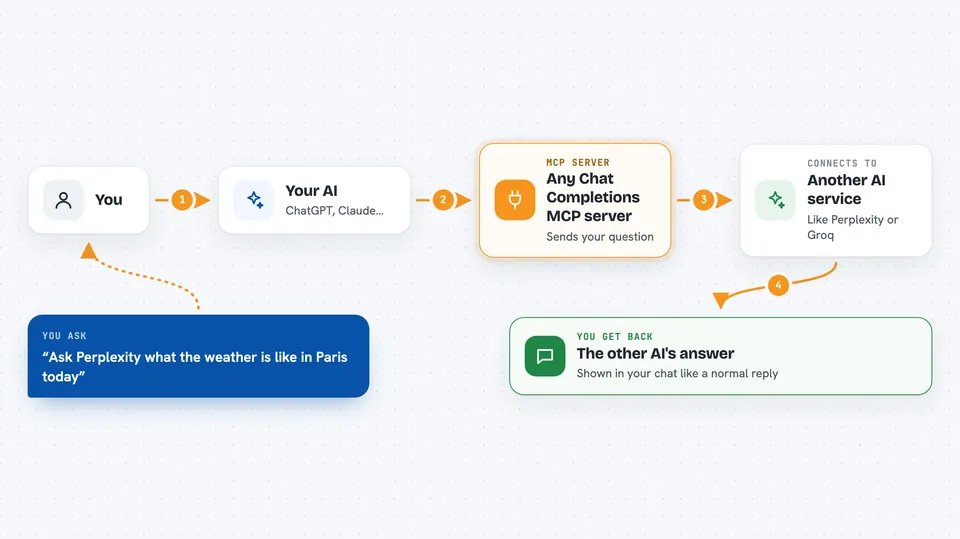
This is a small helper that connects your AI assistant to other AI chat services, like OpenAI, Perplexity, Groq or xAI. Once it is set up, you can ask your assistant to pass a question along to one of those services and show you what it says. It is handy if you already use one AI tool but want a second opinion from a different one without switching apps.
What is an MCP server? The 30-second version
On its own, your AI can only chat with you using what it already knows. An MCP server is a small helper program that gives your AI a new skill or a connection to another service. This one connects your AI to a chat service you choose, such as OpenAI or Perplexity, using a key and web address you provide. After that, your AI can send a question over to that service and read the reply back to you.
What this MCP server does
You type a question in your chat, like you normally would. Your AI notices you want an answer from another service and hands the question to this helper. The helper sends your question to the chat service you set up, using the key and web address from your settings. That service writes an answer and sends it back. The helper passes the answer to your AI, and your AI shows it to you in the chat.
 Click to zoom
What you can do with it
- Ask a second AI service a question and see its answer in your chat
- Compare answers from two different AI services side by side
- Use a service that is good at looking things up online, like Perplexity
- Try a fast or cheaper service like Groq for quick questions
- Set up several services at once and pick which one to ask
- Get a fresh take on something your usual AI seems unsure about
What it gives back to you
You get the other service's answer written out in your chat, like a normal reply. It is usually plain text, sometimes with a short list or a few paragraphs. Your AI may add a line saying which service the answer came from. Nothing is saved anywhere by this helper; it just passes the reply through.
Before you start
What you need
- The Claude desktop app or another app that supports MCP servers
- An account and an API key from the chat service you want to use, such as OpenAI or Perplexity (an API key is a kind of password for apps; the service gives you one on its website)
- The web address of that service's chat endpoint, which the service's instructions will show you
- Node.js installed on your computer if you plan to run it with npx
Good to know
Each question you send goes to the other service and may count against your paid plan there, so keep an eye on your usage.
Install it with your AI
Add Any Chat Completions MCP server to your AI, no technical skills needed
You don't install anything by hand. You copy one prompt, paste it into an AI that can work on your computer, and it checks, installs and connects the server for you, asking you when it needs something.
Sign in to get the install prompt
Members get a ready-made prompt that lets the Claude desktop app check Any Chat Completions MCP server, install it and connect it for them, step by step. You don't need any technical skills: you copy, paste and answer a few questions. Your connected AI can also find and install any of the 4,361 MCP servers here for you.
Who it's for
Anyone who already uses one AI assistant but wants to ask a different AI service a question without leaving their chat.