MCP server · Developer tools
Debezium MCP server
by dockndevai
Let your AI check and manage Debezium and Kafka Connect data connectors for you.
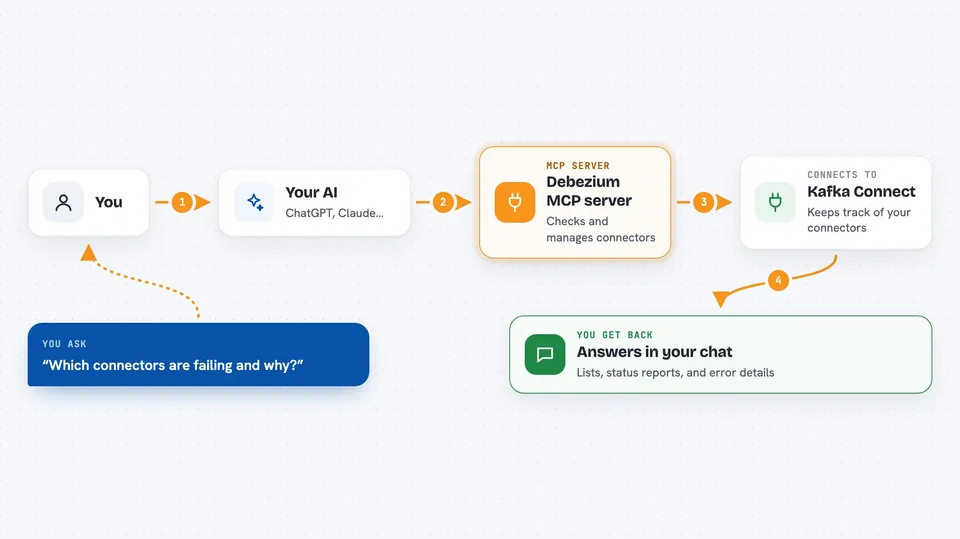
This is a helper that connects your AI assistant to Debezium, a tool that watches databases and copies changes from one place to another. Once it is set up, you can ask your AI things like which connectors are broken, or ask it to restart one. It is handy for people who look after data pipelines and want quick answers without clicking around a web page.
What is an MCP server? The 30-second version
On its own, your AI can only chat. An MCP server is a small helper program that gives your AI a new skill or a connection to another app. This one connects your AI to Debezium through Kafka Connect, so it can look up connector status and, if you allow it, pause, restart or delete connectors for you. You just ask in plain words, and the helper does the talking to the service.
What this MCP server does
You ask your AI a question about your data connectors, like which ones are failing. The AI passes that request to this helper program. The helper talks to Kafka Connect, which is the part of Debezium that keeps track of connectors. It brings back the answer, such as a list of connectors or a status report, and the AI shows it to you in the chat. If you have allowed it, the helper can also make changes like restarting a connector.
 Click to zoom
What you can do with it
- List all your connectors
- Show the status of a connector, including why a task failed
- Show the settings for a connector, with passwords hidden
- List the topics a connector is using
- Pause or resume a connector
- Restart a connector or a single failed task
- Create or update a connector
- Delete a connector (only if you turn that on)
Try asking your AI
- “Which connectors are FAILED, and why?”
- “Restart the failed task on pg-orders.”
- “Show the config for mysql-inventory.”
- “Pause the connector called orders-sync.”
What it gives back to you
You get answers right in the chat: lists of connectors, status reports, and settings. If something failed, you get the error details so you can see what went wrong. When you ask it to make a change, it tells you what it did. Passwords and other secret values come back hidden, shown as ***REDACTED***.
Before you start
What you need
- A running Debezium or Kafka Connect setup you can reach
- The web address of your Kafka Connect service (for example http://localhost:8083)
- Node.js installed on your computer, so the npx command works
Good to know
If you raise the mode above read-only, the helper can change or delete connectors, so keep it in read-only until you really need to make changes, and turn on delete only when you mean it.
Install it with your AI
Add Debezium MCP server to your AI, no technical skills needed
You don't install anything by hand. You copy one prompt, paste it into an AI that can work on your computer, and it checks, installs and connects the server for you, asking you when it needs something.
Sign in to get the install prompt
Members get a ready-made prompt that lets the Claude desktop app check Debezium MCP server, install it and connect it for them, step by step. You don't need any technical skills: you copy, paste and answer a few questions. Your connected AI can also find and install any of the 4,609 MCP servers here for you.
Who it's for
Data engineers and anyone who looks after database sync or data pipelines and wants quick answers from their AI.