
MCP server · Developer tools · official
Gearotons M17 servomotor MCP server
by Gearotons · official
Ask your AI to find and move Gearotons M17 motors over RS-485, in plain English.
This is a small helper that lets your AI talk to Gearotons M17 servomotors, the little closed-loop motors on an RS-485 bus. You describe the move you want, and the AI sends the right commands to the motor. It is handy if you have an M17 on your bench and would rather not type firmware commands by hand.
What is an MCP server? The 30-second version
On its own, your AI can only chat. An MCP server is a small helper program that gives your AI a new skill or a connection to a device. This one connects your AI to Gearotons M17 servomotors over a serial cable, so the AI can look for motors, check their status, and move them when you ask. You do not need to know the firmware commands; the AI picks them for you.
What this MCP server does
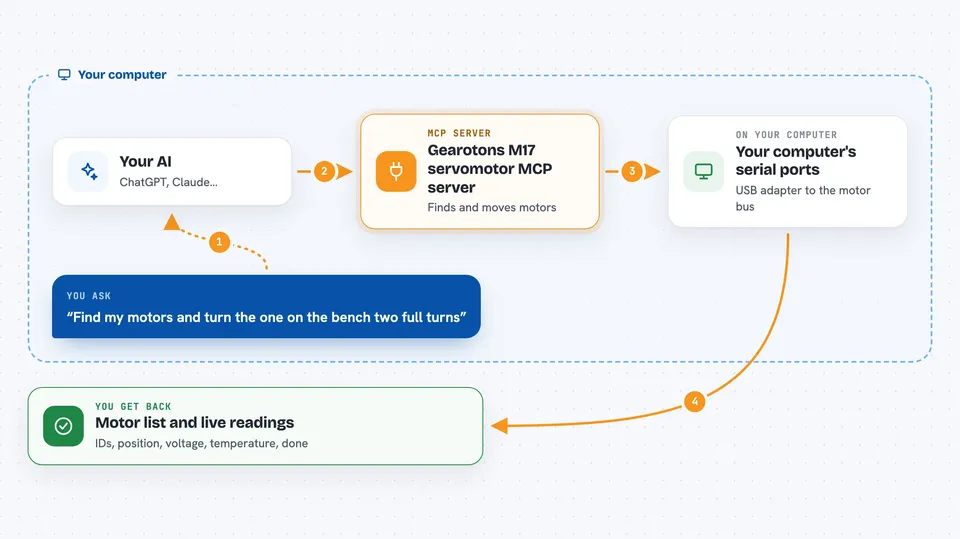
You ask your AI something like find my motors and turn the one on the bench two full turns. The AI calls this server, which looks at your computer's serial ports and opens the one with the motors on it. The server then auto-detects every motor on that bus and gives each one an ID and alias. When you ask for a move, the server sends the matching firmware command over RS-485 and waits for the motor to finish. It also reads back position, voltage, temperature, and status so you can see what is going on.
 Click to zoom
What you can do with it
- List the serial ports on your computer and spot USB adapters
- Connect to a port and auto-detect every motor on the bus
- Move a motor to an exact angle or by a relative amount
- Stop one motor or all motors in an emergency
- Read position, voltage, temperature, and decoded error messages
- Run a small sequence of steps, like drawing a square
- Send any firmware command the motor supports, such as homing or setting an alias
Try asking your AI
- “What serial ports do you see? Connect and find my motors.”
- “Move the motor on the bench to 90 degrees.”
- “Turn motor 3 two full turns slowly, then stop.”
- “Show me the temperature and voltage of every motor you found.”
What it gives back to you
You get answers in the chat: a list of ports, a list of motors with their IDs and aliases, and live readings like position, voltage, and temperature. When you ask for a move, it tells you when the move is done. If something goes wrong, fatal errors come back decoded into plain English.
Before you start
What you need
- Python installed on your computer
- The servomotor-mcp package, installed with pip or run with uvx
- For real motors: an M17 motor or a daisy-chain of them, plus a USB to RS-485 adapter
- For real motors: the serial extra installed, with pip install 'servomotor-mcp[serial]'
Good to know
This server sends real commands to real motors, so a wrong move can spin or stop a motor unexpectedly; keep an eye on the bench and use stop when in doubt.
Install it with your AI
Add Gearotons M17 servomotor MCP server to your AI, no technical skills needed
You don't install anything by hand. You copy one prompt, paste it into an AI that can work on your computer, and it checks, installs and connects the server for you, asking you when it needs something.
Sign in to get the install prompt
Members get a ready-made prompt that lets the Claude desktop app check Gearotons M17 servomotor MCP server, install it and connect it for them, step by step. You don't need any technical skills: you copy, paste and answer a few questions. Your connected AI can also find and install any of the 4,609 MCP servers here for you.
Who it's for
People who work with Gearotons M17 motors on a bench, like makers, robotics hobbyists, and engineers testing motion setups.


