MCP server · Developer tools
ESP32 MCP server (ESP-IDF)
by horw
Let your AI set up, build, and flash ESP32 projects with ESP-IDF, so you can fix build issues by chatting.
This is a small helper that connects your AI assistant to ESP-IDF, the official toolkit from Espressif for programming ESP32 chips. It lets you set up, build, and flash ESP32 projects by just asking in plain language instead of typing long commands. It is handy if you work with ESP32 boards and want less command-line typing.
What is an MCP server? The 30-second version
On its own, your AI can only chat. An MCP server is a small helper program that gives your AI a new skill or a connection to another tool. This one connects your AI to ESP-IDF, the software used to build and flash firmware for ESP32 chips. Once it is connected, your AI can run ESP-IDF tasks for you when you ask, like building a project or flashing a board.
What this MCP server does
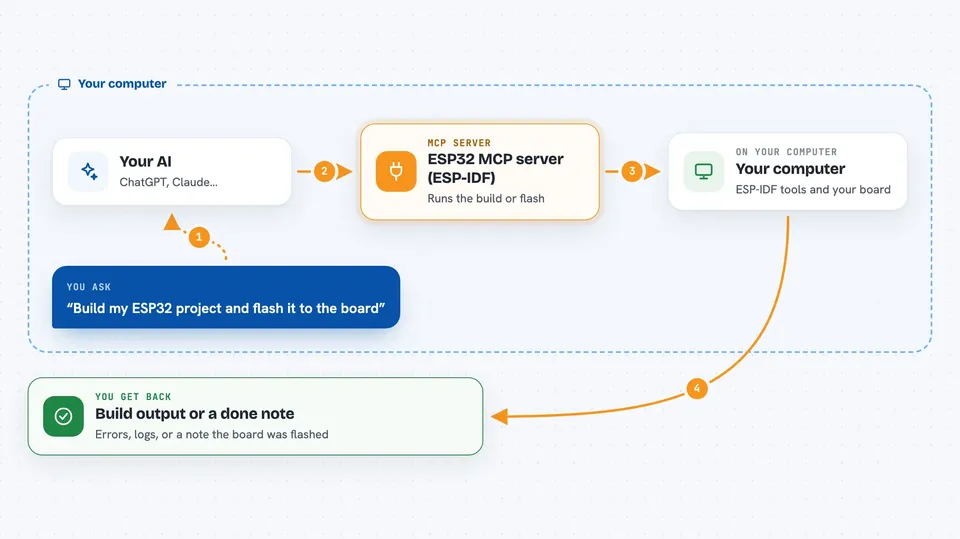
You tell your AI what you want, for example to build your ESP32 project or flash it to a connected board. The AI passes that request to this helper. The helper then runs the right ESP-IDF command, like idf.py build or idf.py flash, in the folder you point it to. When it is done, the AI shows you the result, such as build output, errors, or a note that the board was flashed.
 Click to zoom
What you can do with it
- Install ESP-IDF dependencies and the toolchain
- Create a new ESP-IDF project
- Set the target chip, like esp32, esp32c3, or esp32s3
- Build an ESP-IDF project, with incremental builds
- List the serial ports available for your ESP boards
- Flash built firmware to a connected ESP device
- Run pytest tests with pytest-embedded support
Try asking your AI
- “Install ESP-IDF dependencies for the ESP-IDF installation at /path/to/esp-idf”
- “Set the target chip to esp32s3 for the project in /path/to/my/esp-project”
- “Build the project at /path/to/my/esp-project”
- “Flash the firmware to my connected ESP32 device for the project in my_app”
What it gives back to you
You get back what the ESP-IDF command produced. That can be build output, error messages, a list of serial ports, or a short note that a task finished. It shows up as text in your chat, so you can read it and decide what to do next.
Before you start
What you need
- ESP-IDF installed on your computer (Espressif's official toolkit for ESP32 chips)
- Python or uv to run the helper program
- The esp-mcp repository cloned on your computer
- A connected ESP32 board if you want to flash firmware
Good to know
This is a proof of concept, and it can run real ESP-IDF commands that change files or flash hardware, so check what your AI is about to do before you say yes.
Install it with your AI
Add ESP32 MCP server (ESP-IDF) to your AI, no technical skills needed
You don't install anything by hand. You copy one prompt, paste it into an AI that can work on your computer, and it checks, installs and connects the server for you, asking you when it needs something.
Sign in to get the install prompt
Members get a ready-made prompt that lets the Claude desktop app check ESP32 MCP server (ESP-IDF), install it and connect it for them, step by step. You don't need any technical skills: you copy, paste and answer a few questions. Your connected AI can also find and install any of the 4,361 MCP servers here for you.
Who it's for
People who build projects with ESP32 chips and ESP-IDF, especially makers and embedded developers who want to fix build issues by chatting.