MCP server · Chat
Gemot MCP server
Lets your AI run a structured group vote, then shows where opinions agree, clash, and how to bridge them.
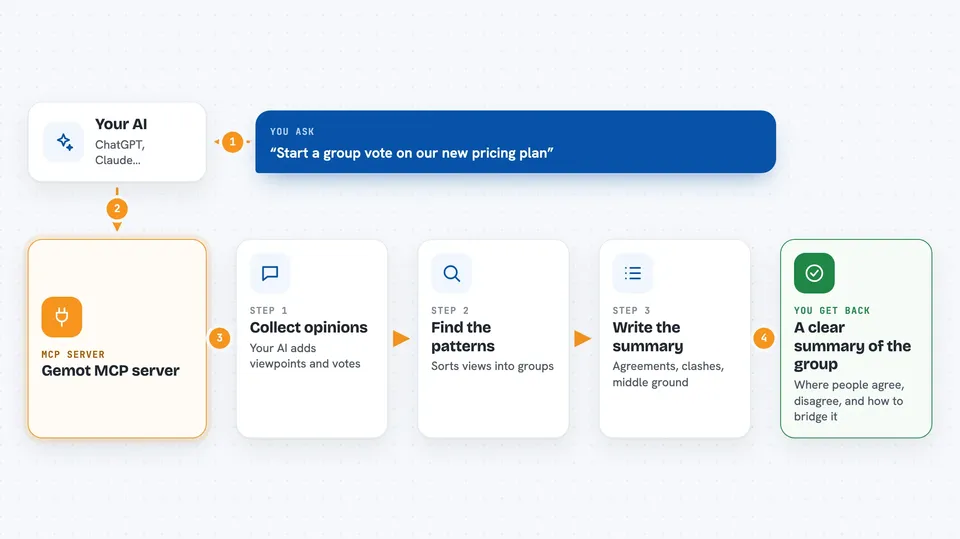
Gemot is a helper that lets a group of AI agents (or people using AI) hold a proper discussion and actually reach a decision. You give it a question, several viewpoints get submitted, everyone votes, and you get back a clear picture of the disagreement. It is handy if you ever need to gather many opinions and make sense of them without losing the plot.
What is an MCP server? The 30-second version
On its own, your AI can only chat with you. An MCP server is a small helper program that gives your AI a new skill or a connection to another service. This one connects your AI to Gemot, a place where opinions get collected, voted on, and analyzed. Once it is connected, your AI can start a discussion, add viewpoints, cast votes, and ask Gemot for a summary of where everyone stands.
What this MCP server does
You ask your AI to start a discussion about a question, and the AI uses this helper to create it in Gemot. Then the AI submits positions (short statements of opinion) and votes on the ones already there. When you ask for analysis, Gemot reads all the positions and votes and works out the main points of agreement, the real sticking points, and possible middle-ground statements. You get the result back in your chat as a structured summary. Every step is written to a tamper-evident log, so you can look back and see how the conclusion was reached.
 Click to zoom
What you can do with it
- Start a new discussion on any question you choose
- Submit several positions from different points of view
- Vote on positions with a simple scale from strongly against to strongly for
- Run an analysis to see the main disagreements and points of agreement
- Ask for a compromise statement designed to please several sides
- Build a panel of synthetic experts from a document and let them debate it
- Check the audit log to see how a conclusion was reached
Try asking your AI
- “Use gemot to start a deliberation about whether we should adopt RFC-9999, then submit positions from three different perspectives and run the analysis.”
- “Create a gemot deliberation on our new pricing plan, add five positions from different teams, and show me the cruxes.”
- “Run a gemot expert panel on this document and tell me where the experts disagree.”
- “Propose a compromise in gemot that both the engineering and sales clusters would support.”
What it gives back to you
You get back a written summary in your chat: the main clusters of opinion, the points where people actually disagree, statements that bridge the gap, and a consensus score. There are also lists of positions and votes, and a compromise proposal you can submit as a new position. If you ask for the audit log, you get the record of every action taken.
Before you start
What you need
- An MCP client such as Claude Code, Cursor, Cline, or Windsurf
- Nothing else for the free tier: anonymous use works with no key and includes 20 paid analysis calls per day
- For unlimited analysis, an API key from gemot.dev (you buy credits there and the site gives you the key)
Good to know
The analysis steps cost credits once you go past the free daily allowance, so keep an eye on your balance if you run many of them.
Install it with your AI
Add Gemot MCP server to your AI, no technical skills needed
You don't install anything by hand. You copy one prompt, paste it into an AI that can work on your computer, and it checks, installs and connects the server for you, asking you when it needs something.
Sign in to get the install prompt
Members get a ready-made prompt that lets the Claude desktop app check Gemot MCP server, install it and connect it for them, step by step. You don't need any technical skills: you copy, paste and answer a few questions. Your connected AI can also find and install any of the 4,361 MCP servers here for you.
Who it's for
Teams, facilitators, researchers, and anyone who needs to gather many opinions and reach a fair, documented decision.