MCP server · Security
IDA Pro MCP server
by mrexodia
Lets your AI read and explain the insides of a program inside IDA Pro, and write up what it finds.
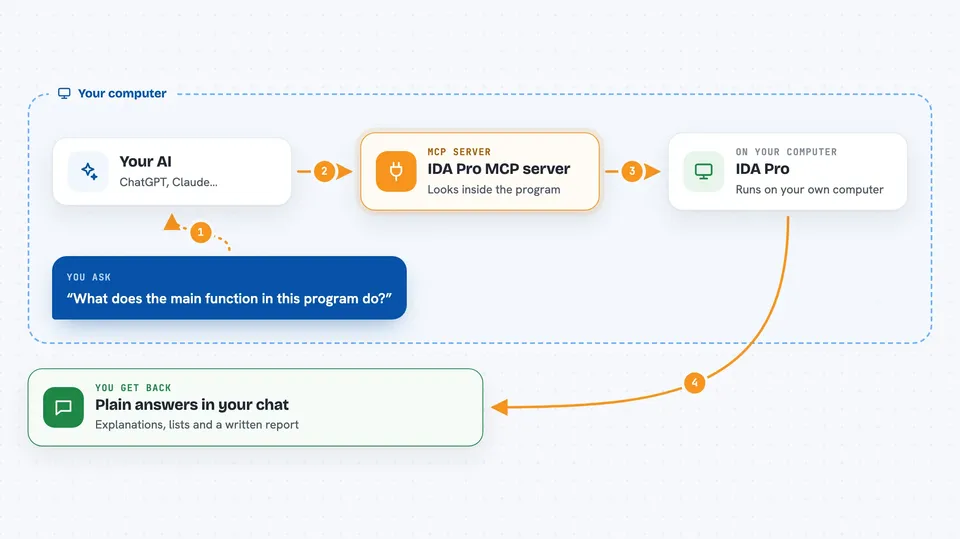
This is a helper that connects your AI assistant to IDA Pro, the program people use to take apart and study software. Once it is set up, you can ask your AI questions about the file you have open, and it will look inside IDA Pro for the answers. It is handy for anyone doing reverse engineering, malware analysis, or security work.
What is an MCP server? The 30-second version
On its own, your AI can only chat with you. An MCP server is a small helper program that gives your AI a new skill or a connection to another app. This one connects your AI to IDA Pro, so it can look at the program you have open and pull out details for you. You ask in plain words, and the helper goes and gets what you need from IDA Pro.
What this MCP server does
You ask your AI something about the program you are studying, like what a function does. The AI sends that request to this helper, which talks to IDA Pro on your computer. IDA Pro hands back things like the decompiled code, the list of functions, or where something is used. The AI then explains it to you in the chat. It can also make small changes in IDA Pro for you, like renaming a function or adding a comment.
 Click to zoom
What you can do with it
- Decompile a function and explain what it does
- List the functions or global variables in the file
- Show what a function calls or what calls it
- Convert numbers between decimal, hex, and bytes
- Rename functions and variables to clearer names
- Add comments to the code with its findings
- Write a report of the analysis it did
Try asking your AI
- “Decompile the main function and tell me what it does”
- “List all the imported functions and which module they come from”
- “What functions call this address, and why might that matter”
- “Rename these variables to names that make sense and add comments”
What it gives back to you
You get answers in the chat: explanations of code, lists of functions or imports, and details about where things are used. If the AI makes changes, like renaming or commenting, you see those described too. It can also put together a written report of what it found. Everything shows up as normal text you can read and copy.
Before you start
What you need
- IDA Pro version 8.3 or higher (IDA Free is not supported)
- Python 3.11 or higher
- An MCP client like Claude, Cursor, or VS Code
- The uv tool installed, and idalib activated
Good to know
It can change things inside your IDA Pro database, like renaming functions and adding comments, so use it on a copy if you want to keep your work untouched.
Install it with your AI
Add IDA Pro MCP server to your AI, no technical skills needed
You don't install anything by hand. You copy one prompt, paste it into an AI that can work on your computer, and it checks, installs and connects the server for you, asking you when it needs something.
Sign in to get the install prompt
Members get a ready-made prompt that lets the Claude desktop app check IDA Pro MCP server, install it and connect it for them, step by step. You don't need any technical skills: you copy, paste and answer a few questions. Your connected AI can also find and install any of the 4,361 MCP servers here for you.
Who it's for
Reverse engineers, malware analysts, and security researchers who already use IDA Pro and want their AI to help read and explain code.