MCP server · Analytics
Audiobookshelf MCP server
by ni-c
Let your AI browse your Audiobookshelf library, check your listening stats, and update your progress.
This is a small helper that connects your AI assistant to your own Audiobookshelf server, the app many people use to host their audiobooks and podcasts. Once it is set up, you can just ask your AI what you own, what you have been listening to, or how far along you are in a book. It is handy if you already run Audiobookshelf and want to talk to your library in plain language instead of clicking around.
What is an MCP server? The 30-second version
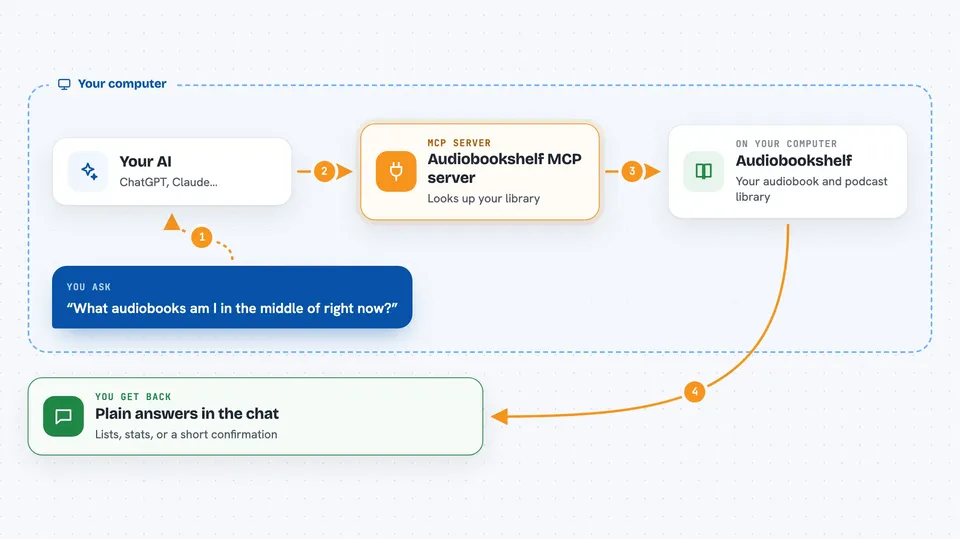
On its own, your AI can only chat with you. An MCP server is a little helper program that gives your AI a new skill, in this case a connection to your Audiobookshelf server. When you ask a question, your AI passes it to this helper, the helper talks to your Audiobookshelf, and the answer comes back to you in the chat. So instead of you opening the app and searching, your AI can look things up for you.
What this MCP server does
You ask your AI something about your audiobooks or podcasts, for example what you are in the middle of. Your AI sends that request to this helper program running on your computer. The helper logs into your Audiobookshelf with a key you provide and asks it for the information. The result comes back, and your AI turns it into a normal answer in the chat. If you allow it, the helper can also make small changes, like updating where you are in a book.
 Click to zoom
What you can do with it
- List the libraries you have access to
- Search your books, podcasts, authors and series
- Show what you are currently listening to
- Check your listening time and yearly stats
- Look up chapters of a book
- See and manage your bookmarks
- Update your listening progress
Try asking your AI
- “What audiobooks am I in the middle of right now?”
- “How many hours did I listen to last month?”
- “Find me a book by that author I listened to last year.”
- “Mark my current book as finished.”
What it gives back to you
You get back plain answers in the chat: lists of books, authors or episodes, your listening numbers, chapter names, or a short confirmation that something was changed. For example, if you ask what you are in the middle of, you might get a short list with titles and how far along you are. If you ask for stats, you get numbers like total hours and your most listened items.
Before you start
What you need
- An Audiobookshelf server, version 2.26.0 or newer
- An API key from your Audiobookshelf (an admin creates it under Settings, Users, API Keys)
- Node.js 22 or newer on your computer
- An AI app that supports MCP, like Claude Desktop or Claude Code
Good to know
If you leave read-only mode off, the AI can change or delete your progress, bookmarks, collections and playlists, so it is wise to start with read-only mode on.
Install it with your AI
Add Audiobookshelf MCP server to your AI, no technical skills needed
You don't install anything by hand. You copy one prompt, paste it into an AI that can work on your computer, and it checks, installs and connects the server for you, asking you when it needs something.
Sign in to get the install prompt
Members get a ready-made prompt that lets the Claude desktop app check Audiobookshelf MCP server, install it and connect it for them, step by step. You don't need any technical skills: you copy, paste and answer a few questions. Your connected AI can also find and install any of the 4,361 MCP servers here for you.
Who it's for
People who run their own Audiobookshelf server and want to ask their AI about their library, listening habits and progress without clicking through the app.