MCP server · Analytics
Apple Podcasts MCP server
Ask your AI for your own Apple Podcasts numbers: plays, listeners, and followers for your show.
This is a small helper that lets your AI read the private analytics Apple keeps for the podcast you own. It shows plays, unique and engaged listeners, and follower counts for your episodes. It is handy if you run a show and want to ask questions about how it is doing without clicking around in Apple Podcasts Connect.
What is an MCP server? The 30-second version
On its own, your AI can only chat with you. An MCP server is a small helper program that gives your AI one new skill or one new connection. This helper connects your AI to Apple's Reporter service, which is where your own podcast listening numbers live. Once it is set up, you can ask your AI about your show and it will go and look the numbers up for you.
What this MCP server does
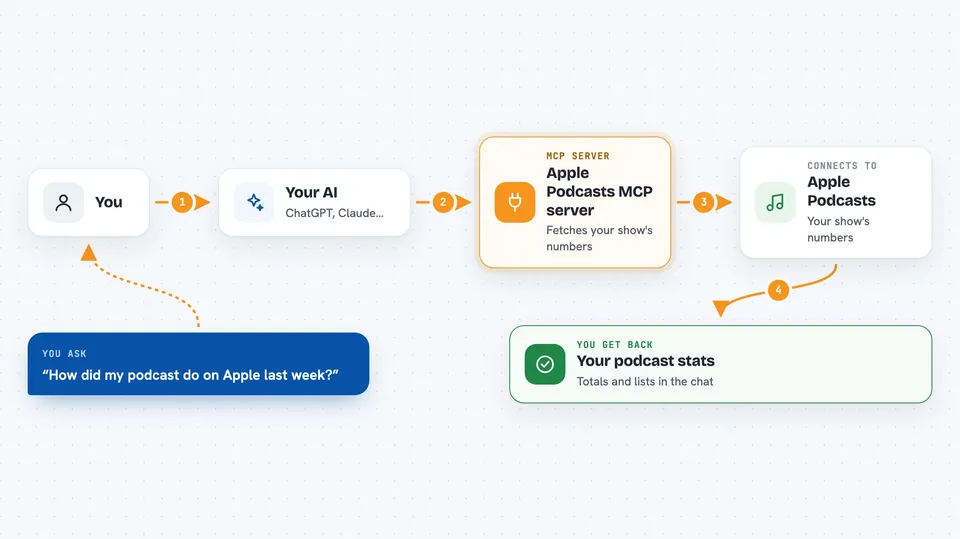
You ask your AI something like how your show did last week. Your AI passes that question to this helper. The helper talks to Apple's Reporter service using your vendor number and access token, and asks for the report for each day in the range you asked about. Apple sends back a table of numbers, and the helper tidies it up into totals and a short list. Your AI then explains the result to you in the chat.
 Click to zoom
What you can do with it
- Check that your Apple access token works and which vendor numbers it can read
- Get total plays, unique listeners, and engaged listeners for a date range
- See which episodes got the most plays or the most engaged listeners
- Track your follower count day by day and see how much it changed
- Compare a recent week against an earlier one by asking for both ranges
- Spot episodes that were clicked a lot but not really listened to
Try asking your AI
- “How did my podcast do on Apple last week?”
- “Which episodes had the most engaged listeners this month?”
- “Show me my follower count over the last 30 days and how much it changed”
- “Check my Apple Podcasts access and tell me when my token expires”
What it gives back to you
You get back plain numbers and short lists in the chat, not raw files. For a show summary you see totals for plays, unique listeners, and engaged listeners, plus a day by day series. For episodes you see a ranked list with each episode's name and its counts. If a range was too long, the answer tells you it was shortened to the most recent days.
Before you start
What you need
- An Apple Podcasters Program membership (a paid yearly enrollment; a free Podcasts Connect account is not enough)
- Your vendor number, which Apple issues as part of that enrollment
- An Apple Reporter access token, generated with Apple's Reporter tooling
- Node.js installed on your computer, so the helper can run
Good to know
It only reads your numbers and cannot change anything, but your access token expires every 180 days and generating a new one turns off the old one everywhere, so plan the switch.
Install it with your AI
Add Apple Podcasts MCP server to your AI, no technical skills needed
You don't install anything by hand. You copy one prompt, paste it into an AI that can work on your computer, and it checks, installs and connects the server for you, asking you when it needs something.
Sign in to get the install prompt
Members get a ready-made prompt that lets the Claude desktop app check Apple Podcasts MCP server, install it and connect it for them, step by step. You don't need any technical skills: you copy, paste and answer a few questions. Your connected AI can also find and install any of the 4,361 MCP servers here for you.
Who it's for
Podcast owners and small show teams who are enrolled in the Apple Podcasters Program and want quick answers about their own listening numbers.