MCP server · Research
Podcast Index MCP server
Let your AI search podcasts, episodes, guest appearances, trending shows, and feed health.

This is a small helper that connects your AI assistant to the Podcast Index, a free public catalog of podcasts. Once it is set up, you can ask your AI to find shows, look up episodes, or check whether a podcast feed is healthy, and it will go and fetch the answers for you. It is handy if you work with podcasts, book guests, or just want to research shows without clicking around a website.
What is an MCP server? The 30-second version
On its own, your AI can only chat with you using what it already knows. An MCP server is a small helper program that gives your AI a new skill or a connection to an app or service. This one connects your AI to the Podcast Index, so it can look up podcasts, episodes, and trends for you when you ask. You do not need to understand how it works inside; you just talk to your AI like normal.
What this MCP server does
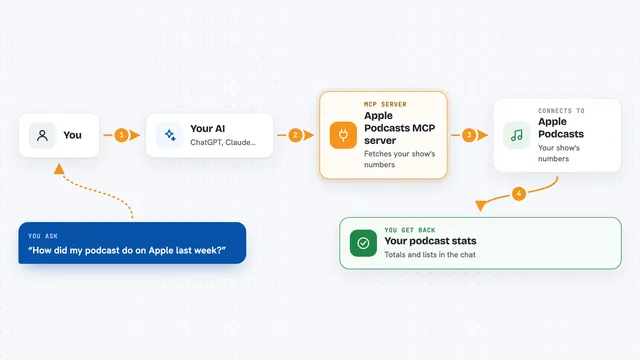
You ask your AI a question, like which episodes a certain person has appeared on. Your AI passes that request to this helper program. The helper talks to the Podcast Index service, which holds information about podcasts and episodes. The helper brings the results back, and your AI shows them to you in the chat as a list or a short answer. Everything here is read-only, so it only looks things up and never changes or deletes anything.
 Click to zoom
What you can do with it
- Search for episodes where a specific person appeared as a host or guest
- Find podcasts by topic, show name, or keyword
- Look up a podcast by its RSS feed address, Apple Podcasts ID, or Podcast Index ID
- See which podcasts are trending right now, filtered by language or category
- List the episodes of a specific show
- Check the feed health and last update time of a podcast
- Get the most recently published episodes across the whole index
Try asking your AI
- “Search Podcast Index for all episodes featuring Satya Nadella as a guest”
- “What are the trending technology podcasts right now?”
- “Look up the feed health for https://feeds.transistor.fm/chain-of-thought and list the last 5 episodes”
- “Find podcasts about AI infrastructure and show me their categories”
What it gives back to you
You get back lists and short answers in the chat, like a list of matching episodes with their show names, or a summary of a podcast's details such as its categories and last update. For a feed health check, you see whether the feed looks healthy and when it was last updated. For trending or recent searches, you get a ranked or dated list of shows or episodes. Nothing is changed on your side; it is all information coming back to you.
Before you start
What you need
- Node.js 18 or newer installed on your computer
- A free Podcast Index account and API credentials (an API key and secret, which are like a username and password for apps; you get them for free at api.podcastindex.org)
- The Claude desktop app or Claude Code, with its config file open so you can add the server
Good to know
This server is read-only, so it only looks things up and never changes or deletes anything, but it does use your Podcast Index credentials, so keep those private.
Install it with your AI
Add Podcast Index MCP server to your AI, no technical skills needed
You don't install anything by hand. You copy one prompt, paste it into an AI that can work on your computer, and it checks, installs and connects the server for you, asking you when it needs something.
Sign in to get the install prompt
Members get a ready-made prompt that lets the Claude desktop app check Podcast Index MCP server, install it and connect it for them, step by step. You don't need any technical skills: you copy, paste and answer a few questions. Your connected AI can also find and install any of the 4,361 MCP servers here for you.
Who it's for
Podcasters, producers, and researchers who want to find guest appearances, check feed health, or track trends without leaving their chat.