MCP server · Analytics
OP3 Podcast Analytics MCP server
Ask your AI for your podcast download numbers, listener countries, and top listening apps.
This is a small helper that connects your AI assistant to OP3, a free and open analytics service for podcasts. Once it is set up, you can just ask your AI questions about your show in normal words and get real numbers back. It is handy for podcasters who want their stats without clicking around a dashboard.
What is an MCP server? The 30-second version
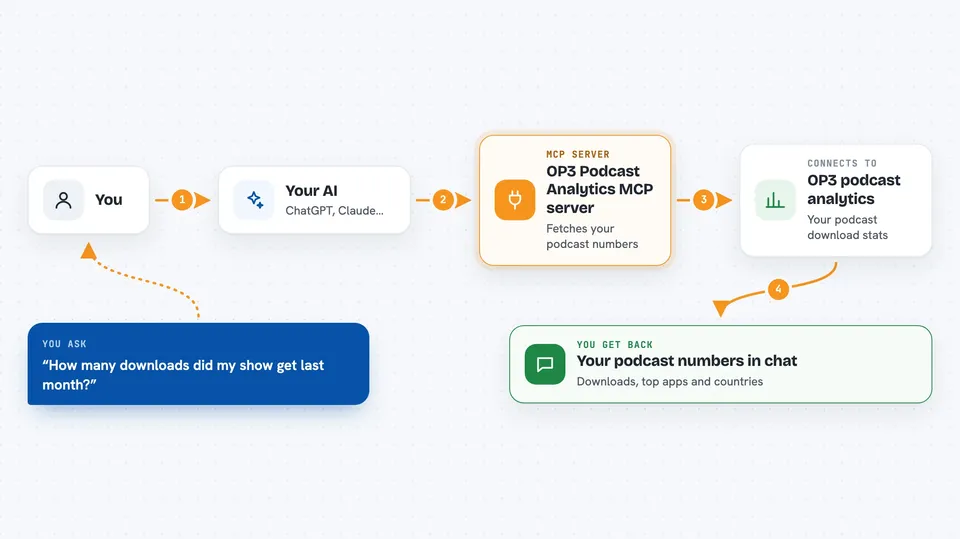
On its own, your AI can only chat with you. An MCP server is a small helper program that gives your AI a new skill or a connection to an app or service. This one connects your AI to OP3, the Open Podcast Prefix Project, so it can look up your podcast analytics for you. You ask a question, your AI asks this helper, and the helper fetches the numbers from OP3.
What this MCP server does
You ask your AI something like how many downloads your show got last month. Your AI passes that question to this helper, which talks to OP3 using your OP3 token. OP3 sends back the download counts, and the helper hands them to your AI. Your AI then explains the numbers to you in plain language, right in the chat. It only reads data. It never changes anything on your show.
 Click to zoom
What you can do with it
- Look up your show on OP3 and get its show ID
- See monthly and weekly download counts for your show
- Check downloads for each episode at 1, 3, 7, and 30 days
- See which apps and players your listeners use
- See which countries your listeners come from
- Pull raw download events over a date range
Try asking your AI
- “Look up my show on OP3 using this feed URL”
- “How many downloads did my show get last month?”
- “Which apps do my listeners use the most?”
- “Show me the top countries for my podcast over the last 90 days”
What it gives back to you
You get answers in the chat, not files. That can be a list of download numbers by month or week, a table of top apps with their share, or a list of countries with counts. For a single episode, you get its downloads at 1, 3, 7, and 30 days plus all-time. Your AI usually turns these into a short summary you can read at a glance.
Before you start
What you need
- An OP3 account and API token (a kind of password for apps; you copy it from your OP3 account page)
- Your podcast feed to use the OP3 prefix, otherwise OP3 has no data for it
- The Claude desktop app or Claude Code, or another tool that supports MCP servers
- Node.js installed on your computer (the setup uses npx to run the server)
Good to know
It only reads your OP3 data and cannot change anything, but the listener country numbers are a sample, not an exact total, so treat them as a rough picture.
Install it with your AI
Add OP3 Podcast Analytics MCP server to your AI, no technical skills needed
You don't install anything by hand. You copy one prompt, paste it into an AI that can work on your computer, and it checks, installs and connects the server for you, asking you when it needs something.
Sign in to get the install prompt
Members get a ready-made prompt that lets the Claude desktop app check OP3 Podcast Analytics MCP server, install it and connect it for them, step by step. You don't need any technical skills: you copy, paste and answer a few questions. Your connected AI can also find and install any of the 4,361 MCP servers here for you.
Who it's for
Podcasters and podcast producers who want quick, honest answers about their download numbers without digging through dashboards.