
MCP server · Research
OriginalVoices MCP server
by ovlabs
Ask groups of AI twins what real people think, so your AI can bring back audience answers.
This is a small helper that connects your AI to OriginalVoices, a service that runs AI twins of real people. It is handy when you want to know how a certain group of people feels about something, like a product, an ad, or an idea. Instead of guessing, you ask your AI and it brings back answers from those twins.
What is an MCP server? The 30-second version
On its own, your AI can only chat with you using what it already knows. An MCP server is a small helper program that gives your AI a new skill or a connection to another service. This one connects your AI to OriginalVoices, where AI twins stand in for real people. Once it is set up, your AI can send questions to a group of twins and bring their answers back to you.
What this MCP server does
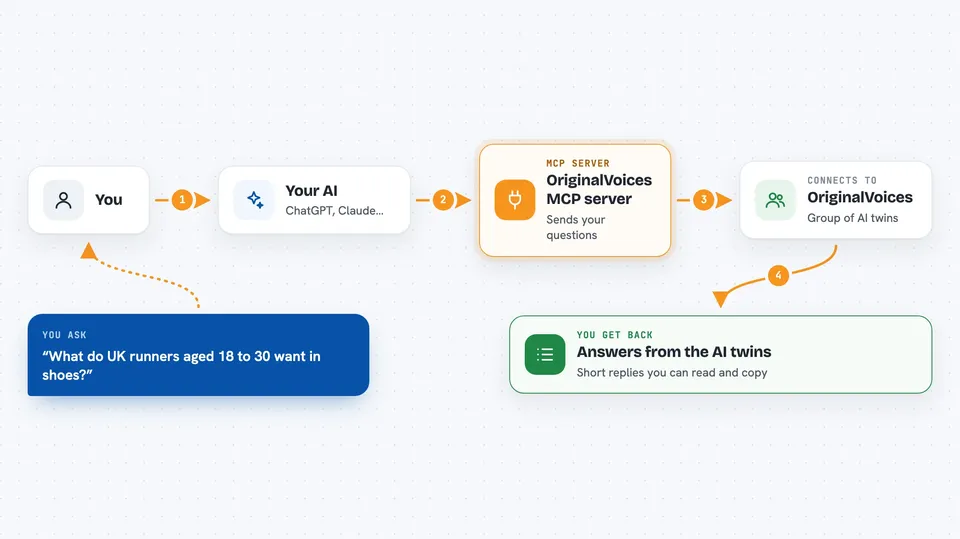
You describe the audience you care about, for example UK, 18-30, fitness enthusiasts. You also give your AI a list of questions you want to ask them. Your AI passes both to this helper, and the helper sends them to OriginalVoices. The twins answer, and the answers come back to you in the chat. You read them like a short survey result, without setting up a survey yourself.
 Click to zoom
What you can do with it
- Ask a group of AI twins what they think about a product idea
- Test how an audience reacts to a message or ad
- Compare opinions across different audience groups
- Get quick answers to several questions in one go
- Explore what matters to people when they buy something
- Check how often people do something, like replacing an item
Try asking your AI
- “Ask UK fitness enthusiasts aged 18 to 30 what matters most when buying running shoes”
- “Ask new parents what they look for in a baby monitor and why”
- “Ask small business owners how they decide which software to pay for”
- “Ask people in their 20s how they find new music these days”
What it gives back to you
You get back the twins' answers to each question you asked, written out in the chat. It usually looks like a short list of replies, one per question, sometimes grouped by the audience you described. There are no charts or files, just text you can read and copy. If you asked several questions, you get answers for each one.
Before you start
What you need
- An OriginalVoices account
- An OriginalVoices API key (a kind of password for apps; you create one on the OriginalVoices platform)
- Node.js installed on your computer if you run it yourself
- The Claude desktop app or another AI app that supports MCP servers
Good to know
The answers come from AI twins, not real people, so treat them as a rough guide rather than a real survey.
Install it with your AI
Add OriginalVoices MCP server to your AI, no technical skills needed
You don't install anything by hand. You copy one prompt, paste it into an AI that can work on your computer, and it checks, installs and connects the server for you, asking you when it needs something.
Sign in to get the install prompt
Members get a ready-made prompt that lets the Claude desktop app check OriginalVoices MCP server, install it and connect it for them, step by step. You don't need any technical skills: you copy, paste and answer a few questions. Your connected AI can also find and install any of the 4,361 MCP servers here for you.
Who it's for
Marketers, product researchers, and anyone who needs quick audience opinions without running a full survey.





