MCP server · Privacy · official
~alter CLI MCP server
by true-alter · official
Claim a personal name handle, control who can read your record, and get paid when someone looks you up.
This is the official helper for ~alter, a service where you claim a name like ~yourname and build a record of what you have actually done. Once connected, your AI can register a handle for you, show who has looked you up, and manage what others are allowed to see. It is handy for freelancers, creators, and anyone who wants a simple, paid identity online.
What is an MCP server? The 30-second version
On its own, your AI can only chat with you. An MCP server is a small helper program that gives your AI a new skill or a connection to an app or service. Here it connects your AI to ~alter, so the AI can look things up or do things there for you when you ask. You do not need to understand how it works, just that it lets your AI act on your ~alter account.
What this MCP server does
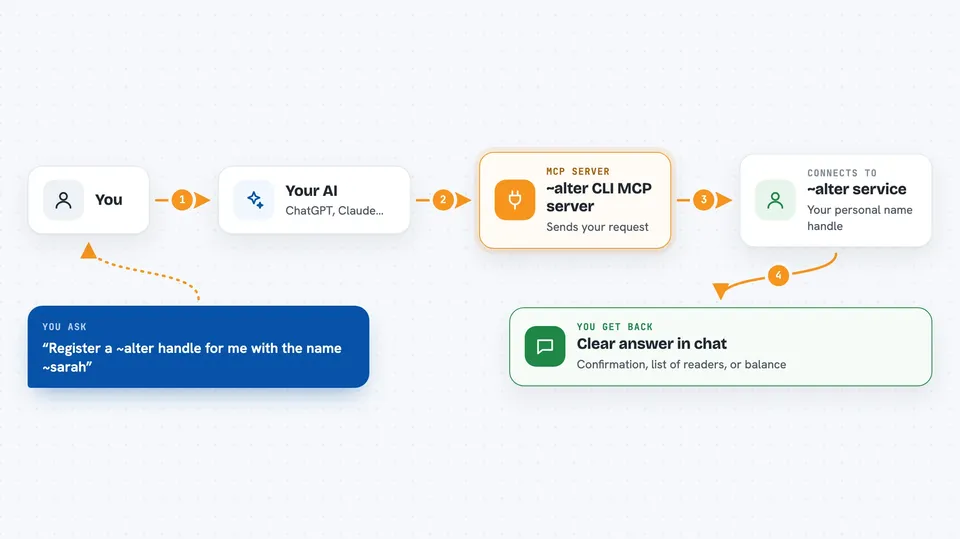
You ask your AI to do something with your ~alter handle, like register a name or check your earnings. The AI uses this helper to talk to the ~alter service. The helper sends your request and gets back the answer, like a list of who read your record or a confirmation that your name is now live. Then the AI tells you the result in plain words. You never have to type commands yourself.
 Click to zoom
What you can do with it
- Register a new ~name handle for yourself
- See who has looked you up and what they paid
- Control which parts of your record others can read
- Connect your GitHub, Discord, or other accounts to your handle
- Check your earnings balance and withdrawal status
- Verify that a handle belongs to a real person
- Run your AI agents under your own handle
Try asking your AI
- “Register a ~alter handle for me with the name ~sarah”
- “Show me who has queried my handle this month”
- “Set my discovery level to recognition so only my trade is visible”
- “Check if ~sam is a real person”
What it gives back to you
You get clear answers in the chat. For example, a list of queries with names and amounts, a confirmation that your handle is registered, or a summary of your current settings. It can also show your balance and what you need to do before you can withdraw. Everything is shown in plain text you can read right away.
Before you start
What you need
- The ~alter CLI installed on your computer (the installer handles Node for you)
- A terminal or command line to run the initial setup
- An email address to confirm for payouts (you can add this later)
Good to know
Some commands like discovery enable make your record public, and ask costs $1 per call, so be sure before you run them.
Install it with your AI
Add ~alter CLI MCP server to your AI, no technical skills needed
You don't install anything by hand. You copy one prompt, paste it into an AI that can work on your computer, and it checks, installs and connects the server for you, asking you when it needs something.
Sign in to get the install prompt
Members get a ready-made prompt that lets the Claude desktop app check ~alter CLI MCP server, install it and connect it for them, step by step. You don't need any technical skills: you copy, paste and answer a few questions. Your connected AI can also find and install any of the 4,066 MCP servers here for you.
Who it's for
Freelancers, creators, and anyone who wants a simple, paid identity online without passwords or logins.