AI agent for frontend developers
Accessibility Regression Repair Agent
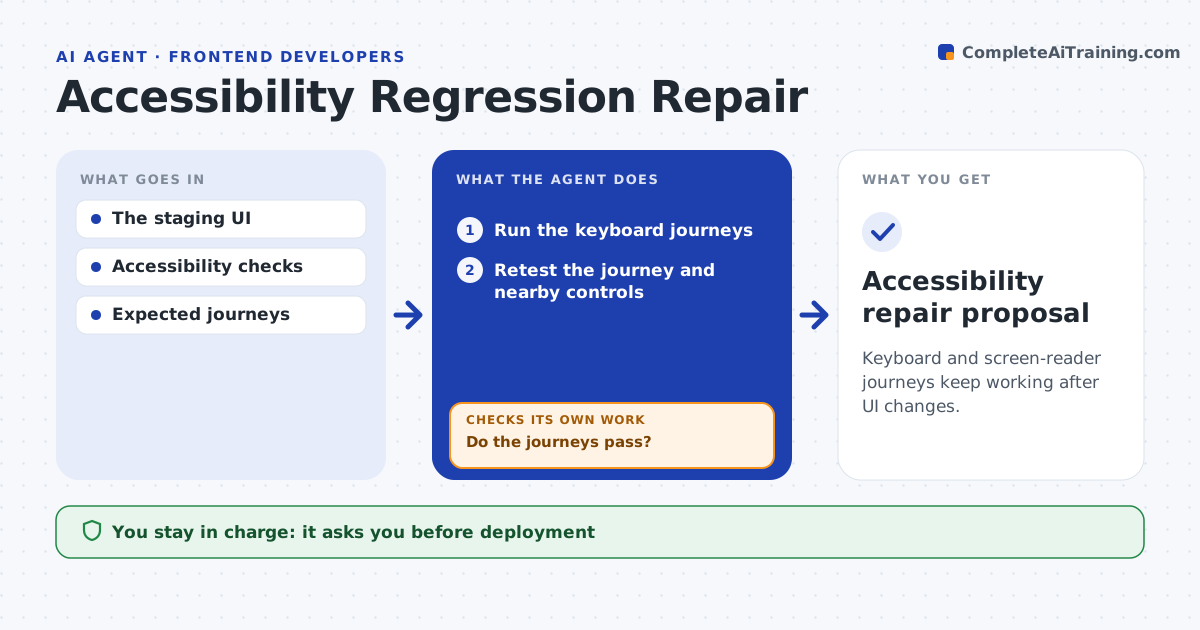
Keyboard and screen-reader journeys keep working after UI changes.
What it does
New UI changes often break keyboard navigation and screen reader labels that used to work. When a change reaches staging, this agent runs the keyboard journeys for key tasks, such as sign-in and checkout. When a journey fails, it reproduces the barrier and patches a branch. Then it retests the whole journey and nearby controls, because a fix can trap focus somewhere else. It revises the patch until focus moves freely and labels are correct. The team lead approves deployment. It does not certify compliance. Edge case: fixing a dialog's focus order makes the close button unreachable, so the agent revises and retests.
How it works
Follow the arrows from top to bottom. The orange dashed arrow is the loop: when a check fails, the agent goes back and tries again.
Read the steps as a list
- UI change in staging
- Run the keyboard journeys
- Do the journeys pass?If not: patch the branch. Back to step 2.
- Retest the journey and nearby controls
- Is focus free and labels correct everywhere?If not: revise the patch. Back to step 3.
- Team lead approves deploymentThe agent waits here for your OK.
- Accessibility repair proposal
How it decides
It chooses fixes from observed focus and label behavior and retests the complete path.
- Retest the complete journey after each patch.
- Check nearby controls for new focus traps.
- Report rather than patch when a fix needs design changes.
Make it yours
Every agent is a starting point. You choose these settings for your own situation.
- Keyboard journeys tested
- Screen reader checks included
- Accessibility rules applied (default common web guidelines)
- Who approves deployment
What keeps you in control
It always asks you first
- Deployment
- Compliance certification
Hard limits
- Branch only.
It stops when
- Done: journeys pass.
Set it up
We guide you through the set-up, step by step
Members get the full set-up guide for this agent. No technical skills needed: you copy, paste and upload.
- One set of instructions to paste into your AI, with the clicks for ChatGPT, Claude, Microsoft 365 Copilot, Gemini and Grok
- The agent then walks you through connecting your own data, one source at a time
- A downloadable copy with the flow chart, the rules and the full guide