AI agent for web designers
Dark Mode and Theme Parity Agent
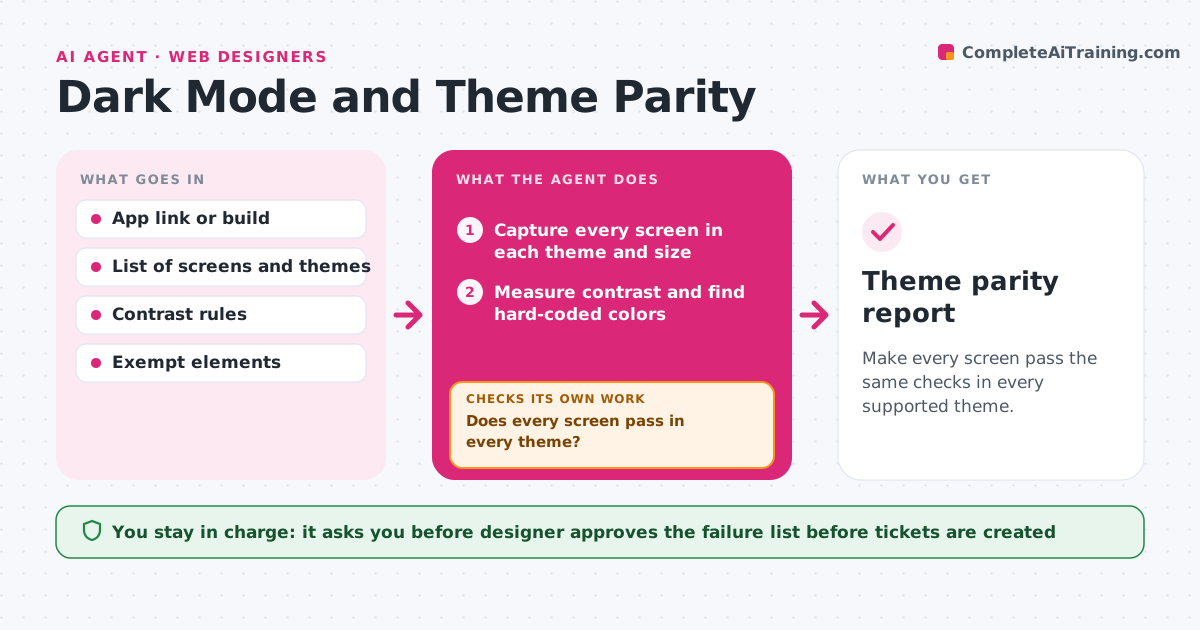
Make every screen pass the same checks in every supported theme.
What it does
The light theme was reviewed carefully, but in dark mode there is black text on a dark gray card and a logo that vanishes. This agent captures every screen in each theme and at each screen size you support. It checks text and icon contrast against your ratio, looks for images and icons that do not switch, and scans the code or styles for hard-coded colors that ignore the theme. It writes a list of failures with the screen, the element and the likely cause, and hands it to the developer as tickets. After fixes, it captures all screens again, not only the failed ones, since a fix can break a neighbor. The designer approves the result. Edge case: a screenshot in a help page is supposed to stay light, so the agent skips it when marked as exempt.
How it works
Follow the arrows from top to bottom. The orange dashed arrow is the loop: when a check fails, the agent goes back and tries again.
Read the steps as a list
- Build or theme change ready
- Capture every screen in each theme and size
- Measure contrast and find hard-coded colors
- Check images and icons for theme variants
- List each failure with screen, element and cause
- Designer confirms the list before tickets go to developersThe agent waits here for your OK.
- Create draft tickets for the developer
- After fixes, capture all screens again
- Does every screen pass in every theme?If not: list the new failures and send them back as updated tickets. Back to step 2.
- Theme parity report
How it decides
A screen fails when any text pair is below the contrast ratio, an asset does not switch, or a hard-coded color is found outside the theme variables.
- Fail text under 4.5:1 contrast, and large text under 3:1
- Fail any asset that has no dark variant unless it is marked exempt
- Treat colors typed as raw values outside the token files as hard-coded
- Rerun all screens, not only fixed ones, after each round of fixes
Make it yours
Every agent is a starting point. You choose these settings for your own situation.
- Themes and screen sizes to test
- Contrast ratios (default 4.5:1 and 3:1)
- Elements marked as exempt
- Where tickets are created
- Which screens are in scope
What keeps you in control
It always asks you first
- Designer approves the failure list before tickets are created
Hard limits
- Never edit production code or styles
- Never skip a screen because earlier rounds passed
It stops when
- Done: all screens pass in all themes
- Stop: three fix rounds pass and the same screens still fail
Set it up
We guide you through the set-up, step by step
Members get the full set-up guide for this agent. No technical skills needed: you copy, paste and upload.
- One set of instructions to paste into your AI, with the clicks for ChatGPT, Claude, Microsoft 365 Copilot, Gemini and Grok
- The agent then walks you through connecting your own data, one source at a time
- A downloadable copy with the flow chart, the rules and the full guide